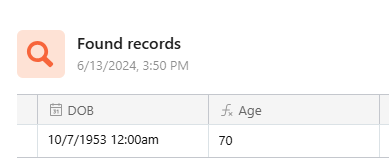
I use the found records automation to create my report and the date is in the correct format, her DoB is 10th July
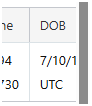
But when I add this as a grid of records to the Send an Email automation, the DoB shows as 7/10/1953 i.e. 7th October.
and this is what arrives in the recipient's email.
Best answer by Pascal_Gallais-
Hello Andy,
In case changing field settings does not work.
I have faced the same problem with automations when printing a date in a document or a mail. I solved this issue by adding a formula field in my table to format the date as I want it to be printed, for example
DATETIME_FORMAT({Date},'DD/MM/YYYY')), and then use this field in my automation when printing to a document or a mail.
I have faced the same problem with automations when printing a date in a document or a mail. I solved this issue by adding a formula field in my table to format the date as I want it to be printed, for example
DATETIME_FORMAT({Date},'DD/MM/YYYY')), and then use this field in my automation when printing to a document or a mail.
I have faced the same problem with automations when printing a date in a document or a mail. I solved this issue by adding a formula field in my table to format the date as I want it to be printed, for example
DATETIME_FORMAT({Date},'DD/MM/YYYY')), and then use this field in my automation when printing to a document or a mail.