
Answer

Date format in a Google Docs automation

  • June 21, 2022
  • 2 replies
  • 47 views

Andrey_Kovalev
Forum|alt.badge.img+20

Hi everybody!

Google Docs automation works for me, but lacks some flexibility. For example, I generate meeting notes digest and would like to add a Date when document was generated in a Title of the document. There is a token TIME which allows inserting complete time, but I have no idea how to format it or truncate unneeded time part. Any ideas how to workaround this?

Regards,
Andrey
Best answer by Andrey_Kovalev

This should work if you create a formula field in your Airtable table using the DATETIME_FORMAT function, and then insert that formula field into your document.

You can learn more about DATETIME_FORMAT here:


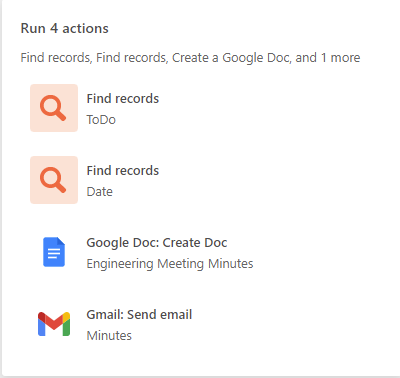
@ScottWorld , it seems I have found a solution. Before creating a document I added another step Find Records which searches through Metting records and finds today’s record, then I take a formatted Date from that record. So currently my automation consists of two searches:

Anyway, thanks for your suggestion.

Andrey

2 replies

ScottWorld
Forum|alt.badge.img+35
  • Genius
  • June 21, 2022

This should work if you create a formula field in your Airtable table using the DATETIME_FORMAT function, and then insert that formula field into your document.

You can learn more about DATETIME_FORMAT here:


Andrey_Kovalev
Forum|alt.badge.img+20
  • Author
  • Inspiring
  • Answer
  • June 21, 2022

This should work if you create a formula field in your Airtable table using the DATETIME_FORMAT function, and then insert that formula field into your document.

You can learn more about DATETIME_FORMAT here:


@ScottWorld , it seems I have found a solution. Before creating a document I added another step Find Records which searches through Metting records and finds today’s record, then I take a formatted Date from that record. So currently my automation consists of two searches:

Anyway, thanks for your suggestion.

Andrey