How to convert the contents of image URL to base64?

  • April 22, 2022
  • 7 replies
  • 239 views

Hello,
As the image uploaded in Airtable returns the URL of the image, I want to convert the contents of the URL(image) to base64, btoa() converts the URL to base64 but not the content of the URL (Actual Image), I want the uploaded Image in base64 format.
Is there anyway to do this inside automation script?
Thank you

7 replies

ScottWorld
Forum|alt.badge.img+35
  • Genius
  • April 22, 2022

There is probably a way to do this with scripting, but I don’t know Javascript so someone else would need to guide you on that.

Without using scripting at all, you can fully automate this by using the Base64 function of Make.com. (You would first need to use the Get A File module to download the image from the URL, and then you can convert it to Base64 afterwards.)


  • Author
  • Known Participant
  • April 22, 2022

There is probably a way to do this with scripting, but I don’t know Javascript so someone else would need to guide you on that.

Without using scripting at all, you can fully automate this by using the Base64 function of Make.com. (You would first need to use the Get A File module to download the image from the URL, and then you can convert it to Base64 afterwards.)


@ScottWorld Is there anyway to do this in automation script and not using Script app?
Because I need to run the automation as soon as a new record is created which sends a POST request with the the attachment image in base64 format, I don’t know how to run script app every time a record is created.


  • Author
  • Known Participant
  • April 23, 2022

There is probably a way to do this with scripting, but I don’t know Javascript so someone else would need to guide you on that.

Without using scripting at all, you can fully automate this by using the Base64 function of Make.com. (You would first need to use the Get A File module to download the image from the URL, and then you can convert it to Base64 afterwards.)


@ScottWorld Exactly, Is there any way to do this in automation script without using make.com or any other external websites.


ScottWorld
Forum|alt.badge.img+35
  • Genius
  • April 23, 2022

@ScottWorld Exactly, Is there any way to do this in automation script without using make.com or any other external websites.


As I mentioned above, there is probably a way to do this with scripting. I don’t know JavaScript, though.


Forum|alt.badge.img+5
  • Inspiring
  • October 14, 2022

There’s no make.com / Integromat function to convert binary to base64. the base64 function only converts text to base64. what’s needed is the JS btoa() function.

i tried using the beta customJS component in make.com but that doesn’t take binary or hex as an input to use btoa() function.


Forum|alt.badge.img
  • New Participant
  • March 1, 2023

Hi,

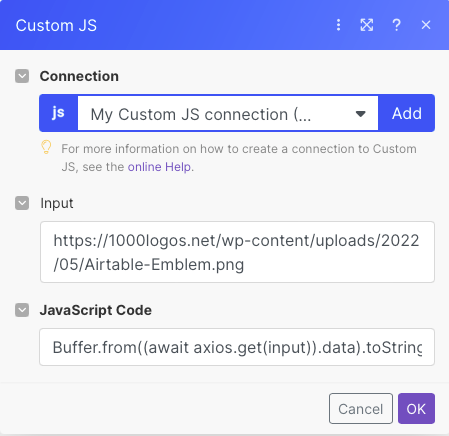
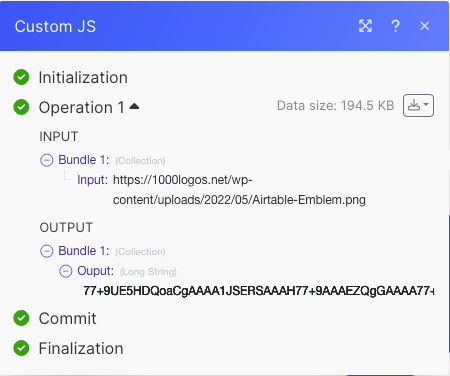
last night I had something similar in front of me and I have now also solved it via the Custom JS Module in make.com using this JS code:  Buffer.from((await axios.get(input)).data).toString('base64')

Because here you can see that this module also includes Axios: customjs.space/web-scraping 


Forum|alt.badge.img
  • New Participant
  • January 25, 2024

Hi,

last night I had something similar in front of me and I have now also solved it via the Custom JS Module in make.com using this JS code:  Buffer.from((await axios.get(input)).data).toString('base64')

Because here you can see that this module also includes Axios: customjs.space/web-scraping 


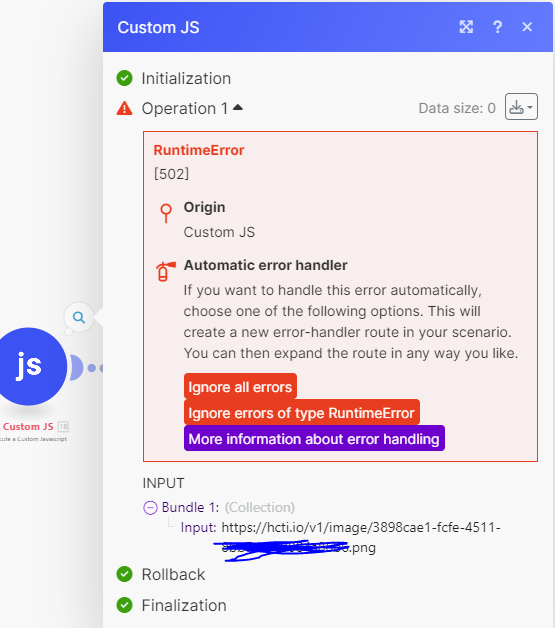
@hnrklppk I tried same as you but I got this. Did I miss something ?