How to update multiple records from search block with script

  • November 20, 2023
  • 2 replies
  • 27 views

Sannit_Vartak
Forum|alt.badge.img+7


let table = base.getTable("Cashflow Grid (Sales Pipeline)"); let inputConfig = input.config(); let record = inputConfig.record; let mmyy = inputConfig.mmyy; let i = 0; const table2 = base.getTable("Cashinflows") const fieldName = "Name" const queryResult = await table2.selectRecordsAsync({fields: ["Name", "Record_ID"]}) const ids = queryResult.records.filter(record => ( record.getCellValueAsString(fieldName) == mmyy )) console.log(ids[0].id); output.set('Cashinflows_Record_ID', ids[0].id); let id1 = ids[0].id; console.log(id1); for (let records of record) { let recordId = record[i]; console.log(recordId); await table.updateRecordAsync(recordId, {'Cashinflows x 1st AZ': [{id: id1}],}) i = i+1; } console.log(record);


2 replies

Dimitris_Goudis
Forum|alt.badge.img+20

Hey @Sannit_Vartak

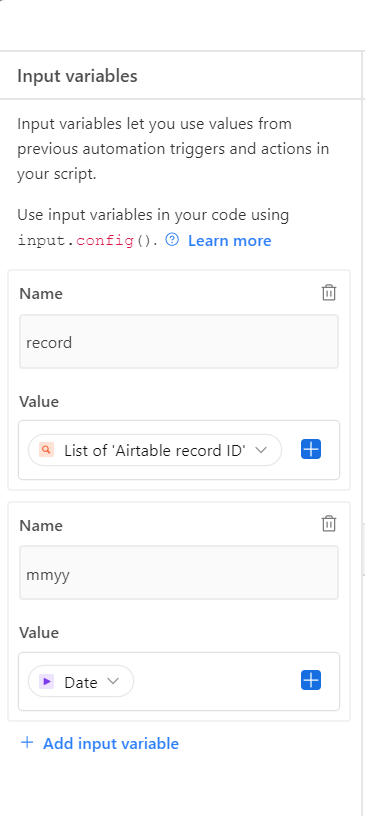
As soon as your action will be to run the script I would recommend to update the script so it will find the records by it self (you could use a specific view for that) and then add a loop in your script to run for every record. 

Combining Find action with Script running as you added it on your screenshot can't run. 

Yours sincerely,

Dimitris Goudis


kuovonne
Forum|alt.badge.img+29
  • Brainy
  • November 20, 2023

Can you say a little more about what you want to accomplish with the script, where the script came from, and what is not working the way you want?

There are a few things about this script that make it hard to read. For example, this line:

for (let records of record) {

Normally in a loop of this sort, you would name your variables so that the singular variable refers to a single item and the plural variable is an array of items. However, in this case your variable with a singular name refers to an array while the plural variable refers to a single element of that array. Yet you are not even using the records variable in your code after it is created.