Solved

Number that increments based on a condition

  • February 25, 2026
  • 3 replies
  • 40 views

Graham Reed
Forum|alt.badge.img+7

This has been asked a couple of times with slightly different solutions, so seeing current thinking.

I want to have an incrementing number that is specific to a group of records only. In fact I want 3. This is used to create unique names (don’t ask me what this client wants this!), but the number should increment if the record has a field set to x. So when grouped together, there is a sequential incrementation (1, 2, 3, 4,) , but others not in that group do not get that number. They would get a different increment (different field probably).

My current thinking is to link the records to another table (using deep match?), identify the highest number of increment already, and then have an automation add to the new record ‘number +1’. 

Thoughts?

Best answer by Neuralicc

Your instinct is right, but the linked table approach has a critical flaw worth flagging: race conditions. If two records are created near-simultaneously, both automations could read the same MAX value and assign duplicate numbers. For low-volume tables it's rarely a problem, but it's worth knowing before you build.

Here's how I'd approach this cleanly:

Option 1 — Automation with FIND + COUNT (simplest)
When a record is created or the group field is set:
1. Use a "Find Records" step filtered by your group field (e.g. field = x)
2. Count the results
3. Assign COUNT + 1 as the increment number to the new record

This is clean, readable, and handles your 3 groups easily — just 3 separate automation paths, each filtering by their respective group value and writing to their respective number field.

Option 2 — Summary table (your original idea, done properly)
Create a separate "Group Counters" table with one record per group. Each record stores the current highest number for that group. Your automation then:
1. Finds the matching counter record
2. Reads the current value
3. Writes current + 1 to the new record
4. Updates the counter record immediately after

This is more reliable at scale but adds maintenance overhead. Only worth it if you're processing high volumes.

Option 3 — Formula-based (no automation needed)
If records have a created time field, you can use a formula that COUNTs all records in the same group with an earlier creation date + 1. Zero automation, always accurate, but purely read-only — you can't use this number as a writable field for naming.

For your use case (unique name generation across 3 groups), I'd go Option 1. Simple, transparent, and easy to debug when something inevitably needs tweaking.

3 replies

Neuralicc
Forum|alt.badge.img+1
  • New Participant
  • Answer
  • February 25, 2026

Your instinct is right, but the linked table approach has a critical flaw worth flagging: race conditions. If two records are created near-simultaneously, both automations could read the same MAX value and assign duplicate numbers. For low-volume tables it's rarely a problem, but it's worth knowing before you build.

Here's how I'd approach this cleanly:

Option 1 — Automation with FIND + COUNT (simplest)
When a record is created or the group field is set:
1. Use a "Find Records" step filtered by your group field (e.g. field = x)
2. Count the results
3. Assign COUNT + 1 as the increment number to the new record

This is clean, readable, and handles your 3 groups easily — just 3 separate automation paths, each filtering by their respective group value and writing to their respective number field.

Option 2 — Summary table (your original idea, done properly)
Create a separate "Group Counters" table with one record per group. Each record stores the current highest number for that group. Your automation then:
1. Finds the matching counter record
2. Reads the current value
3. Writes current + 1 to the new record
4. Updates the counter record immediately after

This is more reliable at scale but adds maintenance overhead. Only worth it if you're processing high volumes.

Option 3 — Formula-based (no automation needed)
If records have a created time field, you can use a formula that COUNTs all records in the same group with an earlier creation date + 1. Zero automation, always accurate, but purely read-only — you can't use this number as a writable field for naming.

For your use case (unique name generation across 3 groups), I'd go Option 1. Simple, transparent, and easy to debug when something inevitably needs tweaking.


TheTimeSavingCo
Forum|alt.badge.img+31

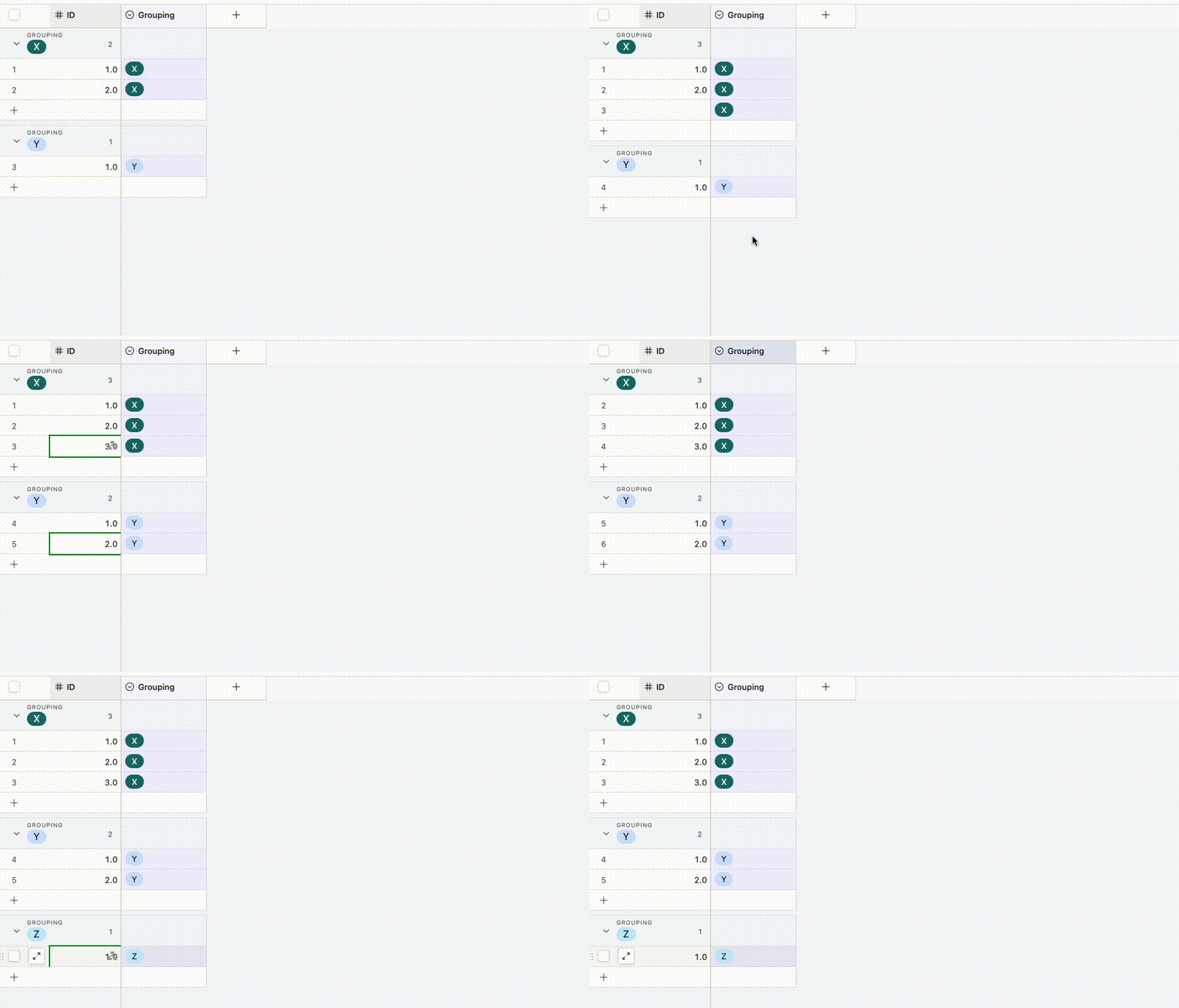
Does this look right?  If so I’ve set it up here for you to check out!

The idea is to have an automation that’ll trigger whenever the grouping field is one of the values you care about, and in the gif above the assumption is that you’re grouping by X, Y, and Z

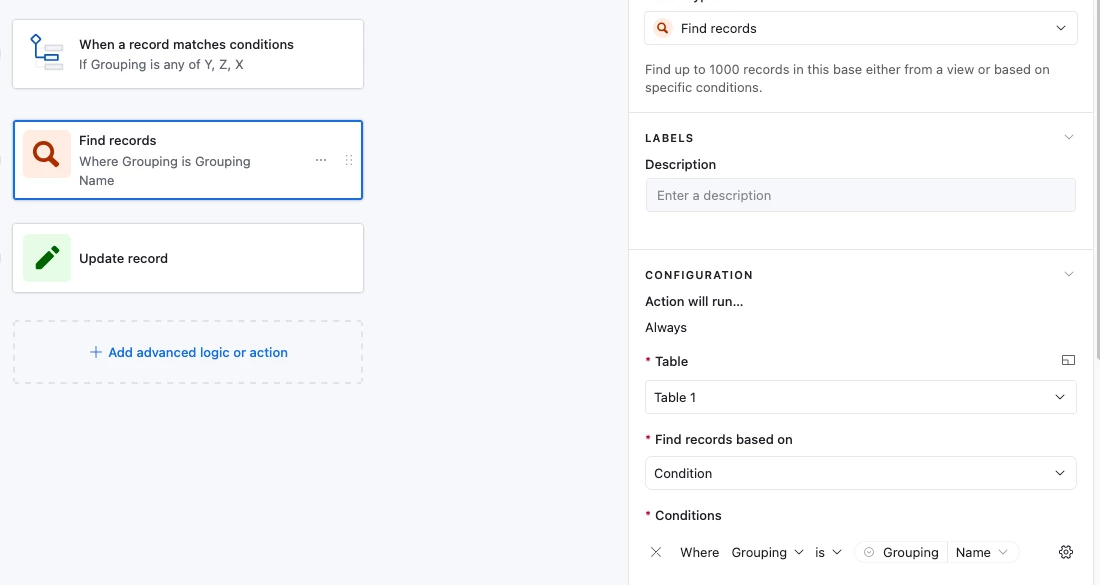
The automation then does a ‘Find record’ step to look for all records with that grouping:

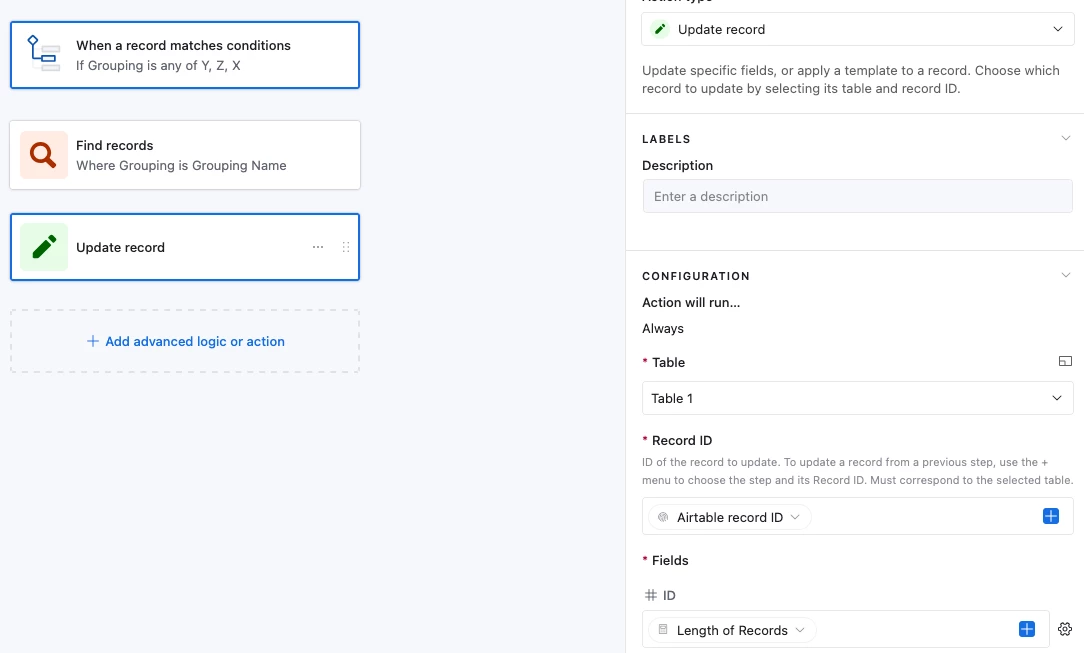
And it then updates the triggering record with the length value of the Find Record step:

Potential edge case is if the user triggers the automations in quick succession which might cause the same ID to be created.  There’s ways around that but probably easier to handle it manually if that’s possible.  Let me know if it has to 100% be right and I’ll see if I can figure something out!


Graham Reed
Forum|alt.badge.img+7
  • Author
  • Known Participant
  • February 26, 2026

Your instinct is right, but the linked table approach has a critical flaw worth flagging: race conditions. If two records are created near-simultaneously, both automations could read the same MAX value and assign duplicate numbers. For low-volume tables it's rarely a problem, but it's worth knowing before you build.

Here's how I'd approach this cleanly:

Option 1 — Automation with FIND + COUNT (simplest)
When a record is created or the group field is set:
1. Use a "Find Records" step filtered by your group field (e.g. field = x)
2. Count the results
3. Assign COUNT + 1 as the increment number to the new record

This is clean, readable, and handles your 3 groups easily — just 3 separate automation paths, each filtering by their respective group value and writing to their respective number field.

Option 2 — Summary table (your original idea, done properly)
Create a separate "Group Counters" table with one record per group. Each record stores the current highest number for that group. Your automation then:
1. Finds the matching counter record
2. Reads the current value
3. Writes current + 1 to the new record
4. Updates the counter record immediately after

This is more reliable at scale but adds maintenance overhead. Only worth it if you're processing high volumes.

Option 3 — Formula-based (no automation needed)
If records have a created time field, you can use a formula that COUNTs all records in the same group with an earlier creation date + 1. Zero automation, always accurate, but purely read-only — you can't use this number as a writable field for naming.

For your use case (unique name generation across 3 groups), I'd go Option 1. Simple, transparent, and easy to debug when something inevitably needs tweaking.

I had to read this a few time to get my head around each option. Thanks so much for outlining.

My thoughts:

Option 1 works but only if there are no deletions in the table. There shouldn’t be, but the unique number is a critical piece for file naming outside of Airtable.

Option 2: Yes! So the automation changes the the stored value AND writes the number to the record - totally separate from any linking of records. That is cool. Between writing my question and these responses I got the linked record solution working, but obviously not tested at scale, so will change this.

It also has an advantage of being able to manually increment or even reset the number if we wanted to. 

Option 3: Same as option 1, it works (and I was thinking about creation dates and all that), but only without deletions. 

Thanks so much!