Possible to automate a +1 (add) into a number field

  • March 3, 2021
  • 7 replies
  • 272 views

Forum|alt.badge.img

Hi! Have not figured out this yet. It seems like a task, but I am not sure what the most elegant solution is.

How can you add a +1 to a number if something happens in a record?

Regard,
Tor Martin

7 replies

ScottWorld
Forum|alt.badge.img+35
  • Genius
  • March 3, 2021

Automations don’t understand formulas, so you would need to create a new formula field where the NEW NUMBER already exists. (In other words, you would create a formula field which is equal to your original number field +1.)

Then, set an Airtable Automation to set your original number field to the contents of the formula field, which will kick in whenever your trigger happens.

(Alternatively, you could automate this with a custom JavaScript as well, but the method above doesn’t require any coding.)


Forum|alt.badge.img
  • Author
  • Participating Frequently
  • March 3, 2021

Automations don’t understand formulas, so you would need to create a new formula field where the NEW NUMBER already exists. (In other words, you would create a formula field which is equal to your original number field +1.)

Then, set an Airtable Automation to set your original number field to the contents of the formula field, which will kick in whenever your trigger happens.

(Alternatively, you could automate this with a custom JavaScript as well, but the method above doesn’t require any coding.)


Thank you for your answer.
I’ll see how this will work for me.

ons. 3. mar. 2021 kl. 20:01 skrev ScottWorld via Airtable Community Forum <airtable@discoursemail.com>:


Forum|alt.badge.img
  • Author
  • Participating Frequently
  • March 3, 2021

Thank you for your answer.
I’ll see how this will work for me.

ons. 3. mar. 2021 kl. 20:01 skrev ScottWorld via Airtable Community Forum <airtable@discoursemail.com>:


Hi @ScottWorld
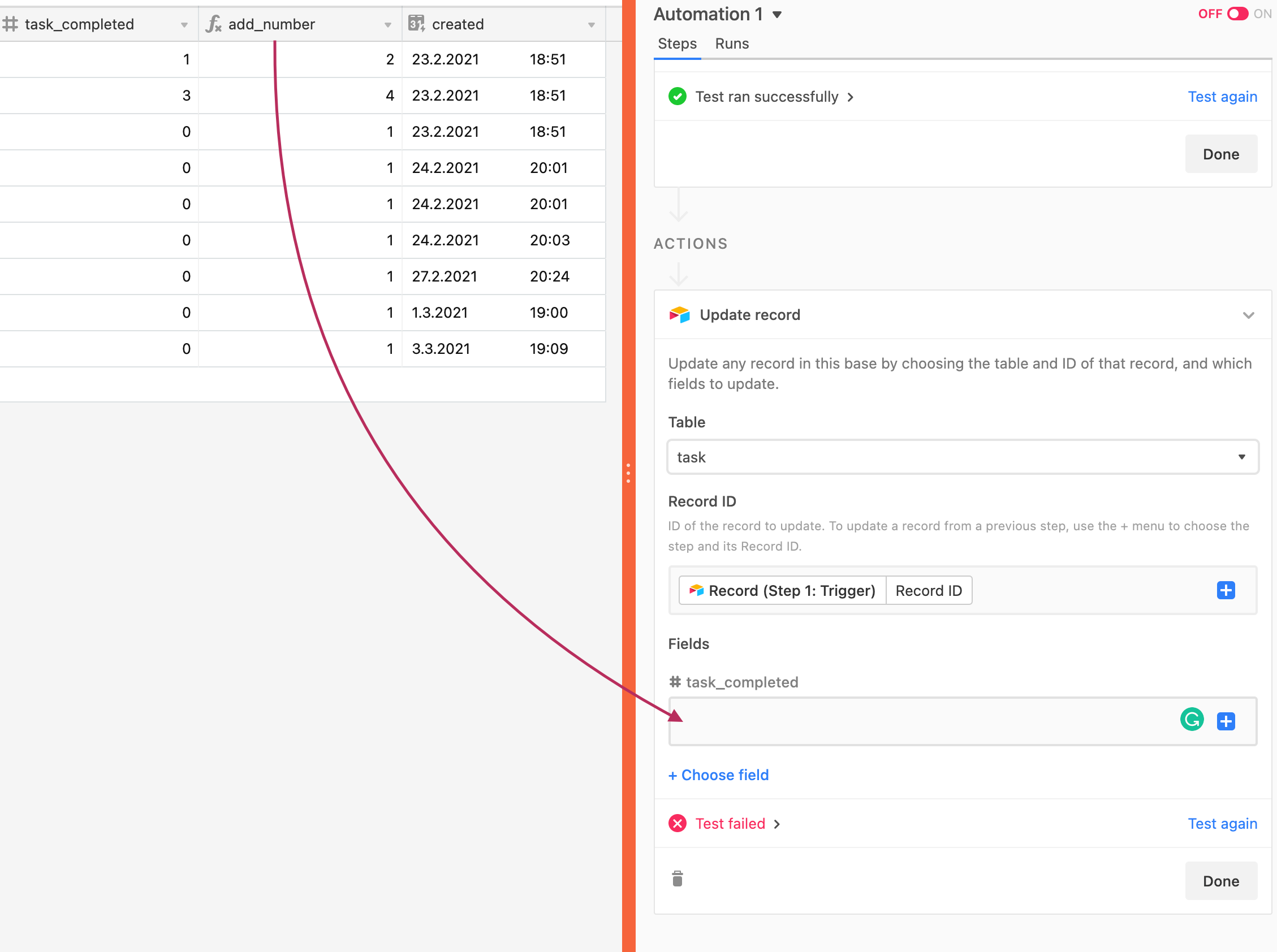
How can I update the original numbers field (task_completed) with the numbers in “add_number”.
Can I refer to a field when using “Update record”?

Regards,
Tor M


ScottWorld
Forum|alt.badge.img+35
  • Genius
  • March 3, 2021

Hi @ScottWorld
How can I update the original numbers field (task_completed) with the numbers in “add_number”.
Can I refer to a field when using “Update record”?

Regards,
Tor M


Yes, click on the blue plus sign and choose the formula field.


Forum|alt.badge.img
  • Author
  • Participating Frequently
  • March 4, 2021

Yes, click on the blue plus sign and choose the formula field.


Thanks, worked perfectly!


Forum|alt.badge.img+17

@ScottWorld - Must say - your posts are fantastically helpful! They have helped me many a time!!

I have just found this. Wanted to do the same, and the best I could think of was to add another field to my table (+ 1 of the original number) and insert that. Was hoping it could be done within the formula as it would be much cleaner but doesn’t seem to be possible. Oh well!

Thanks again,
Andrew


ScottWorld
Forum|alt.badge.img+35
  • Genius
  • May 15, 2022

@ScottWorld - Must say - your posts are fantastically helpful! They have helped me many a time!!

I have just found this. Wanted to do the same, and the best I could think of was to add another field to my table (+ 1 of the original number) and insert that. Was hoping it could be done within the formula as it would be much cleaner but doesn’t seem to be possible. Oh well!

Thanks again,
Andrew


Hi @Andrew_Davies,

That is so nice of you to say! :blush: :sparkles:

Thanks so much, and I’m so glad that my posts have been helpful for you on multiple occasions! :grinning_face_with_big_eyes: :raised_hands: