Question

Preventing/Flagging Duplicate records from Forms

  • February 9, 2026
  • 7 replies
  • 24 views

Forum|alt.badge.img+5

I have a main database that stores all the data for my company that is collected from various sources (team member input or customer input but all data is entered through forms) and I need help ideally preventing the input of duplicate records, or at the minimum flagging/alerting the person entering the data that a record already exists.

To simplify - For my team member forms:

  1. Is there a way I can have a script or automation check existing records for matching ‘Project Name’, ‘Customer Name’, and/or ‘Customer Email’ and if any of these exist already, allow them to update/edit the record. Or, if it does not exist, they can create a new one.
  2. If there is no ability available to to stop/alert them while they are creating, can an automation be used to send an email after the form is submitted alerting them that it was a duplicate so they can go in a fix it?

For the forms being filled out by the customer:

  1. Same as #2 above, creating an automation to send an email to a team member alerting them that a dup exists and to merge the data.

Lastly, if there is a better way, to have this set up in general, I’m all ears. This workflow was set up on a smaller scale but grew quickly, so there might be a better way out there.

Thanks for any help/advice/tips in advance. I appreciate all the knowledge here and being able to learn from you all!


7 replies

DisraeliGears01
Forum|alt.badge.img+21

Airtable’s native forms implementation has some strong limitations that can be worked around but it gets complex quickly. Before diving in too deeply, as always I have to recommend Fillout Forms as a third party forms solution that is integrated very tightly with Airtable to include options for editing records via forms and tons of other helpful features.

That said, there are ways to utilize automations to achieve some of what your looking for. First off I find it helpful to separate your form submissions from the rest of your data, rather than form entries going right into your data tables. Then it’s all about using the Find action in automations along with conditionalities. So you make an automation that is triggered when form is submitted, find records in Project Table where Project Name = Form Project Name. If Records is not 0, edit record found to update, if Records is 0, create new record. Super simple to add a send email action at the end too as an alert for staff.

Where that gets tricky is trying to key off multiple fields, especially “name” fields as people add spaces or capitalize/abbreviate willy nilly. You can normalize some of this (adding formulas to delete additional spaces and uncap everything) but it’s hard to account for all variations (Coca Cola, CocaCola, Coke, etc). I find email to be the best public facing key as most people have one email they’re using with you (business or otherwise) and it mostly gets filled in correctly. 


ScottWorld
Forum|alt.badge.img+35
  • Genius
  • February 9, 2026

@Jan123 

As ​@DisraeliGears01 mentioned above, your #1 best bet for duplicate prevention is to use Fillout’s advanced forms for Airtable because it lets you prevent duplicate form submissions based on any text fields (or email fields) that you specify.

Additionally, Fillout offers hundreds of other features that Airtable’s native forms don’t offer, including the other feature which you were asking about: updating existing Airtable records using a form.

Fillout offers so much more, too. You can create custom PDF files from a form submissionaccept payments on formscustomize the style and branding of your formcustomize a theme for your form, display Airtable lookup fields on forms, create new linked records on a form, control access to a form via SSO or email domains or a list of email addresses stored in Airtable, perform math or other live calculations on your forms, collect signatures on a form, create multi-page forms with conditional paths, connect a single form to dozens of external apps simultaneously, add CAPTCHAs to your form, and much more.

I show how to use a few of the advanced features of Fillout on these 2 Airtable podcast episodes:

Hope this helps!

If you have a budget and you’d like to hire the best Airtable consultant to help you with this or anything else that is Airtable-related, please feel free to contact me through my website: Airtable consultant — ScottWorld


Mike_AutomaticN
Forum|alt.badge.img+28

ACTUALLY:

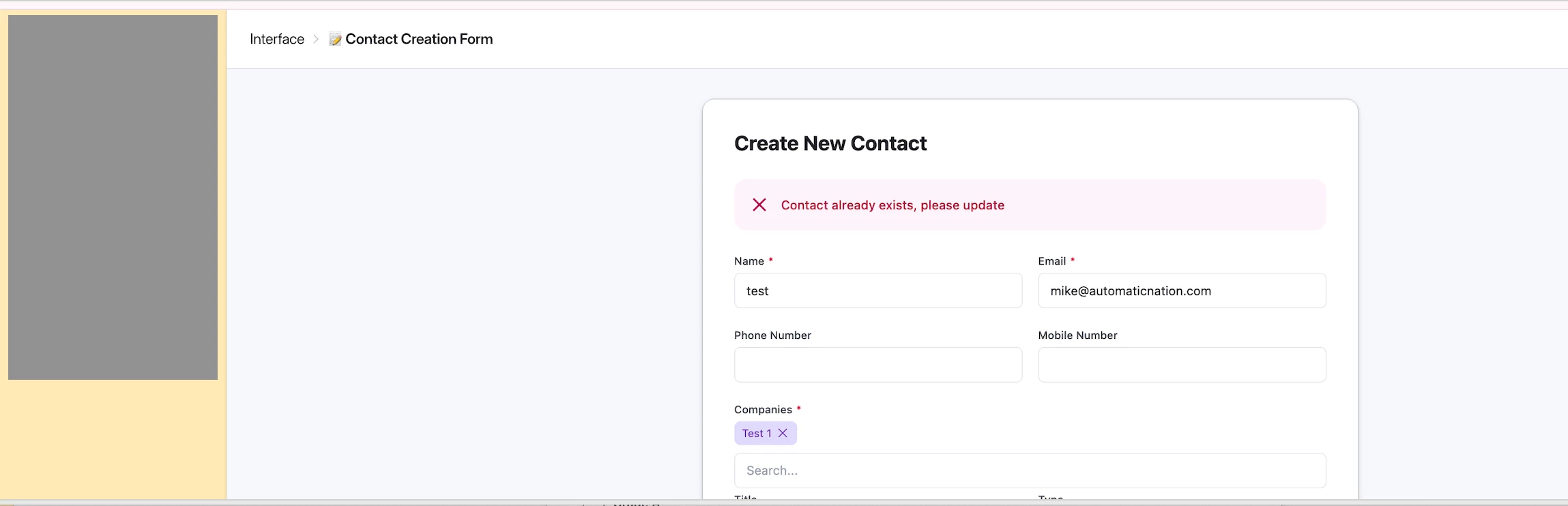
This is possible using Airtable Custom Interfaces!!!!!!!!!!!! Make sure to enable AI Labs on your workspace. I’ll be recording a video on this matter soon but see screenshot below:

You could prompt omni to (i) avoid duplicates by showing the error banner, or (i) update found record ratehr than creating a duplicate.


This is actually GREAT!!!!!!!!!!!!!!!!!!!!!!!!!!!!!!!!!!!!!!!!!!!!!!!!!!!!!!!!!!!!!!!!!!!!!!!!!!!!!!!


Completely different matter, but would love to have you join the March 2026 AT Community led Hackathon! Make sure to sign up!!


Mike, Consultant @ Automatic Nation 
YouTube Channel 


DisraeliGears01
Forum|alt.badge.img+21

@Mike_AutomaticN Interesting that custom interfaces can try this, but are custom interfaces publicly shareable (embeddable or accessible by non-logged in users)? If they’re not publicly shareable the utility plummets. I expect this is basically Omni reskinning an editable interface to look like a form…

I’m def interested in a video version, look forward to checking it out!


Mike_AutomaticN
Forum|alt.badge.img+28

As far as I tried earlier this morning (spent 30 secs on it) it seems that you can actually both publicly share and embed. I did not try submitting. But yes, this would also mean that you would be “skipping” on airtable paid seats for “editors” under other use cases.
Seems strange, so I should triple check. But that is as far as I got today!

Mike


Forum|alt.badge.img
  • New Participant
  • February 9, 2026

I have a main database that stores all the data for my company that is collected from various sources (team member input or customer input but all data is entered through forms) and I need help ideally preventing the input of duplicate records, or at the minimum flagging/alerting the person entering the data that a record already exists.

To simplify - For my team member forms:

  1. Is there a way I can have a script or automation check existing records for matching ‘Project Name’, ‘Customer Name’, and/or ‘Customer Email’ and if any of these exist already, allow them to update/edit the record. Or, if it does not exist, they can create a new one.
  2. If there is no ability available to to stop/alert them while they are creating, can an automation be used to send an email after the form is submitted alerting them that it was a duplicate so they can go in a fix it?

For the forms being filled out by the customer:

  1. Same as #2 above, creating an automation to send an email to a team member alerting them that a dup exists and to merge the data.

Lastly, if there is a better way, to have this set up in general, I’m all ears. This workflow was set up on a smaller scale but grew quickly, so there might be a better way out there.

Thanks for any help/advice/tips in advance. I appreciate all the knowledge here and being able to learn from you all!

There are several methods to achieve this:


 1. Extension: Use the “Dedupe” feature to select fields for identifying duplicates, then choose to either merge or delete them.


 2. Simple formula: Create a formula to identify duplicates and perform the necessary cleanup.


 3. Automation with script: Develop a script to output duplicates, update records, send notifications, or perform any combination of these actions.


TheTimeSavingCo
Forum|alt.badge.img+31

Airtable has a guide on how to update records via form submissions that you can find here: https://support.airtable.com/docs/use-case-update-records-via-a-form

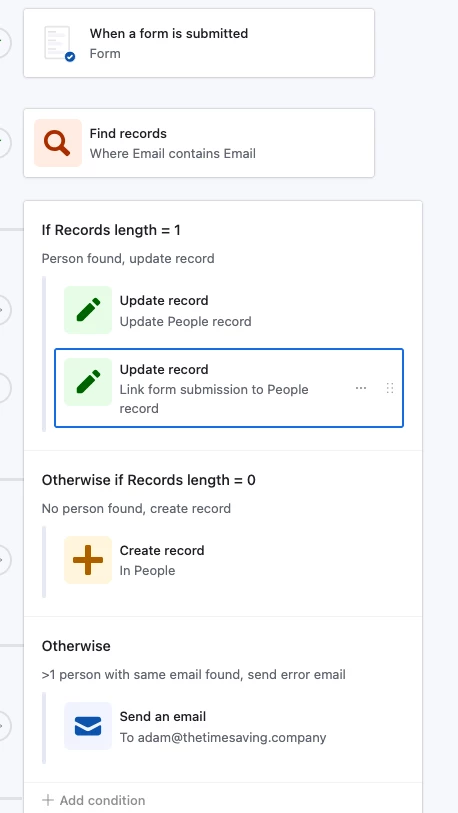
The idea is to use a Find Record step to look for the original record that needs to be updated, and I echo what DisraeliGears01 mentioned about emails being the safest option for duplicate checking

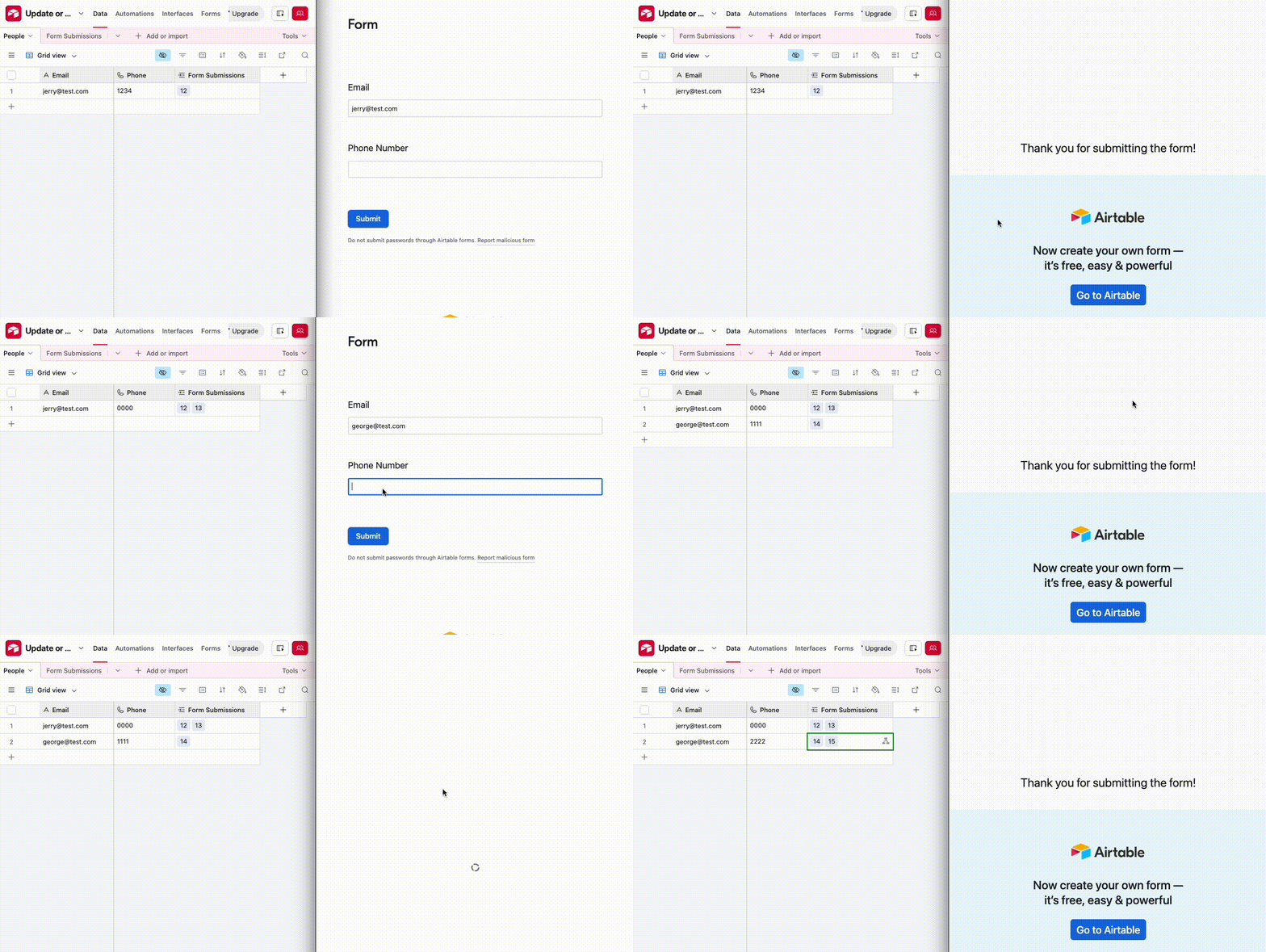
You can extend this functionality using conditional logic to handle record creation if it doesn’t exist as well, and I’ve set that up here for you to check out.  Here’s how it looks in action:

 And here’s how the automation looks: