Solved

Recording Status Changes

  • February 2, 2026
  • 3 replies
  • 26 views

Forum|alt.badge.img+5

I have a database that is used to record the status change of projects and I need help with my automation. Currently I have an automation set up that is triggered when a record is updated (watching the “status” field); then it creates a record on my Change Log Table. I want it to record the “old” status and the “new” status in a field, along with the date the change was made and the user who made it. I am having trouble setting this up, can anyone help? Thanks in advance!

Best answer by TheTimeSavingCo

Does this look right?  If so I’ve set it up here for you to check out!
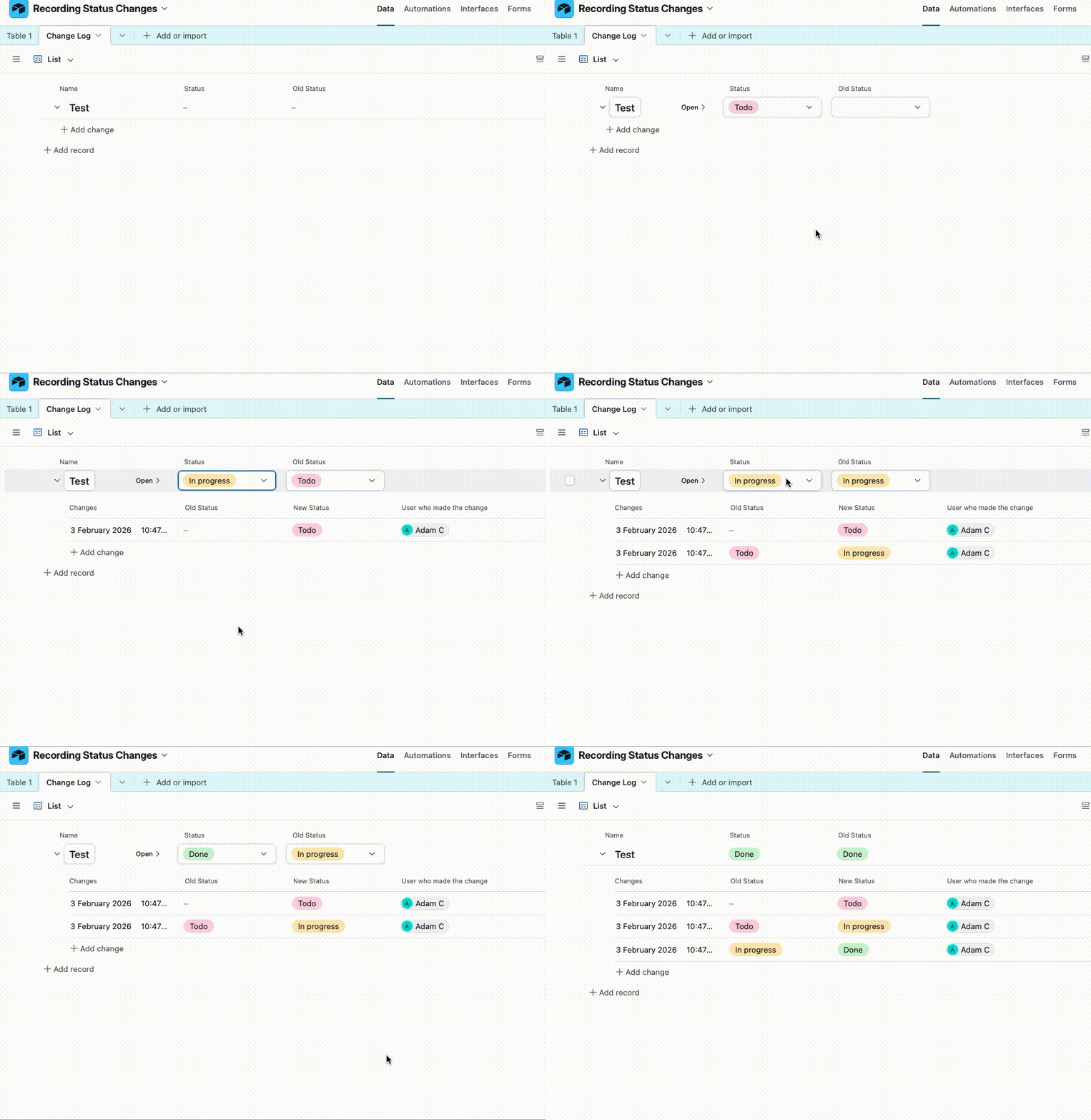
 

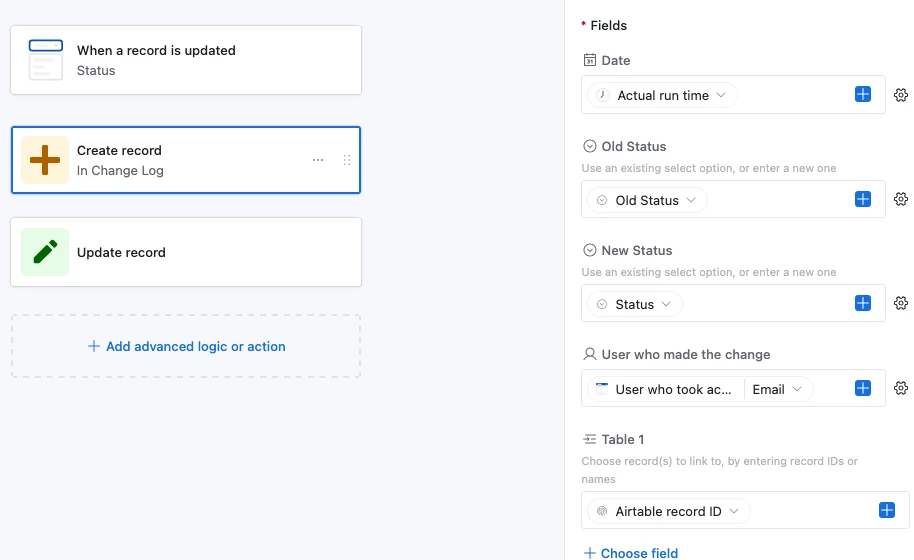
The idea is to have an ‘Old Status’ field that only the automation touches, and whenever the Status field gets updated, the automation will:

  1. Create a new record in the Change Log table
    1. Copy the value from ‘Old Status’ into the field ‘Old Status’ in Change Log
    2. Copy the value from ‘Status’ into the field ‘New Status’ in Change Log
  2. In the data table, update the triggering record by pasting the value from ‘Status’ into ‘Old Status’
3 replies

ScottWorld
Forum|alt.badge.img+35
  • Genius
  • February 2, 2026

That’s a tricky one because an automation only triggers AFTER the change has already been made.

You might want to create a DIFFERENT FIELD that’s called “Change Status To:”, and then when you update that field, the automation can grab the old status for your Change Log Table, and then the automation itself can change your REAL “status” field to the new status field that you selected.

Someone else might have a different idea on how to accomplish this, but that might be the easiest way to handle it.

Hope this helps!

If you have a budget and you’d like to hire the best Airtable consultant to help you with this or anything else that is Airtable-related, please feel free to contact me through my website: Airtable consultant — ScottWorld


TheTimeSavingCo
Forum|alt.badge.img+31

Does this look right?  If so I’ve set it up here for you to check out!


The idea is to have an ‘Old Status’ field that only the automation touches, and whenever the Status field gets updated, the automation will:

  1. Create a new record in the Change Log table
    1. Copy the value from ‘Old Status’ into the field ‘Old Status’ in Change Log
    2. Copy the value from ‘Status’ into the field ‘New Status’ in Change Log
  2. In the data table, update the triggering record by pasting the value from ‘Status’ into ‘Old Status’

Forum|alt.badge.img+5
  • Author
  • New Participant
  • February 3, 2026

Thank you TimeSavingCo! This worked great - appreciate your help and the example was super helpful!!