Referencing Lookup fields

  • January 5, 2022
  • 7 replies
  • 87 views

Forum|alt.badge.img

Hey everyone,

I’m having trouble referencing my Lookup fields in my automations. Every time I try to reference them in my automatic Slack messages or my automatic e-mails, the reference throws empty values, rather than the lookup value that is actually shown in the cell.
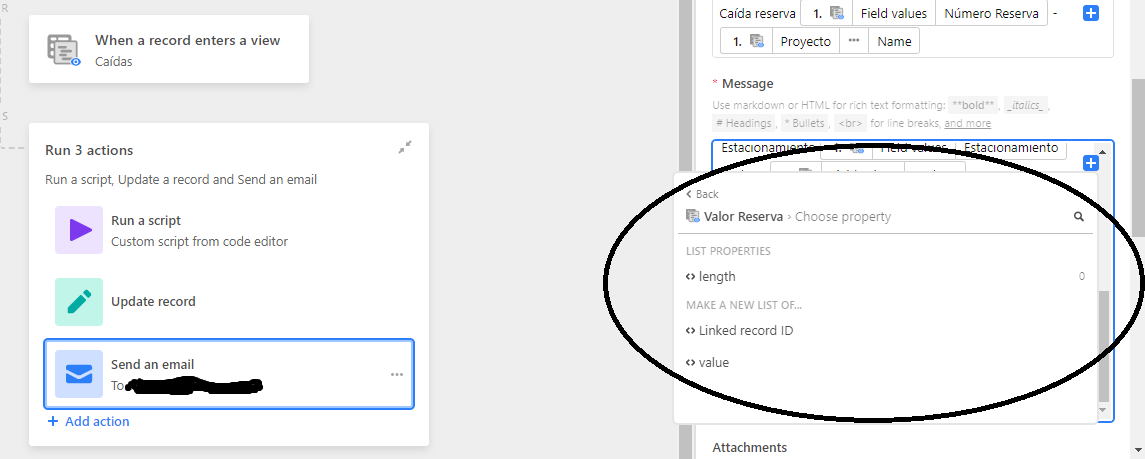
Am I doing something wrong? Does it make any sense to try to work around the problem via scripting or by running a “find records” action?

Thank you very much in advance

7 replies

Databaser
Forum|alt.badge.img+25
  • Brainy
  • January 5, 2022

Hi @Gerardo_Hormazabal

I think you need a “find records” action before your “send an email” action.


ScottWorld
Forum|alt.badge.img+35
  • Genius
  • January 5, 2022

I would try re-testing your trigger to make the values appear in the automations window.


Forum|alt.badge.img
  • Author
  • New Participant
  • January 5, 2022

I would try re-testing your trigger to make the values appear in the automations window.


My trigger is “When a record enters a view”. I’ve been trying this for quite some time, I don’t think it’s a testing issue


Forum|alt.badge.img
  • Author
  • New Participant
  • January 5, 2022

Hi @Gerardo_Hormazabal

I think you need a “find records” action before your “send an email” action.


I can’t really see how. I’m trying to send an e-mail as soon as a status changes on a record, and I want it to use information from a lookup field on that email.

How would I use “find record” in that scenario? It’s surely possible, but I can’t see a natural way of doing it (I can only think of creating a view specifically for a status that changed in the last 15 minutes, or something like that).


Databaser
Forum|alt.badge.img+25
  • Brainy
  • January 7, 2022

I can’t really see how. I’m trying to send an e-mail as soon as a status changes on a record, and I want it to use information from a lookup field on that email.

How would I use “find record” in that scenario? It’s surely possible, but I can’t see a natural way of doing it (I can only think of creating a view specifically for a status that changed in the last 15 minutes, or something like that).


No, a “find records” action is not necessary in contrary to what I mentioned. It should work just fine with the trigger + email action step when all previous steps are tested. Do the previous actions (script, update record) have any impact on your lookup field (or the source field for that lookup field)?


Forum|alt.badge.img
  • Author
  • New Participant
  • January 12, 2022

No, a “find records” action is not necessary in contrary to what I mentioned. It should work just fine with the trigger + email action step when all previous steps are tested. Do the previous actions (script, update record) have any impact on your lookup field (or the source field for that lookup field)?


This is the flow:

Trigger: When a record enters a view, which is only filtered by status. Every time that status changes to “Done”, the status enters the view and it triggers the automation.

Actions:
Scripting sets a variable as the current time [let now = Date.now()]
Update Record, sets the value of “now” as one of the cells in the record
Send Email, using most of the values as the body of the email. The only one that doesn’t work is the one that comes from a lookup field.

So neither the trigger nor the actions have any impact in neither the lookup field, or the source field. Should them? If they shouldn’t, how would you fix this?

Thank you very much in advance


Forum|alt.badge.img+4
  • New Participant
  • April 14, 2023

Bumming to the top for same issue.