Welcome to the community, @Cheyne_Toomey! :grinning_face_with_big_eyes: This is doable, but it will require a change in the design of your setup.
First, to have each email sent individually will require a separate automation run for each affected record. That of course will increase how many automations you use per month out of your available allotment, so be aware of that before moving forward with this (especially if you sent a lot of these each day).
I can think of a couple of options for the rest of the setup. One would allow you to keep the “At a scheduled time” automation trigger, but it would also require a script action. Long story short, at 10 am each day this automation would run and execute a script that would a) search for all past due records, and then b) use a webhook to call another automation (once per found record) which would send an email. For example, if you have 10 past due records, it would result in 11 automation runs: one for the main 10am weekday trigger, and then one each for the emails to be sent to clients.
The other option that I’m thinking of can be done without any scripting, but it completely changes the trigger mechanism. It also means that the automation(s) might not run at precisely 10am (more on that later).
First you’ll need some new fields in the table where you’re tracking your client orders. One will be a formula that simply outputs the result of the TODAY() function. In the field formatting options, make sure that “Use the same time zone (GMT) for all collaborators” is ON, but turn off the time field option.
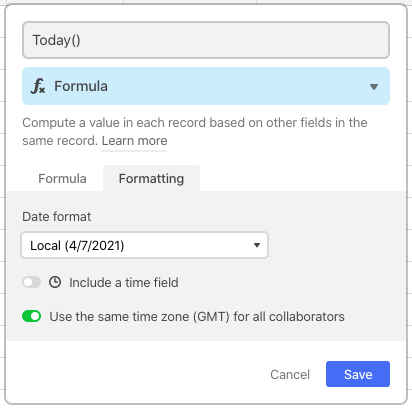
Next make a {Last Notified} date field. It will be empty at first, but that’s okay. This will come into play later.
Finally make a {Send Past Due Email} formula field with this formula:
AND(
    Status = "Past Due",
    HOUR(NOW()) - 8 >= 10,
    SWITCH(WEEKDAY(TODAY()), 0, 0, 6, 0, 1),
    OR({Last Notified} = BLANK(), {Last Notified} != TODAY())
)
That will output a 1 only when:
- The
{Status} field is “Past Due” AND
- The time is 10am or later (more on tweaking this below) AND
- The weekday is not Sunday or Saturday AND
-
{Last Notified} is neither empty nor matching today’s date
Now create an automation using the “When record matches conditions” trigger, with the condition being that this {Send Past Due Email} field outputs a 1. Add your choice of “Send email” action (Airtable or Gmail) to send an email to the client whose record triggered the automation. Also add an “Update record” action to take the date from the “Today” formula field that you made and insert it into the {Last Notified} field.
The first time that you set this up, {Last Notified} will be empty. When a weekday comes along and it’s 10am(ish), any record that’s past due will have a 1 appear in that field and trigger the automation. The automation will email the client, copy the “Today” date into {Last Notified}, which should reset the formula output back to 0 until the next weekday at 10 am.
Now, regarding the time setting in this line of the “Send Past Due Email” formula:
HOUR(NOW()) - 8 >= 10,
You’ll need to change the 8 to another number based on your local timezone’s offset from GMT. Long story short, the NOW() function returns the current time based on GMT, not your local timezone, which is why you need to adjust the result. I used 8 because my timezone is currently GMT-8. If you’re on the east coast, it would be -5:
HOUR(NOW()) - 5 >= 10,
The other hiccup with NOW() is that it’s not updated constantly. Long story short, it updates roughly every 5-15 minutes when your base is open, and (in theory) every hour-ish when it’s not. In the end, the emails won’t go out precisely at 10am every weekday, but unfortunately this is the best option available using this method.






