

Question

Stop automation creating new records when referencing linked tables

  • February 19, 2026
  • 3 replies
  • 0 views

_amber
Forum|alt.badge.img+5

Hi everyone,

I have an automation that matches keywords to a record. In this case it’s a person and their biography, e.g. I want to tag Neil Armstrong with Astronaut — chosen from a fixed list. NB. I have tried the deep match and it’s too slow for the volume I’m working with.

Table A: Profiles
Table B: Keywords

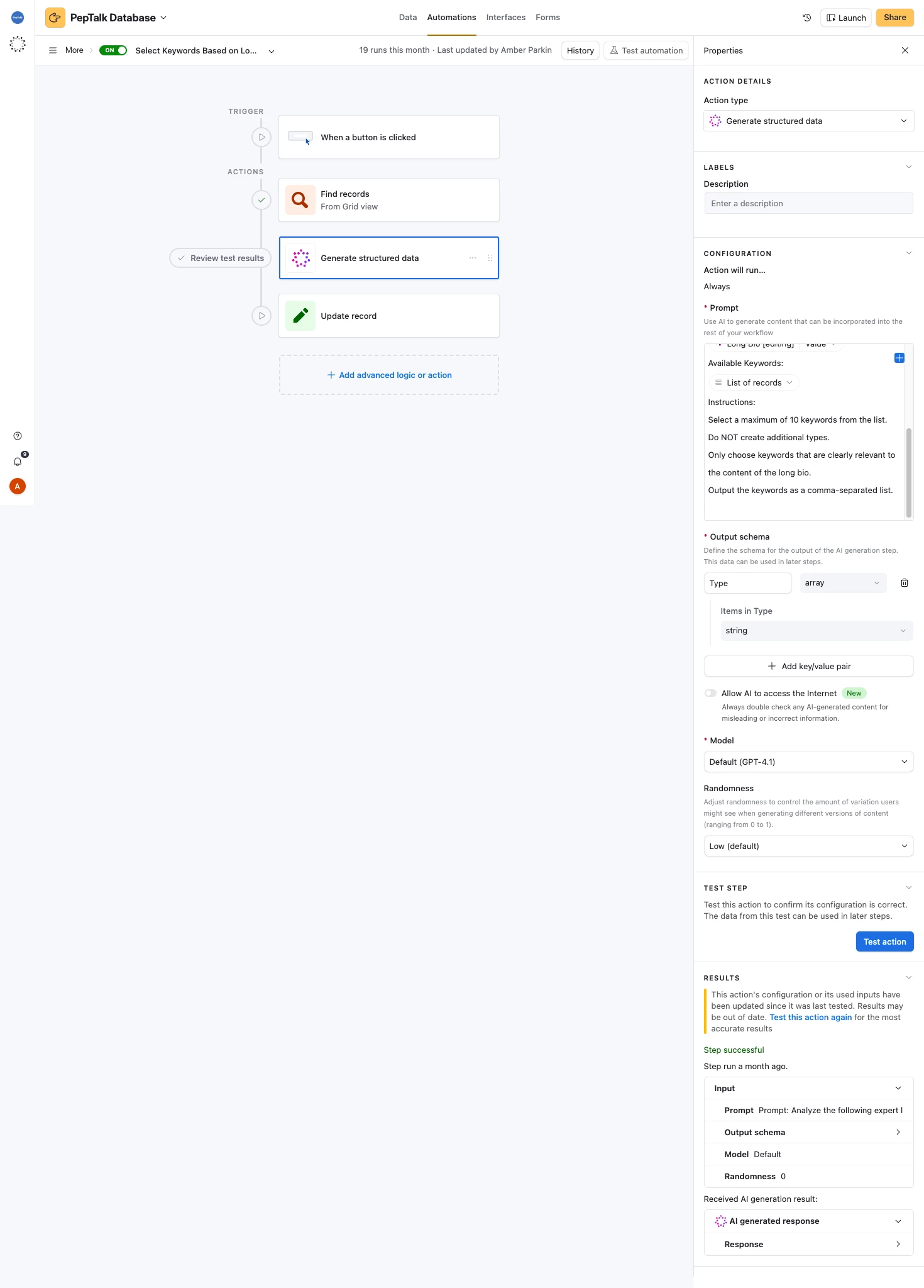
It compares the two and selects very well, but sometimes it invents new keywords. If I don’t allow the keywords field to be edited by automations, I get nothing. Does anyone have any bright ideas? Would this be better as a script (I had a script a year ago but can’t remember why I changed)

Screenshot attached so you can see how I set it up.


3 replies

Mike_AutomaticN
Forum|alt.badge.img+28

Hey ​@_amber,

Even if your prompt is pretty clear “...do not invent new kewyeords..” I do beleive this system should work. I’d suggest iterating the prompt a few more times. Also if you make the kewyrods primary field a formula (rather than free text), the automation should not be able to create any new record for you (as it cannot type on a calculated field). I think this is different to what you mentioned, I believe it should help.

Please let me know if that works!


Completely different matter, but would love to have you join the March 2026 AT Community led Hackathon! Make sure to sign up!!


Mike, Consultant @ Automatic Nation 
YouTube Channel


TheTimeSavingCo
Forum|alt.badge.img+31

Hmm, what if instead of doing an ‘Update Record’ step and updating all the tags at once, we did a Repeating Group + Conditional?

And so the idea would be: Repeating group on the array that was created

  1. ‘Find Record’ action to look for the Repeating Group’s Current Item in the ‘Keywords’ table
  2. Conditional 1: Find Record action from previous step finds a single record
    1. ‘Find Record’ action to look for the triggering record
      1. We do this to get the latest update of this record, i.e. the latest ‘Keywords’ value 
    2. ‘Run a Script’ action to clean up the new value we want to put into ‘Keywords’
      1. i.e. Combine the current ‘Keywords’ value with the Current Item, or if there isn’t currently a value in ‘Keywords’, just output the Current Item so that the automation doesn’t error out
        1. e.g. if ‘Keywords’ currently has ‘Hello’ and Current Item is ‘World’, combine it to be ‘Hello, World’
        2. e.g. if ‘Keywords’ is empty and Current Item is ‘World’, output ‘World’
    3. ‘Update Record’ action to update the triggering record’s Keyword field with the output of 2.2.1
  3. Conditional 2: Find Record action from 1 cannot find a record or finds >1 record
    1. Do nothing / send yourself an email alert or something

_amber
Forum|alt.badge.img+5
  • Author
  • New Participant
  • February 19, 2026

Thanks ​@TheTimeSavingCo and ​@Mike_AutomaticN  — I’ll give both methods a shot and report back!