Question

Take selected fields from Table A and populate them in Table B based off of a 'tick' selection in Table A

  • January 27, 2026
  • 6 replies
  • 45 views

Forum|alt.badge.img+1

Hi guys, hoping you can help me out here. I have ‘Table A’ which is used for collecting issues. I have ‘Table B’ that will be used to track the work being done to resolve the issues from Table A. I’m looking for a way to automatically populate predefined data fields from Table A into Table B when you put a ‘tick’ in Table A.

For example: If I have Issue 1, Issue 2 and Issue 3 in Table A and I put a ‘tick’ on Issue 2, I want the predefined fields from Table A to then automatically populate in Table B.


Any help you’re able to give would be greatly appreciated 



6 replies

Forum|alt.badge.img+1
  • Author
  • New Participant
  • January 27, 2026

Never mind. I figured it out


airballer86
Forum|alt.badge.img+18
  • Known Participant
  • January 28, 2026

@Kyle8 How did you figure it out? I’m always curious to see how others solve workflow issues!


Mike_AutomaticN
Forum|alt.badge.img+28

Hey ​@airballer86 ,

You could build an automation (as explained below) to achieved exactly what is described on the initial post. However, you might be better off just having the automation link Issue 2 to the new record on table B, and then just create lookups to show the values dynamically. You can read more about lookups here.


Having said that, if you still want to achieve what has been described on the initial post then here’s the setup you’ll want to follow:

Step 1: Add a checkbox field in Table A 
This is your trigger. When someone ticks the box, the workflow fires.

Step 2: Create an automation 
Trigger: When record in Table A matches conditions 
Condition: Checkbox is ticked

Step 3: Add a Create Record action 
Target table: Table B 
Map the fields from Table A into Table B. 
For example: 
• Table B field: Issue Name → pull from Table A’s Issue Name 
• Table B field: Description → pull from Table A 
• Table B field: Priority → pull from Table A 
…and so on.

Step 4: (Optional but recommended) 
After creating the record in Table B, add an Update Record step to untick the checkbox in Table A.

This gives you a brand new record in Table B every time the tick happens, containing whatever predefined fields you mapped.

Does this make sense, feel free to grab a slot using this link if you are still struggling to set this up! I’d be happy to help.

Mike, Consultant @ Automatic Nation 
YouTube Channel


Forum|alt.badge.img+1
  • Author
  • New Participant
  • January 28, 2026

@Kyle8 How did you figure it out? I’m always curious to see how others solve workflow issues!


Hey Airballer, I used  similar method to what Mike laid out


Forum|alt.badge.img+1
  • Author
  • New Participant
  • January 29, 2026

Having said that...I now have an issue where by the predefined data will add to Table B, but, if I make changes to Table A it doesn’t automatically update them in Table B.


For example: If I make changes to the data in Table A, lets say number of units with an issue, that change wont be reflected in Table B (like it would for a V Lookup for example).


Does anyone know how I can make my automation more dynamic so that changes in Table A are captured in Table B?


TheTimeSavingCo
Forum|alt.badge.img+31

Could try using another automation with a ‘When record updated’ trigger and make it update the linked Table B record.  This assumes that when you’re creating the record in Table B initially you’re also linking it back to the triggering record 

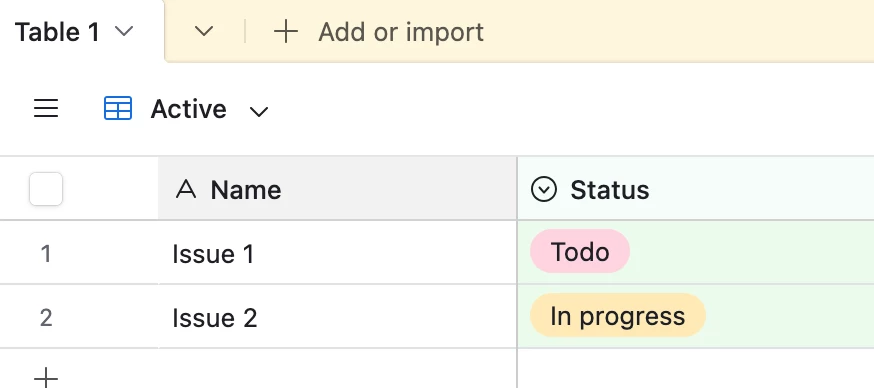
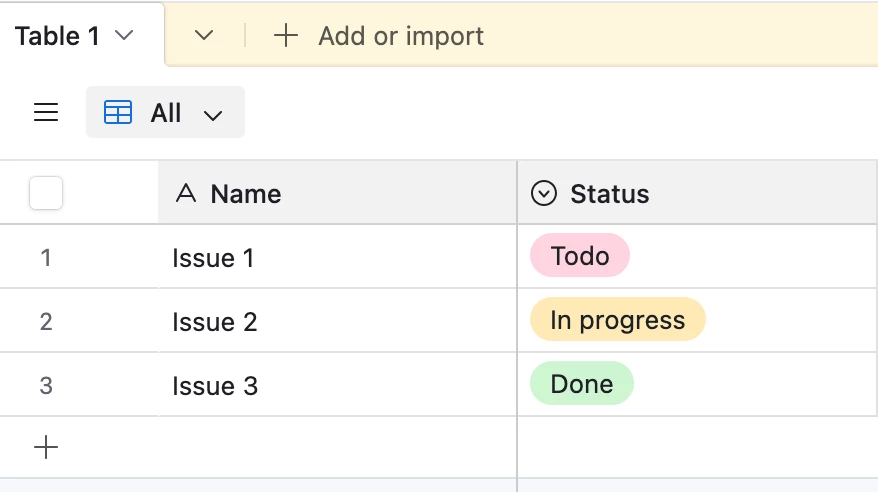
I’m curious what you’re trying to do though.  Generally if the data between tables is 1:1 the advice is to just keep it all in one table and use select fields and views to handle it instead of using a new table.  (I bring this up as you’re asking about keeping things synced, which seems to hint at the records in each table being 1:1)

For example, in the screenshots below, we have an ‘Active’ view which shows all records with Statuses that are not ‘Done’, and an ‘All’ view that just shows us all the records instead.  Apologies if I’m way off the mark here!