Answer

Trying to sync one table to another (ERROR)

  • December 4, 2025
  • 4 replies
  • 22 views

Forum|alt.badge.img+1

Hello everyone,

I’m new to Airtable and hoping someone can point me in the right direction.

I run a small insurance and finance company (about 2 years old), and I’m trying to sync data between two tables: Insurance Policies and Insurance Documents. The goal is for any changes made in the Policies table to automatically update the corresponding record in the Documents table.

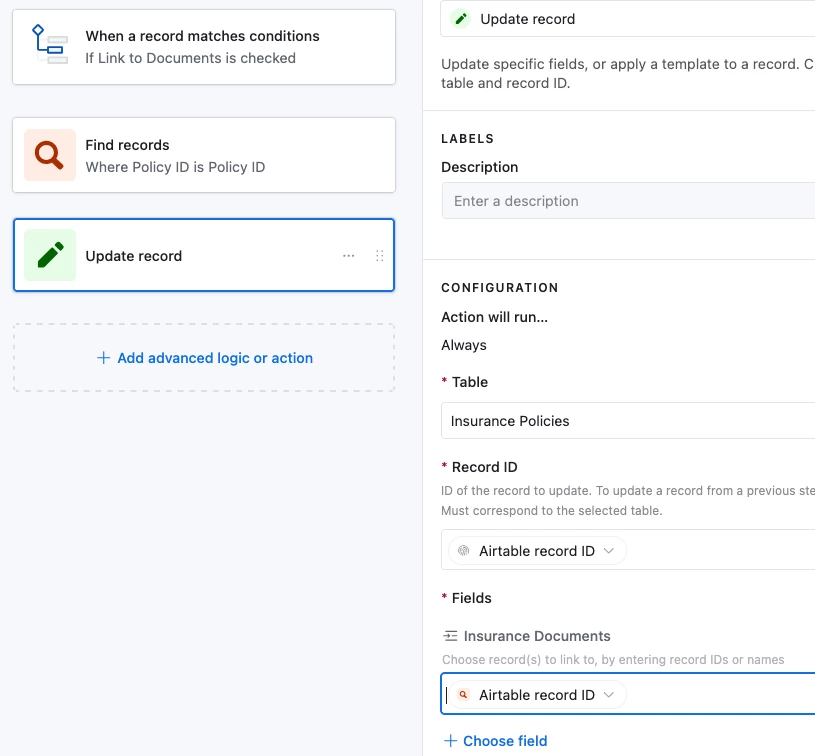
I’ve tried linking records, but that causes unwanted behavior (for example, it creates new records in the Policies table when I select Policy IDs in the Documents table). I then tried setting up automations, but I keep running into errors and loops.

Below is the automation prompt I was attempting to follow:

“Create an automation that keeps the Insurance Documents table perfectly in sync with the Insurance Policies table. Whenever a record in Insurance Policies is created or updated, find the matching record in Insurance Documents where the Policy ID matches the Policy Number. If a matching record exists, update:
• Carrier → from Insurance Policies
• Client → from Insurance Policies
• Policy ID → from Insurance Policies
• Document Name → {{Client}} – {{Carrier}} – {{Policy Type}}
This automation must not create new Insurance Policies records.”

Despite multiple attempts, including using ChatGPT for guidance, I haven't been able to get this to work properly. Automations either fail, or fields cannot be updated as required.

Is there a better way to automate this sync, or a recommended structure for linking these two tables without causing unwanted record creation?

Any help or best practices would be greatly appreciated!


Best answer by DisraeliGears01

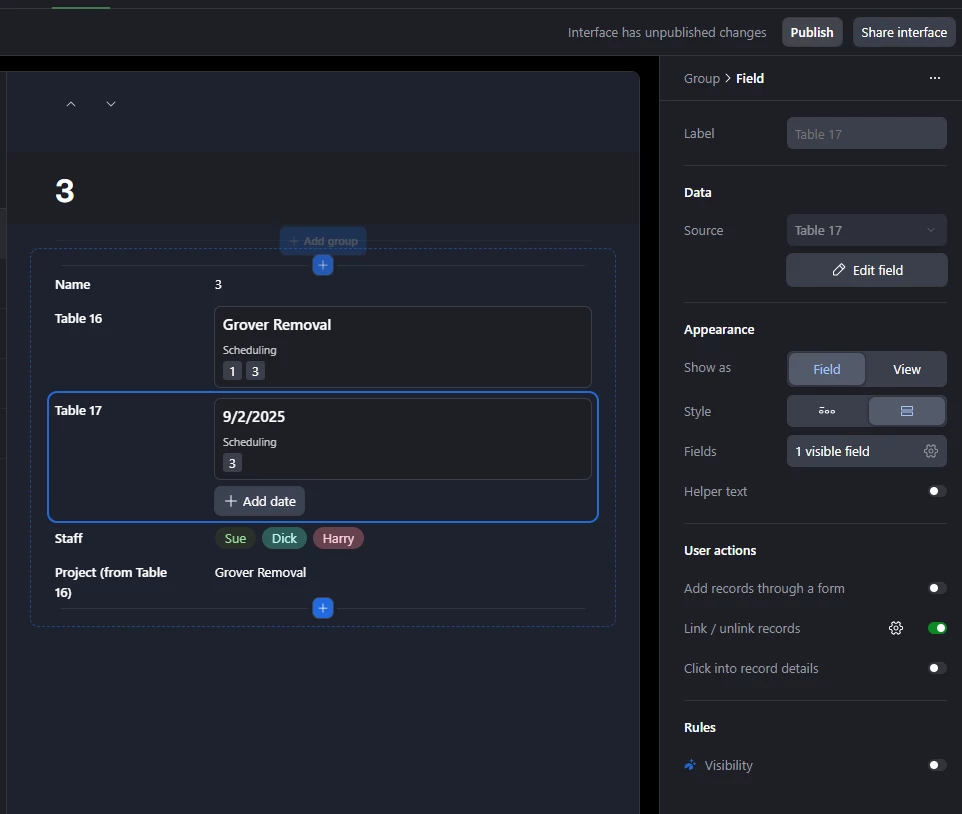
I don’t have time today to run through everything related to interfaces, but basically I’d set up your tables, use a linked record field to connect the Policies and Documents table, and then create an interface (top center of the screen) for the documents table. The screenshot I clipped above is a Record Review template, but a List version would also work. 

From there you set up your interface with the fields you need, you can set it up to add records and edit in line (so it behaves a bit like a spreadsheet) but you’ll have granular control so you can enable settings to only allow already created records to be linked (eliminating your stated problem of additional records in the Policies table being added).

If none of that made sense, short story is stop futzing with automations and instead use linked record fields (combined with lookups), run through an interface. Futz with interfaces instead of automations, and actually do it yourself rather than querying fancy autocomplete, that won’t ever get you anywhere functional.

4 replies

DisraeliGears01
Forum|alt.badge.img+21

Using linked record fields is really by far the best option here. Syncing across tables with automations is a huge pain. Creating the initial copy is usually achievable but the real problem is keeping things in line.

To reduce your linked record issues, there are several settings at the field level and then even more when included in an interface to help prevent new record creation. I’d recommend building out an interface as you can disable new record creation but allow new record linking. 

The settings in the User actions segment


Forum|alt.badge.img+1
  • Author
  • New Participant
  • December 4, 2025

Hello,

Sorry to bother but i ahve no idea how to do this. 

Do you have a link to a guide or something that you can send me please?

thanks you so much in advance and thanks for taking your time in replying!


DisraeliGears01
Forum|alt.badge.img+21

I don’t have time today to run through everything related to interfaces, but basically I’d set up your tables, use a linked record field to connect the Policies and Documents table, and then create an interface (top center of the screen) for the documents table. The screenshot I clipped above is a Record Review template, but a List version would also work. 

From there you set up your interface with the fields you need, you can set it up to add records and edit in line (so it behaves a bit like a spreadsheet) but you’ll have granular control so you can enable settings to only allow already created records to be linked (eliminating your stated problem of additional records in the Policies table being added).

If none of that made sense, short story is stop futzing with automations and instead use linked record fields (combined with lookups), run through an interface. Futz with interfaces instead of automations, and actually do it yourself rather than querying fancy autocomplete, that won’t ever get you anywhere functional.


Forum|alt.badge.img+1
  • Author
  • New Participant
  • December 4, 2025

OK thanks for the explanation, i will try tomorrow to see where it gets me. I have not tried interfaces yet.
hope you have a great day!