

Solved

Underscore getting lost in links

  • May 13, 2023
  • 7 replies
  • 122 views

Forum|alt.badge.img+3

I have an automation that is sending a Google Doc link via gmail. But when the link sends, an underscore is left out somehow, so the link doesn't work. Any idea why? Or is there some kind of work around?

This is how the link is showing up when it gets emailed:

this is what the message looks like in the automation :
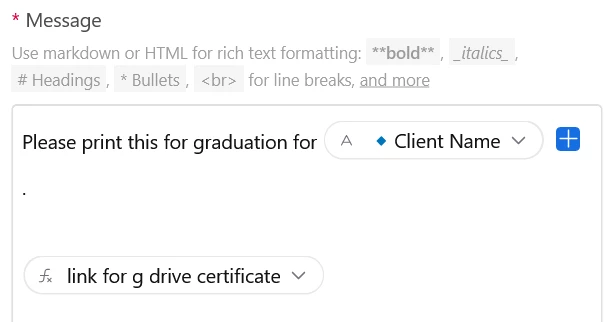


This is how the formula looks that is making  the g drive certificate link-- the link shows up fine in the airtable.


"https://docs.google.com/document/d/" & {📜Certificate Google Doc ID}"/edit?usp=drivesdk"

The broken link seems to happen only when the google doc ID has an underscore in it.

Best answer by NitaiLS

Hi,

The links are sent broken, for some annoying reason when sent by mail.

The fix is easy: wherever there is "_", replace it with "\_"

the link that will be sent by mail will work.

7 replies

Scott_Hoek
Forum|alt.badge.img+16
  • Known Participant
  • May 13, 2023

Can you add some screen shots of your automation steps maybe?  I don't think anyone can really help if we can't see the automation with the problem 🙂


Forum|alt.badge.img+7
  • Inspiring
  • Answer
  • May 14, 2023

Hi,

The links are sent broken, for some annoying reason when sent by mail.

The fix is easy: wherever there is "_", replace it with "\_"

the link that will be sent by mail will work.


Forum|alt.badge.img+3
  • Author
  • New Participant
  • May 23, 2023

but the links are autogenerated. so you're saying i need to make, like, a formula that looks for hyphens and replaces them, and then send that link?


Forum|alt.badge.img+3
  • Author
  • New Participant
  • May 23, 2023

Did it. I had to make a formula that changes the link after it's created for proper sending. Thanks!


Forum|alt.badge.img+7
  • Inspiring
  • May 23, 2023

Did it. I had to make a formula that changes the link after it's created for proper sending. Thanks!


Great! 🙂

Forum|alt.badge.img+7

Did it. I had to make a formula that changes the link after it's created for proper sending. Thanks!


I have the same issue. What was the formula you created?

Thanks!


Forum|alt.badge.img+5
  • New Participant
  • July 16, 2024

Late to this game but this sucks.  I have to create a new formula field specifically for this.  Does anybody know if this to be expected or something Airtable should fix at some point?

