Question

Best way to aggregate many linked record fields

  • December 17, 2025
  • 7 replies
  • 34 views

Forum|alt.badge.img+1

Hi all. Fairly a newby (but just got my builder certification🤗) so bear with me!

My supervisor developed a fairly complicated base that uses, among many other things, user and user attribute tables. To make user attributes dynamically editable by type (income, demographics, etc) in a Softr interface, he made each type its own linked record field on the user. So while the user has all of these linked attributes, they are linked records split across many fields (think Attributes (work experience), attributes (race), etc.)

We’re now trying to clean up this base and reunify them in one linked attributes field, but there are so many linked fields at play that it’s a bit intimidating to get started. What’s the safest route here? Working in sandbox :)

7 replies

Forum|alt.badge.img+9
  • Participating Frequently
  • December 17, 2025

Just to clarify - right now there are multiple linked fields between the user and attribute fields?
eg:
User:
Name
Work Experience (link to Attributes table)
Location (link to Attributes table)
etc?


Forum|alt.badge.img+1
  • Author
  • New Participant
  • December 17, 2025

That’s exactly right; this was done to circumvent a display issue at the time in Softr.


Forum|alt.badge.img+9
  • Participating Frequently
  • December 17, 2025

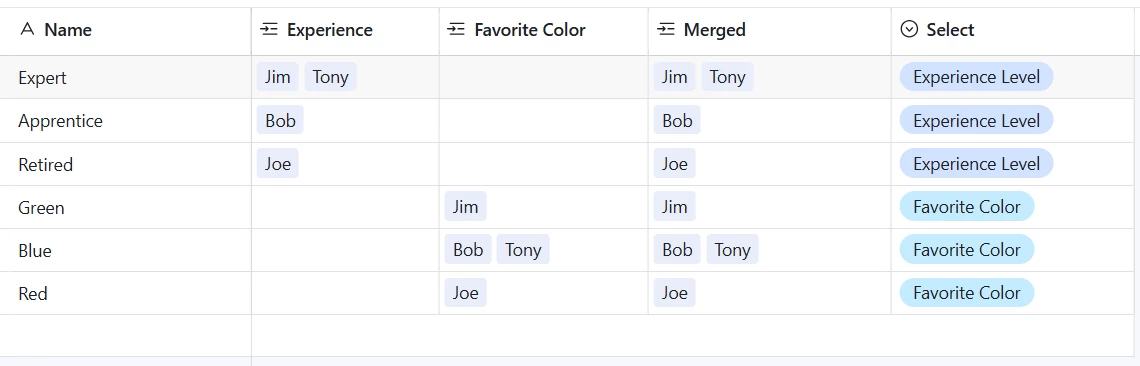
There are ways to do this with scripting and/or automations, but looking at the simplest solution first, if your Attributes table looks like this

you may be able to get away with creating the new “merged” relationship field and an attribute type single select, and copy/pasting each attribute into the new linked field.
 

You’d need to copy paste once for each attribute type. I’d maybe filter by attribute type for each operation so you aren’t overwriting previous attributes with blanks.

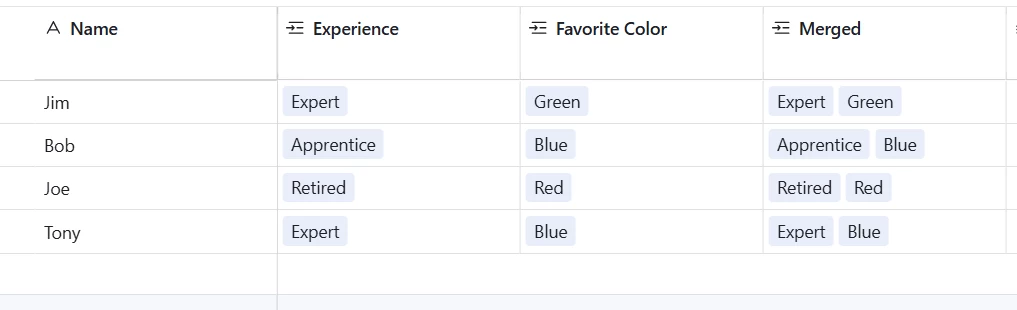
Your people table will end up like this


This assumes a certain simplicity about your data to work. 


Forum|alt.badge.img+1
  • Author
  • New Participant
  • December 17, 2025

Ah, thank you for providing such clear images. This is going to be my last resort as there are 580 rows and thousands of linked users.

I may end up going the automation route, this just seemed like it should be possible with a formula or something given that all the attributes exist in the same field.


Mike_AutomaticN
Forum|alt.badge.img+28

Hey ​@rubylenard,
 

​@Matt_Jastremski soluton above should work perfectly fine. To avoid filtering, etc, you could also create a formula field on the People table, where you would concatenate all attributes from the different fields, with comma separation. 

Then, on your new “Merged” field, you would just copy and paste the value from the formula field. If your Merged field is set to allow for multiple links, then that would be pretty much it.

Mike, Consultant @ Automatic Nation 
YouTube Channel 


TheTimeSavingCo
Forum|alt.badge.img+31

Ah, thank you for providing such clear images. This is going to be my last resort as there are 580 rows and thousands of linked users.

I may end up going the automation route, this just seemed like it should be possible with a formula or something given that all the attributes exist in the same field.

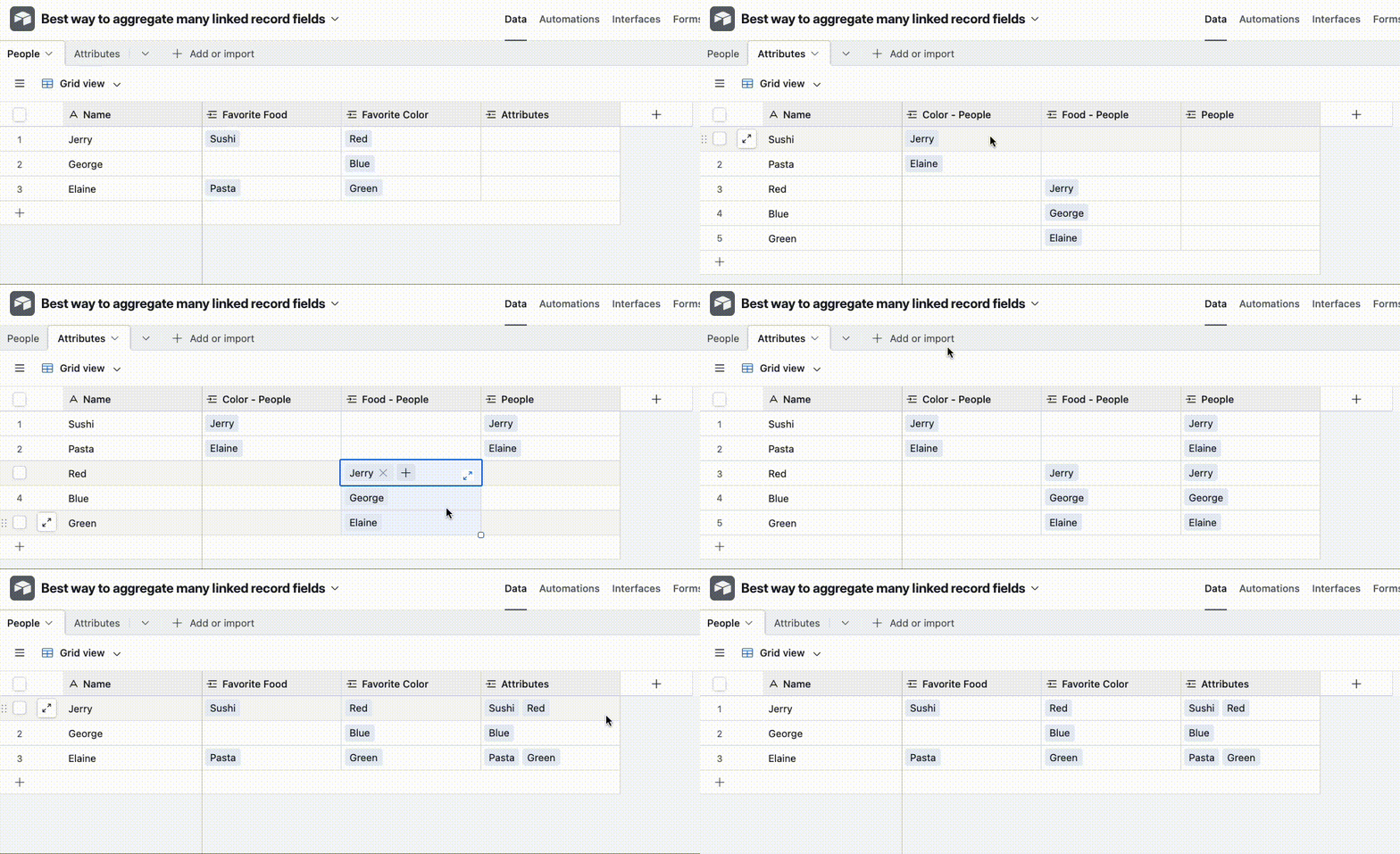
Hm how much work this is depends on how many attribute fields you’ve got, but it should be fairly straightforward:

And to make it cleaner you could filter by ‘Color’ not empty, then copy paste, ‘Food’ not empty, copy paste etc


Forum|alt.badge.img+1
  • Author
  • New Participant
  • December 18, 2025

This is what I ended up doing, and it worked great! Thanks so much for your help.