Question

How can I structure Airtable so that two separate workflows—each with their own task templates—can share task dependencies?

  • February 11, 2026
  • 1 reply
  • 9 views

Forum|alt.badge.img+8

I’m building two workflows in Airtable, Workflow A and Workflow B.

  • Workflow A includes Task 1, Task 2, and Task 3.
  • Workflow B includes Task 4, Task 5, and Task 6.

Task 3 in Workflow A cannot begin until Task 2 in Workflow A is completed and Tasks 4 and 5 from Workflow B are also completed.

What’s the best way to set up Airtable so I can track cross‑workflow task dependencies like this? These two Workflow’s overlap with eachother so is there a way I can set up like Status’s for each task that when one task is blocked until xyz tasks are marked as completed?


1 reply

TheTimeSavingCo
Forum|alt.badge.img+31

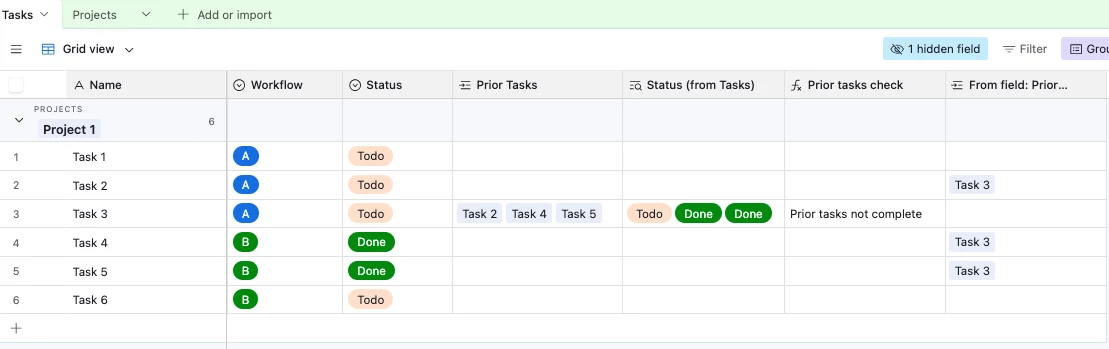
Try creating a linked field in the Tasks table and linking it to the prior tasks like so, and I’ve set it up here for you to check out

We can then add a lookup field to display the statuses of the linked tasks, and use a formula field to display whether the prior tasks have been completed or not:

IF(
FIND(
'Todo',
{Status (from Tasks)}
),
'Prior tasks not complete'
)

We then have an automation that triggers if the ‘Status’ is ‘Done’ and the ‘Prior tasks check’ field is not empty that’ll send an alert notifying me that something’s gone wrong, and we can use the same logic to try to block it off.  e.g. maybe in an Interface we don’t show the Status field for Task 3 at all until ‘Prior tasks check’ is empty, does that make sense?