Question

How to best organize a multi step and layered task?

  • January 15, 2026
  • 3 replies
  • 24 views

Forum|alt.badge.img

I am trying to figure out what is the best way to track tasks that have multiple layers and steps in Airtable. Let’s use an example here to explain:


There is a task at my company where we track the payment for assets we purchased from a third party source which...

Step 1 - requires sending an LOD (Letter of Direction) and making sure the LOD is accepted

Step 2 - tracking the payment is made to my company

Step 3, if applicable - tracking the pass through of a payment that was made to the prior payee rather than our company (which happens when the LOD is not accepted in time before the next payment cycle)


So I would name each task (1) LOD, (2) Payment, and (Pass Through). Each task would have the following statuses to track:

(1) LOD - Need to Send; Sent and Awaiting Confirmation; Revising LOD; LOD Accepted.

(2) Payment - Waiting for Payment; Missed Payment; Paid.

(3) Pass Through - Need to Request Pass Through, Requested, Paid.


I don’t want to create a Single Select option for Tasks and Statuses as I want to “archive” old records so I can go back and see that and LOD was completed or a Pass Through was paid. Right now, I create a separate record for each Task (whether it is an LOD, Payment, or Pass Through) and then I have three separate fields or columns for a Single Select option for the Status of each Task type. This works until you build your Interface view. In a single Interface, without having to make another Interface, I would not be able to have an LOD record and a Payment record where the Record Detail ONLY displays the Status field that pertains to the specific task type. I would have to include the Status field of all Task types in the Record Detail which looks messy. 


Anyone have any ideas on how to get around this or is there a better way to set up my Airtable to track this all?


Also I spent a lot of time trying to figure out how to ask this question so if none of this makes sense, feel free to ignore all of this 😅.


Thank you!

3 replies

ibayub
Forum|alt.badge.img+10
  • Participating Frequently
  • January 16, 2026

you could use a single Tasks table where each record is one specific task instance (LOD, Payment, or Pass Through) tied to a parent asset/purchase. 

Key fields:

  • Asset ID or Link: A linked record field to a separate Assets table (where you track the overall purchase). This groups all tasks for one asset together. (If you don't have an Assets table yet, create one with basics like purchase date, third-party source, total amount.)
  • Task Type: Single select with options: "LOD", "Payment", "Pass Through".
  • Status: Single select with all possible statuses across types. 
    • LOD options: "Need to Send", "Sent and Awaiting Confirmation", "Revising LOD", "LOD Accepted".
    • Payment options: "Waiting for Payment", "Missed Payment", "Paid".
    • Pass Through options: "Need to Request Pass Through", "Requested", "Paid".
    • Add a universal "Archived" or "Completed" option to flag done tasks without deleting them.
  • Due Date or Timeline Notes: Date field or text for tracking cycles (e.g., payment deadlines).
  • Created Date and Last Modified: Auto-generated for auditing history.

And then could add some automations like

  • On Record Creation: Auto-set default Status based on Task Type (e.g., if Task Type = "LOD", set Status = "Need to Send").
  • Status Change Triggers: When Status changes to "LOD Accepted" or "Paid," auto-create the next task record (e.g., from LOD to Payment) and link it to the same asset.
  • Archiving Automation: When Status = "Completed," update a flag or move/copy the record to an Archive table

TheTimeSavingCo
Forum|alt.badge.img+31

I would have to include the Status field of all Task types in the Record Detail which looks messy. 

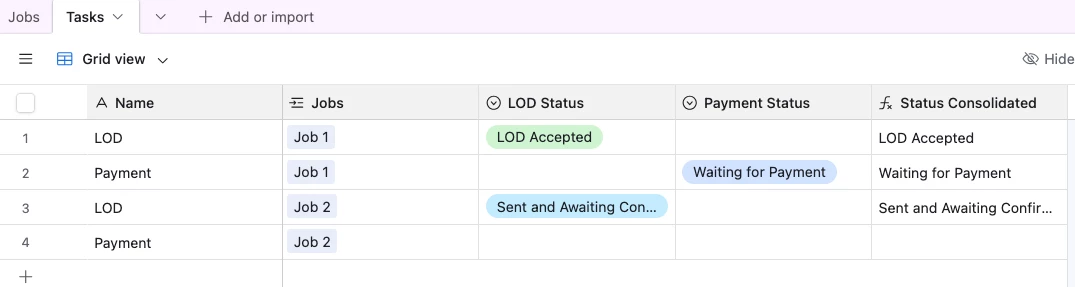
Hm what if you created a formula field that consolidates the data from the three Status fields?  Here’s an example of it consolidating two fields: 


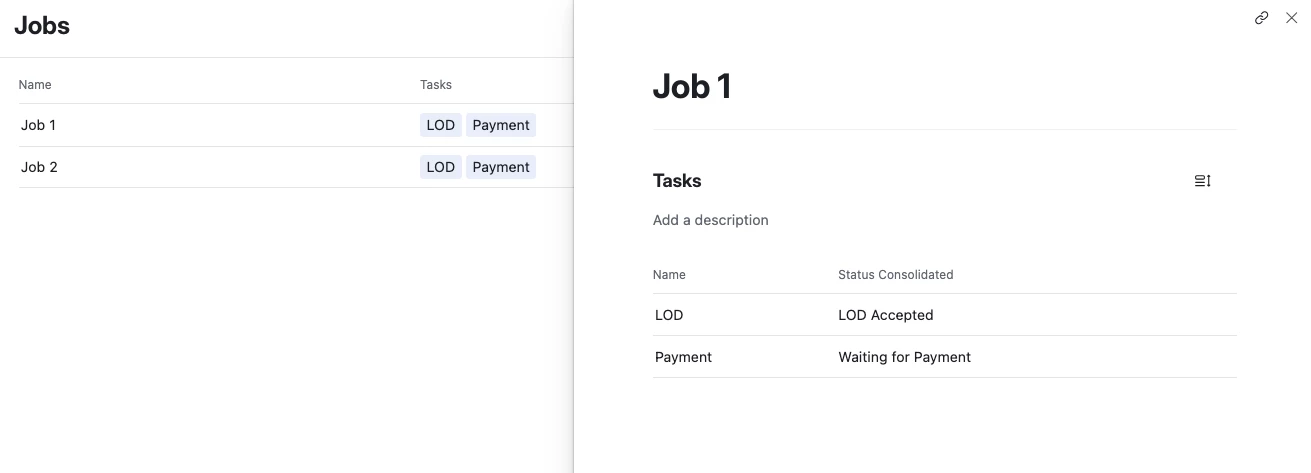
And here's the Interface, and you could make the formula field output select options to make it prettier


Mike_AutomaticN
Forum|alt.badge.img+28

Hey ​@ibayub,

 I’d highly suggest having two “templates”/library tables.
Tasks Library
Tasks Statuses Library

Under Tasks Library you would list all tasks.
Under Tasks Statuses Library you would list all statuses
You would link these.

For last, on your actual “Tasks” table (not the library) you would have a linked record field to Tasks Library determine the task, and you would create a linked record field to the Status Library as well. For the Status linked record field, you would set dynamic conditions (click on the small gear next to the conditions being set on the linked record field) where you can only select a status for which task=task. Therefore you would only see statuses corresponding to such task template on the “dropdown”.

Please let me know if you need further help.

Mike, Consultant @ Automatic Nation 
YouTube Channel