
Question

Lookup/rollup filtering on date from the record itself (for monitoring daily event booking amounts)

  • November 30, 2025
  • 3 replies
  • 48 views

Forum|alt.badge.img+17

Hi,

We run a photography studio. The customer journey starts with a discovery call, before proceeding with a deepened consultation call for some, and then the actual photo session. The bookings for the discovery call come primarily from Meta ads.

When monitoring that we have enough bookings (and potentially need to work on the Meta ads to get more bookings), we need to see historical data for how many bookings we’ve had. This would be on either daily or weekly basis, the problem is the same. For example, we’d like to see a table showing how many bookings we had for the coming two weeks and have this for each day, and see what the historical levels have been.

This is how I tested: I first created a new table with one record per day. Then I linked the event bookings to each record (day). I then created a lookup field that would select all events of the type Discovery and wanted to add a filter for including only those events with a date “on or later” than that record’s date, which was not possible.

You can see my setup here:
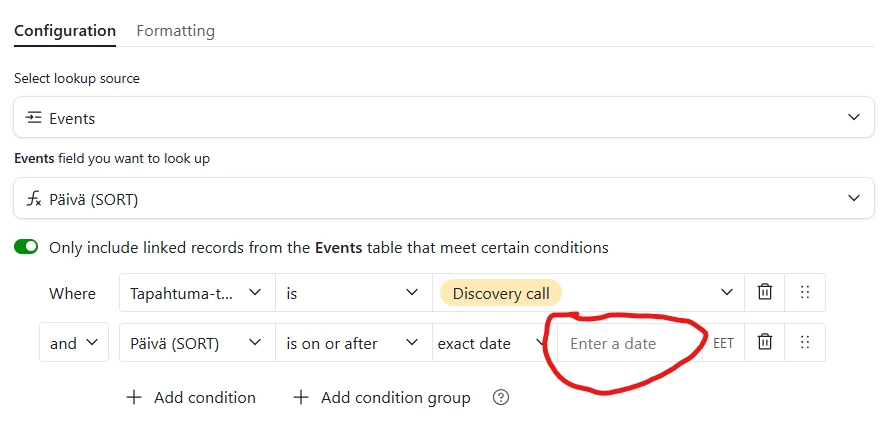
I would need to reference the record’s date (actually the primary field named as dates) in “Enter a date” field, but that is not possible.

I played around with straight formula fields also, but couldn’t come up with a logic that would select (count) only the instances after the record’s date. Mainly I tried IF clauses referring to being greater than the record’s date, but this doesn’t seem to work with array data.

Any thought how I should re-think or approach this, given the limitation of being stuck with not being able to reference a record field in the filter section?

TIA,

Björn


3 replies

TheTimeSavingCo
Forum|alt.badge.img+31

Hm yeah, unfortunately we can’t use dynamic values when conditionally filtering lookups at this point


--

I first created a new table with one record per day. Then I linked the event bookings to each record (day).

As a workaround, instead of linking the event bookings for that day to each record, what if you linked the next two weeks worth of bookings to each day instead?   

i.e. for 1 Dec, you linked the event bookings from 1-14 Dec to it?  


Forum|alt.badge.img+17
  • Author
  • Known Participant
  • December 2, 2025

Hi Adam,

Thanks for your suggestion.

I guess this would work for that one case, but that’s like hard coding one specific time window, non?

Then I’d need to do create another table for another time window, say for bookings 7 days ahead, i.e. link days 1-7 Dec to 1 Dec. Did I understand you right?

If so, it’s indeed a workaround, but I had higher hopes for flexibility and calculations based on being able to limit the amount of records based on different criteria in different columns.

No super creative other workarounds coming to mind, using ARRAY formulas e.g? I think this is one example again where’d it be a breeze to do in Excel 🙄.

Rgds,

Björn


--

I first created a new table with one record per day. Then I linked the event bookings to each record (day).

As a workaround, instead of linking the event bookings for that day to each record, what if you linked the next two weeks worth of bookings to each day instead?   

i.e. for 1 Dec, you linked the event bookings from 1-14 Dec to it?  


TheTimeSavingCo
Forum|alt.badge.img+31

I guess this would work for that one case, but that’s like hard coding one specific time window, non?

If by specific time window, you mean wanting to see the bookings for the next 14 days of each Day record, then yeap!  Whenever a booking gets created an automation would get triggered to link it to the 14 ‘Day’ records before it

---

Then I’d need to do create another table for another time window, say for bookings 7 days ahead, i.e. link days 1-7 Dec to 1 Dec. Did I understand you right?

Nah, another linked field would do I think?  So you’d have one linked field for 7 days, another for 14 days, etc
