Question

Partial Archive of Live Base

  • February 11, 2026
  • 2 replies
  • 19 views

Forum|alt.badge.img+1

I built a fairly complex Airtable architecture about 12 months ago. Since then, both our operational model and my own Airtable knowledge have evolved significantly.

I now want to redesign parts of the structure, including primary fields, relationships, automations, AI usage, and reducing manual inputs, so it’s more scalable and aligned with how we operate today. This means that filtering by year or creating views won’t be a viable solution as would break the data schema needed for the old data and built metrics to work.

The challenge is that I have 12+ months of historic data that’s critical for KPIs, forecasting, and performance tracking. I don’t want to lose that history, but I’d like to effectively “start fresh” in 2026 with a cleaner structure focused only on new data.

Additional considerations:

  • I need to ensure the archive and the live 2026 base are not structurally connected, changes in one must not affect the other.

  • The build is heavily reliant on connected data (linked records, lookups, rollups). I want to avoid spending hours rebuilding relationships either in the archive or in the new version.

What would be considered best practice in this situation?

  • Archiving historic records into separate tables within the same base?

  • Duplicating the entire base and freezing the old one?

  • Creating a dedicated historical base and rebuilding the new structure cleanly?


I’m particularly interested in approaches that preserve relational integrity while allowing structural redesign without legacy constraints.

2 replies

samshank
Forum|alt.badge.img+1
  • New Participant
  • February 11, 2026

I am going through something similar with one of our bases. Here are some things I am doing that have been helpful for preserving existing functionality and building/improving the plane while flying. 

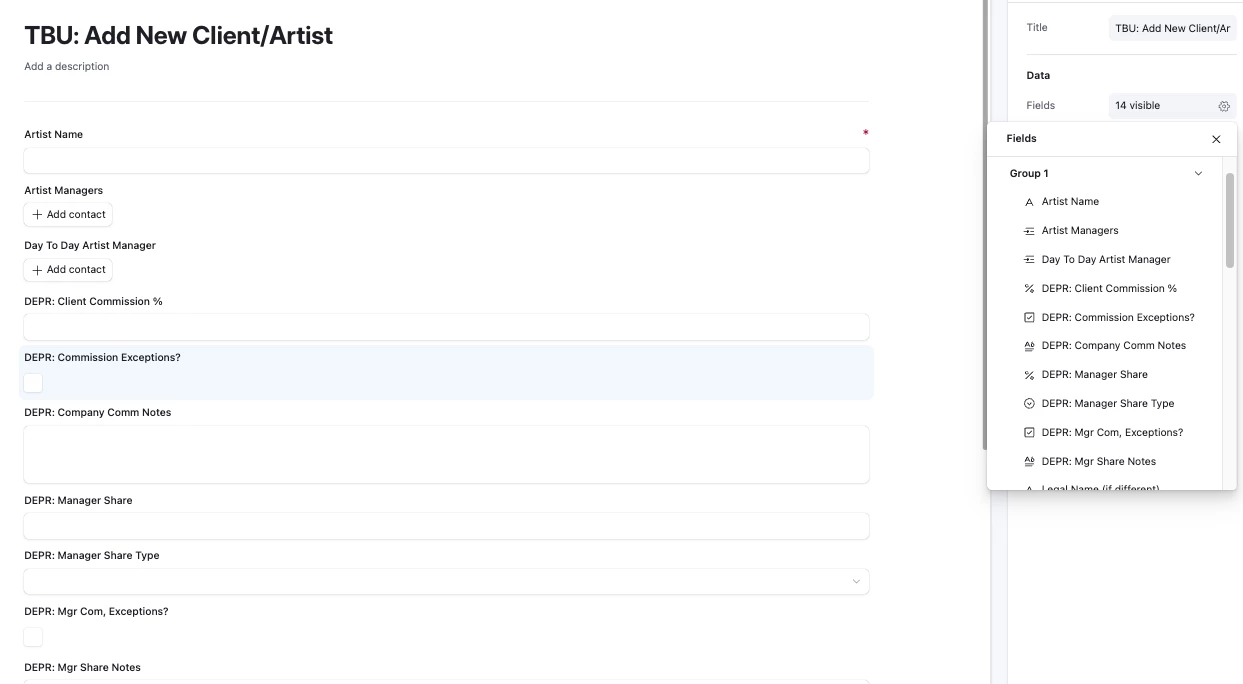
  1. I never delete columns. If I don’t want to use a column anymore, I will rename it to have “DEPR:” in the beginning, standing for deprecated. This makes it easy to avoid selecting those when building interfaces, new rollups, etc. It also makes it very easy to see these fields for removing them from existing interfaces. 
  2. I also do the same for tables and then you can also hide these from navigation in the base layer. 
  3. When I am deprecating a field, it usually means I’m making a new one that is better. When that cleanup happens, I’ll hide everything, but the deprecated field and the new one and i will sort by the deprecated one. Then, I will make sure to populate the new field based on the old field, but NEVER delete from the original deprecated field. It’s always good to have that to look back at just in case. 
  4. I use these abbreviations a lot and it really helps myself and users in tune with changes going on in between official notices of updates:
    1. TBU: To Be Updated
    2. WIP: Work In Progress
    3. DEPR: Deprecated

Forum|alt.badge.img+1
  • Author
  • New Participant
  • February 11, 2026

I am going through something similar with one of our bases. Here are some things I am doing that have been helpful for preserving existing functionality and building/improving the plane while flying. 

  1. I never delete columns. If I don’t want to use a column anymore, I will rename it to have “DEPR:” in the beginning, standing for deprecated. This makes it easy to avoid selecting those when building interfaces, new rollups, etc. It also makes it very easy to see these fields for removing them from existing interfaces. 
  2. I also do the same for tables and then you can also hide these from navigation in the base layer. 
  3. When I am deprecating a field, it usually means I’m making a new one that is better. When that cleanup happens, I’ll hide everything, but the deprecated field and the new one and i will sort by the deprecated one. Then, I will make sure to populate the new field based on the old field, but NEVER delete from the original deprecated field. It’s always good to have that to look back at just in case. 
  4. I use these abbreviations a lot and it really helps myself and users in tune with changes going on in between official notices of updates:
    1. TBU: To Be Updated
    2. WIP: Work In Progress
    3. DEPR: Deprecated

Thank you — this is helpful from a change-management perspective, but my situation is slightly different.

I already have an archive function built within the base, and I also use deprecation conventions for fields/tables. The issue isn’t visibility or gradual cleanup.


The core problem is structural.

I want to:

  • Keep my legacy data fully intact in its current form for KPI tracking and forecasting.
  • Redesign parts of the schema for 2026 (primary fields, relationships, formulas, automations).
  • Simplify linked structures to reduce manual maintenance.
  • Remove workaround fields that exist purely because of earlier architectural decisions.


The challenge is that these structural enhancements will fundamentally change key links and formula logic. If I implement them in the same base, they will break or distort the way historical data is currently calculated and connected — effectively corrupting my legacy reporting.


So I feel stuck maintaining the legacy structure purely to preserve historical integrity, even though that structure is now inefficient and manual-heavy.


What I’m really trying to understand is:

  • Is there a best practice for versioning a base at this level of complexity?
  • Is duplicating and freezing the entire base the safest approach?
  • Has anyone successfully redesigned core relational logic while preserving historic data without maintaining two fully separate bases?