Year Field Validation

  • February 23, 2022
  • 3 replies
  • 43 views

Forum|alt.badge.img+1

How can I add a field validation for a four-digit year to ensure that only numbers between 2000-2050 are entered?


3 replies

ScottWorld
Forum|alt.badge.img+35
  • Genius
  • February 24, 2022

Airtable does not support field validations, but you could create a formula field that displays some sort of an error message if someone types in the wrong year. The error message could even be a simple emoji symbol like :no_entry_sign: .


Alexey_Gusev
Forum|alt.badge.img+25
  • Brainy
  • February 24, 2022

Hi,

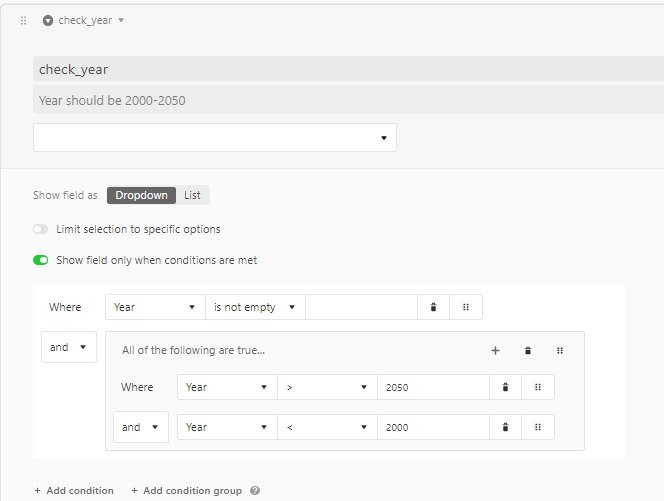
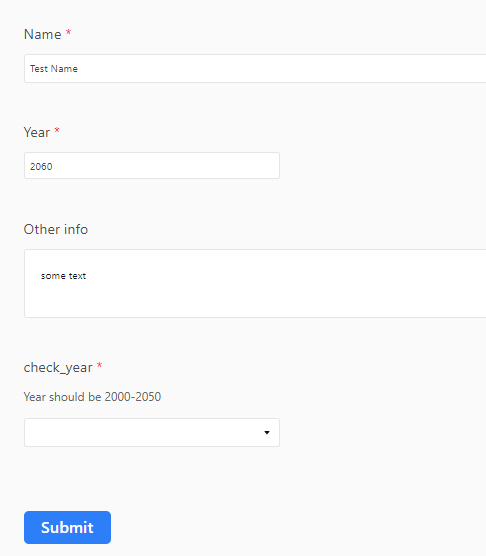
You can use a ‘workaround’ - additional field, (hidden in usual view), make it conditional, required single select without options, so form can’t be sumbmitted when it’s active ))


kuovonne
Forum|alt.badge.img+29
  • Brainy
  • February 24, 2022

Hi,

You can use a ‘workaround’ - additional field, (hidden in usual view), make it conditional, required single select without options, so form can’t be sumbmitted when it’s active ))


If you use this method for validating numbers in a form, I recommend also making the single-select field required and removing all of the options, as I described in my post here.

However, it isn’t clear if the original poster is ask for field validation in a form or in a regular grid view. When entering a year in a regular grid view, Scott is correct that the only option is to have a error warning, either in a formula field, a record color, or both. (I like to use a formula field to use text to explain the warning combined with a record color based on the presence of text in the formula field.)