Question

API doesn't respect IS_AFTER filter, issue also reported 3 years ago

  • January 27, 2026
  • 3 replies
  • 48 views

Forum|alt.badge.img+1

Previously reported issue: Getting all records modified after a date | Airtable Community

I’m calling Airtable passing

filterByFormula: "IS_AFTER(LAST_MODIFIED_TIME(), '2026-01-25T00:00:00.000Z')",
// filterByFormula: "IS_AFTER({Last Modified}, '2026-01-25T00:00:00.000Z')",

Last Modified is a formula column I created. Neither of them works.

Expected

  • Only return records that were edited after a certain date

Actual

  • It returns all records


Am I doing something wrong? Is it not supposed to work?

Are there workarounds for this?

3 replies

TheTimeSavingCo
Forum|alt.badge.img+31

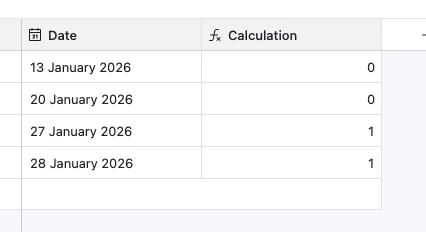
Hm as a datapoint I just tried this via Postman with both a GET and a POST and it works fine.  Could you provide some screenshots of your data and the full body of your POST?
 

GET with URL params

https://api.airtable.com/v0/appz6YcyO3dXfqDWV/tblVg5MfRaHq9Cnvt?filterByFormula=IS_AFTER({Date}, '2026-01-25T00:00:00.000Z')


POST with JSON

URL

https://api.airtable.com/v0/appz6YcyO3dXfqDWV/tblVg5MfRaHq9Cnvt/listRecords

Body:

{
"filterByFormula": "IS_AFTER({Date},'2026-01-25T00:00:00.000Z')"
}


Return: 

{
"records": [
{
"id": "recelxVi6HgvyfFeT",
"createdTime": "2026-01-27T14:37:26.000Z",
"fields": {
"Date": "2026-01-28",
"Calculation": 1
}
},
{
"id": "recmCfH2Xhij23hTl",
"createdTime": "2026-01-27T14:36:29.000Z",
"fields": {
"Date": "2026-01-27",
"Calculation": 1
}
}
]
}


Here’s my data:


Flow Digital
Forum|alt.badge.img+2
  • Participating Frequently
  • January 28, 2026

Hey ​@Bruno_Leonardo_ !

Adam's test confirms IS_AFTER works correctly, so the issue is likely in how you're referencing the field. Here are the common problems:

Issue #1: LAST_MODIFIED_TIME() is a function, not a field reference

This won't work:

filterByFormula: "IS_AFTER(LAST_MODIFIED_TIME(), '2026-01-25T00:00:00.000Z')"

LAST_MODIFIED_TIME() is a formula function that returns a value when used inside a formula field. You can't call it directly in filterByFormula.

Solution A: Use the system "Last Modified Time" field

If you've added the "Last Modified Time" field type to your table (not a formula field), reference it like this:

filterByFormula: "IS_AFTER({Last Modified Time}, '2026-01-25T00:00:00.000Z')"

Solution B: If using a formula field

If your {Last Modified} field is a formula field containing LAST_MODIFIED_TIME(), then this should work:

filterByFormula: "IS_AFTER({Last Modified}, '2026-01-25T00:00:00.000Z')"

Debugging Steps:

  1. Check field type: Click the field header → "Customize field type" → verify it's either:

    • System field: "Last modified time"
    • Formula field containing: LAST_MODIFIED_TIME()
  2. Verify field name: The exact field name matters - check for:

    • Extra spaces: {Last Modified } vs {Last Modified}
    • Case sensitivity: {Last Modified} vs {last modified}
    • Special characters
  3. Test the formula directly in Airtable:

    • Create a formula field: IS_AFTER({Last Modified}, '2026-01-25T00:00:00.000Z')
    • Check which records return 1 (true)
    • Those should be the records your API filter returns

Common Issues:

Formula fields with dependencies:

  • If {Last Modified} is a formula field, ensure it's calculating correctly
  • Formula fields don't always update immediately on record modification
  • System "Last Modified Time" fields are more reliable for this use case

Date format:

  • Your format looks correct: '2026-01-25T00:00:00.000Z'
  • Alternative that also works: '2026-01-25'

Workaround if filtering still fails:

If the filter continues to fail, fetch all records and filter client-side:

const allRecords = await base('TableName').select().all();
const filteredRecords = allRecords.filter(record => {
const lastModified = new Date(record.get('Last Modified'));
return lastModified > new Date('2026-01-25T00:00:00.000Z');
});

Test Request:

Can you share:

  1. Screenshot of your field configuration (field type)
  2. The exact field name as it appears in Airtable
  3. Sample values from the {Last Modified} field

This will help identify the exact issue.

Flow Digital - Airtable Gold Services Partner — We're happy to help!


Forum|alt.badge.img+1
  • Author
  • New Participant
  • January 30, 2026

Then my table is corrupted. Thanks for the help, but I’ll have to figure out a workaround for this.