Autogenerate 4 digit numbers

  • May 30, 2019
  • 6 replies
  • 159 views

Hi,
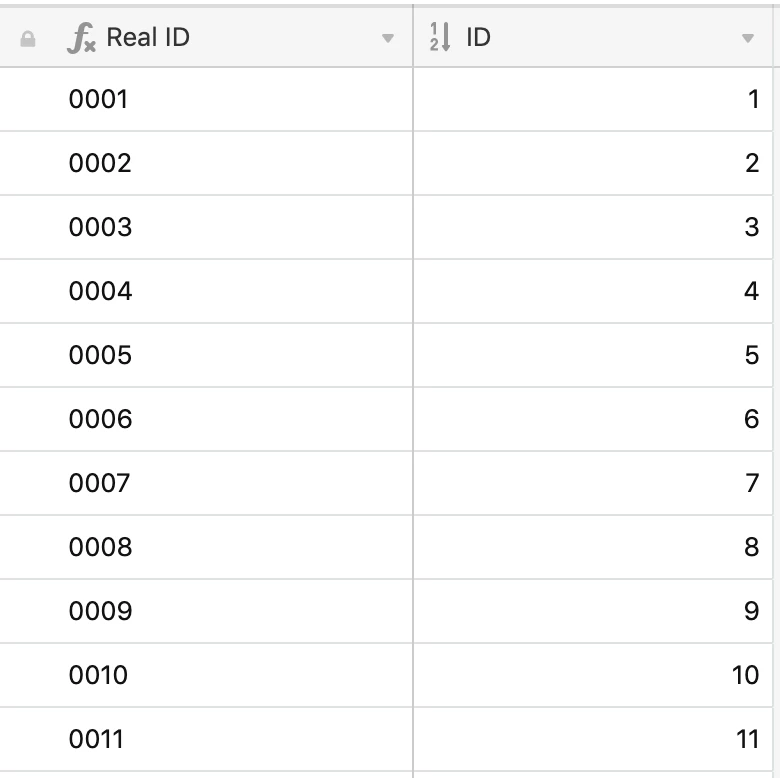
I am creating a client job tracker and would like to autogenerate 4 digit numbers, eg. 0001, 0002.
Can someome please help as I can only get a single digit or decimals so far.

Thanks Daz

6 replies

JonathanBowen
Forum|alt.badge.img+18

Hi @Darren_Ledwich - you need an autonumber field (which you can then hide), then create a formula field using this:

REPT('0', (4 - LEN({ID} & ''))) & ID

JB


  • Author
  • New Participant
  • May 30, 2019

Jonathan that is brilliant.
Thanks so much for the quick response too.

Daz


Forum|alt.badge.img+1
  • New Participant
  • August 15, 2019

This is close to what I am looking for, but I’m not advanced enough to deconstruct that formula.
Is there a way to customize an alphanumeric code with some static characters… Example: In Excel, I can enter “3.1-001” into a cell, then “3.1-002” in the next, then auto-populate the rest of the cells. Is there a workaround/solution for this?


  • Participating Frequently
  • August 15, 2019

This is close to what I am looking for, but I’m not advanced enough to deconstruct that formula.
Is there a way to customize an alphanumeric code with some static characters… Example: In Excel, I can enter “3.1-001” into a cell, then “3.1-002” in the next, then auto-populate the rest of the cells. Is there a workaround/solution for this?


Just use the formula that @JonathanBowen provided and add some text at the beginning.

For example, if you want the alphanumeric code to start with “3.1-”, then use this:
"3.1-" & REPT('0', (4 - LEN({ID} & ''))) & ID

The number 4 is used to calculate the number of times that the text ‘0’ is repeated.
If you want more zeros, you can use a higher number in the formula.


Forum|alt.badge.img+1
  • New Participant
  • August 15, 2019

Just use the formula that @JonathanBowen provided and add some text at the beginning.

For example, if you want the alphanumeric code to start with “3.1-”, then use this:
"3.1-" & REPT('0', (4 - LEN({ID} & ''))) & ID

The number 4 is used to calculate the number of times that the text ‘0’ is repeated.
If you want more zeros, you can use a higher number in the formula.


Excellent. That’s simple. Thanks.


Forum|alt.badge.img+24
  • Inspiring
  • March 15, 2022

Hi @Darren_Ledwich - you need an autonumber field (which you can then hide), then create a formula field using this:

REPT('0', (4 - LEN({ID} & ''))) & ID

JB


Very helpful. It’s fine, but…

LEN({ID} & ‘’)

Why does it not work without blanks? :thinking: