Button to link to Google Maps

  • June 29, 2022
  • 6 replies
  • 79 views

Leah_Relish
Forum|alt.badge.img+9

I am trying to create a button to link to a client’s address and am getting a “about:blank#blocked” url when I click on it.

What am I missing?

The URL Formula I am using is:

ENCODE_URL_COM (“https://google.com/map/place/”& {address})

Or is there a better way to accomplish this - it needs to be able to be clicked from the app on a mobile phone.

Thanks!

6 replies

Kamille_Parks11
Forum|alt.badge.img+27

Try

"https://google.com/map/place/" & ENCODE_URL_COMPONENT({address})

Leah_Relish
Forum|alt.badge.img+9
  • Author
  • Known Participant
  • June 29, 2022

Thank you, that worked this time. Now, can it work with a field that is a formula because I really want to use it with a Concatenated string that is referenced from another table. And when I try to use that field it won’t work.


Kamille_Parks11
Forum|alt.badge.img+27

Thank you, that worked this time. Now, can it work with a field that is a formula because I really want to use it with a Concatenated string that is referenced from another table. And when I try to use that field it won’t work.


That’s not very specific, doesn’t work how?

You mention the other field being both a formula and referenced from another table. Do you mean a Lookup field that is pulling from a Formula?

If its a Lookup field then do {Field Name} & "" to force the array to be a string.


Leah_Relish
Forum|alt.badge.img+9
  • Author
  • Known Participant
  • July 6, 2022

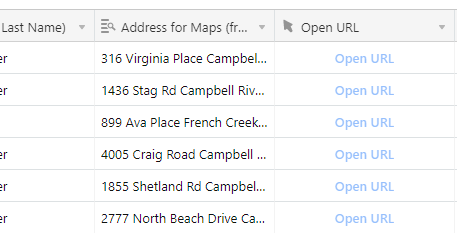
Sorry for the delay. The “Open URL” is light blue and doesn’t link to anything:


Kamille_Parks11
Forum|alt.badge.img+27

Sorry for the delay. The “Open URL” is light blue and doesn’t link to anything:


Well your address is in fact a Lookup based on your screenshot. Did you add the &"" to the end of the field name as suggested?

"https://google.com/map/place/" & ENCODE_URL_COMPONENT({Address for Maps (fr...)} & "")

Leah_Relish
Forum|alt.badge.img+9
  • Author
  • Known Participant
  • July 6, 2022

I ended up doing a CONCATENATE formula from 2 fields that were linked from another table and used that as the address for maps - it worked.