Can IF use selected type

  • November 8, 2022
  • 4 replies
  • 33 views

Hello everyone,

Sorry to bother you, but here’s a little question for the formula.

Can the selected function be used in the formula?
For example:

IF(argument 1 selected A, then count as xxxx, argument 2 selected B, Argument 2 Selected C then xxxx)

I’ve tried a few different ways, but it didn’t work.
Hope anyone can kindly give me some structure,

Thank you.

Best Regards,
K.c

4 replies

TheTimeSavingCo
Forum|alt.badge.img+31

Hmm, could you provide some example data and your desired output for said data?


  • Author
  • New Participant
  • November 8, 2022

Hmm, could you provide some example data and your desired output for said data?


For example, I have three types of tax status.

So when I select type A, it should counted as a formula,
when I select type B, it should be counted as b formula,
I select type C, it should be count as c formula.

Hope this could help, thank you so much.


TheTimeSavingCo
Forum|alt.badge.img+31

For example, I have three types of tax status.

So when I select type A, it should counted as a formula,
when I select type B, it should be counted as b formula,
I select type C, it should be count as c formula.

Hope this could help, thank you so much.


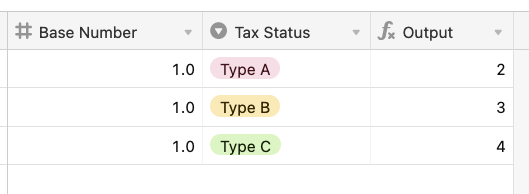
Oh sure, here

Output field formula:

SWITCH(
  {Tax Status},
  "Type A", {Base Number} + 1,
  "Type B", {Base Number} + 2,
  "Type C", {Base Number} + 3
)

  • Author
  • New Participant
  • November 8, 2022

Oh sure, here

Output field formula:

SWITCH(
  {Tax Status},
  "Type A", {Base Number} + 1,
  "Type B", {Base Number} + 2,
  "Type C", {Base Number} + 3
)

Thank you so much!!
It works.