Solved

Change numbers assigned to weeks of the year, for a school calendar

  • Sep 17, 2025 11:34 AM UTC
  • 4 replies
  • 165 views

Forum|alt.badge.img+2

I’m using this formula: WEEKNUM({Registered})

Where “Registered” is the date a user registered on my website. This assigns each record a week number according to the Jan-Dec calendar.

I want August 17-23, 2025 to be my Week 1 and January 25-31, 2026 to be my last week (Week 24). How can I change this?

Best answer by Alexey_Gusev

Hi,

You can use 
 

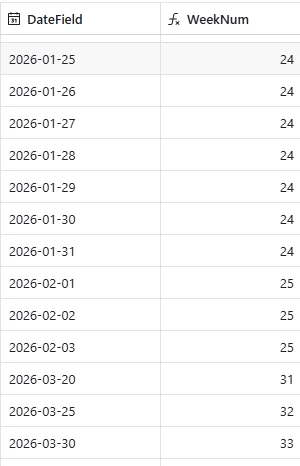
WEEKNUM(DATEADD(DateField,-231,'days'))

Where 231 - difference in days between August 17 and beginning of the 1st week.
 

View original
This topic has been closed for replies.

4 replies

Alexey_Gusev
Forum|alt.badge.img+25
  • Brainy
  • Answer
  • Sep 17, 2025 11:51 AM UTC

Hi,

You can use 
 

WEEKNUM(DATEADD(DateField,-231,'days'))

Where 231 - difference in days between August 17 and beginning of the 1st week.


Forum|alt.badge.img+2
  • Author
  • New Participant
  • Sep 17, 2025 12:24 PM UTC

Amazing, thanks! When we hit January, will this continue to work by counting up? I mean, the first week of January 2026—I don’t want it to be Week 1. It would be 21.


Alexey_Gusev
Forum|alt.badge.img+25

Yes, it actuall will show a week for a date 231 day before DateField. So it will show Jan 2026 as 21-24. But if you want it to work in other way  later in 2026, you will need to change formula. 


Forum|alt.badge.img+2
  • Author
  • New Participant
  • Sep 17, 2025 12:39 PM UTC

Perfect, thank you!