Combining Start Date and End Time in Airtable with Fillout Forms Integration

  • January 14, 2025
  • 5 replies
  • 68 views

Forum|alt.badge.img+9

Hey everyone!

I’m running into a challenge while using Airtable in conjunction with Fillout forms. When using the duration field in Fillout, it only provides the exact times (start and end) rather than a length of time in between. To simplify things, I’ve limited entries to a start time and end time, assuming the event will occur on the same day.

Here’s what I’m trying to do:

•I’d like to create a formula in Airtable that takes the start date (provided in a date field) and combines it with the end time (from the duration field, which doesn’t have an attached date).

•The goal is to format the end time as part of the same day as the start date.

For example:

Start Date: 2025-01-14 08:00 AM

End Time: 10:30 AM

Result: 2025-01-14 10:30 AM

How would I go about writing a formula that merges these fields correctly? Any advice or tips would be greatly appreciated!

Thank you in advance for your help!

For reference, here's the formula I've already tried: 
DATETIME_PARSE(
DATETIME_FORMAT({Start Time}, 'YYYY-MM-DD') & "T" & DATETIME_FORMAT({Duration}, 'HH:mm'),
'YYYY-MM-DDTHH:mm'
)


5 replies

TheTimeSavingCo
Forum|alt.badge.img+31

Does this look right?

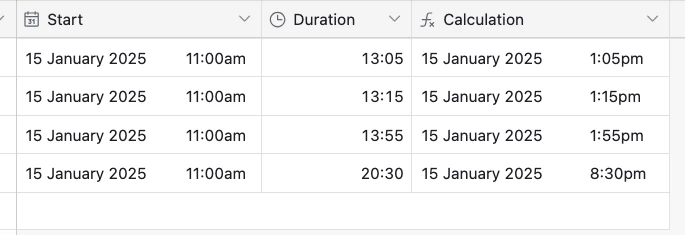
DATETIME_PARSE( DATETIME_FORMAT(Start, 'DD MMM YYYY') & ' ' & ROUNDDOWN(Duration/60/60, 0) & ':' & MOD(Duration, 3600) /60, 'DD MMM YYYY hh:mm' )

Link to base


Forum|alt.badge.img+9
  • Author
  • Inspiring
  • January 15, 2025

Does this look right?

DATETIME_PARSE( DATETIME_FORMAT(Start, 'DD MMM YYYY') & ' ' & ROUNDDOWN(Duration/60/60, 0) & ':' & MOD(Duration, 3600) /60, 'DD MMM YYYY hh:mm' )

Link to base


Thanks. We are getting closer as I am finally not getting an error. Which is helpful, but its still returning a weird result. The formula is in 'End Time Copy' so it should return the result of 5:00 p.m., but instead 12:00 p.m.

Any recommendations?


TheTimeSavingCo
Forum|alt.badge.img+31

Thanks. We are getting closer as I am finally not getting an error. Which is helpful, but its still returning a weird result. The formula is in 'End Time Copy' so it should return the result of 5:00 p.m., but instead 12:00 p.m.

Any recommendations?


Hmm could you try updating both the Start date field and the End formula field to use the same timezone?


Forum|alt.badge.img+9
  • Author
  • Inspiring
  • January 16, 2025

Hmm could you try updating both the Start date field and the End formula field to use the same timezone?


That was my first thought as well. Verified both fields to be EST. 


TheTimeSavingCo
Forum|alt.badge.img+31

That was my first thought as well. Verified both fields to be EST. 


Hmm could you DM me a read-only invite link to a base where this is happening?  I can't replicate the issue I'm afraid