Concatenate formaula, adding a comma, but if fields are empty still adds comma

  • February 7, 2020
  • 16 replies
  • 180 views

Forum|alt.badge.img+3

Hi, Rookie question;

I have 3 columns “Full Name” (which has the formula to join the next two columns) “Last name” and “First Name”, putting a comma in between.

The formula I’m using is: CONCATENATE({Last name}&", "&{First name})

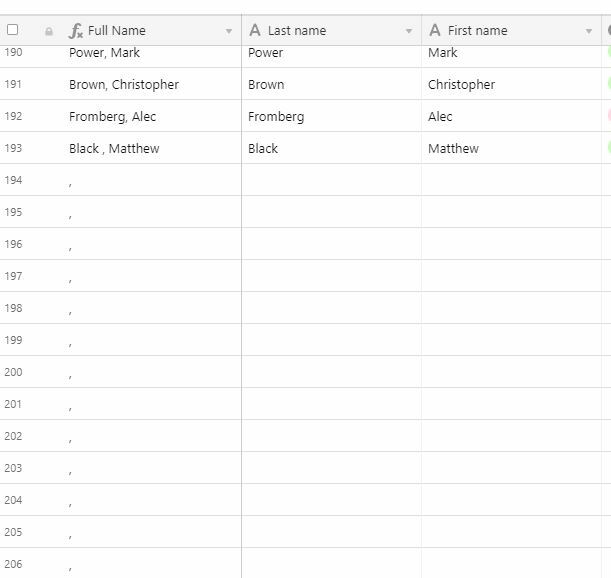
The issue is when Last name and First name are blank (empty records), the formula runs indefinitely in the Full Name column creating rows and only putting in the comma (see pic). How do I stop this?

16 replies

Nathalie_Collin
Forum|alt.badge.img+18

Hi Patrick, Try this;

=IF(OR(FIRSTNAME=BLANK(),LASTNAME=BLANK()),CONCATENATE(LASTNAME,FIRSTNAME),CONCATENATE(LASTNAME,", ",FIRSTNAME))


Forum|alt.badge.img+3
  • Author
  • Known Participant
  • February 7, 2020

Hi Patrick, Try this;

=IF(OR(FIRSTNAME=BLANK(),LASTNAME=BLANK()),CONCATENATE(LASTNAME,FIRSTNAME),CONCATENATE(LASTNAME,", ",FIRSTNAME))


Thank you very much! Worked perfectly :slightly_smiling_face:

Thank you.


Forum|alt.badge.img+3
  • Author
  • Known Participant
  • February 23, 2020

Hi,
Can I ask another question?
I have two columns, 1st is “Days since contact” I want the 2nd column to be a formula for IF 0-30 = HOT, 30-60 = WARM, >60 = COLD

What’s the proper formula/syntax for this?

Thanks, Pat


Forum|alt.badge.img+3
  • Author
  • Known Participant
  • February 23, 2020

Hi,
Can I ask another question?
I have two columns, 1st is “Days since contact” I want the 2nd column to be a formula for IF 0-30 = HOT, 30-60 = WARM, >60 = COLD

What’s the proper formula/syntax for this?

Thanks, Pat


I figured this out! Thanks :slightly_smiling_face:


kuovonne
Forum|alt.badge.img+29
  • Brainy
  • February 23, 2020

How about this:

  IF({Days since contact} > 60,
    "COLD",
    IF({Days since contact} > 30,
    "WARM",
    "HOT"
    )
  )

If you want to use the actual date of the last contact in the formula:

IF({Date},
  IF(DATETIME_DIFF(TODAY(), {Date}, 'd')  > 60,
    "COLD",
    IF(DATETIME_DIFF(TODAY(), {Date}, 'd')  > 30,
    "WARM",
    "HOT"
    )
  )
)

By the way, here is a slightly different formula for your original question. It will put a “?” as a placeholder for the missing name if only the first or last name is given.

IF(AND({Last name}, {First name}),
  {Last name} & ", " & {First name},
  IF({Last name},
    {Last name} & ", ?",
    IF({First name},
      "?, " & {First name}
    )
  )
)


  • Known Participant
  • March 31, 2020

Hi Patrick, Try this;

=IF(OR(FIRSTNAME=BLANK(),LASTNAME=BLANK()),CONCATENATE(LASTNAME,FIRSTNAME),CONCATENATE(LASTNAME,", ",FIRSTNAME))


Hello, I’m having the same issue and found this formula to work, but I can’t figure out how to extend the formula to concatenate 4 columns instead of 2. I tried using the below, but that didn’t work. I’m sorry to be so daft, but could you show an example of this formula set up for 4 columns, please? Thank you!!!

IF(OR(Building=BLANK(),City=BLANK(),State=BLANK(),Country=BLANK()),CONCATENATE(Building,City,State,Country),CONCATENATE(Building,", “,City,”, “,State,”, ",Country))


kuovonne
Forum|alt.badge.img+29
  • Brainy
  • March 31, 2020

Hello, I’m having the same issue and found this formula to work, but I can’t figure out how to extend the formula to concatenate 4 columns instead of 2. I tried using the below, but that didn’t work. I’m sorry to be so daft, but could you show an example of this formula set up for 4 columns, please? Thank you!!!

IF(OR(Building=BLANK(),City=BLANK(),State=BLANK(),Country=BLANK()),CONCATENATE(Building,City,State,Country),CONCATENATE(Building,", “,City,”, “,State,”, ",Country))


I recommend using the & operator instead of the CONCATENATE function. It does the same thing but is a bit clearer.

You also need to think through the logic when there should be a comma and space.

Building & IF(AND(Building, OR(City, State, Country)), ", ")
& City & IF(AND(City, OR(State, Country)), ", ")
& State & IF(AND(State, Country), ", ")
& Country

It would be much simpler if the ARRAYJOIN function worked with user-entered arrays, but it only works with linked record fields, rollups, and lookups.


  • Known Participant
  • March 31, 2020

I recommend using the & operator instead of the CONCATENATE function. It does the same thing but is a bit clearer.

You also need to think through the logic when there should be a comma and space.

Building & IF(AND(Building, OR(City, State, Country)), ", ")
& City & IF(AND(City, OR(State, Country)), ", ")
& State & IF(AND(State, Country), ", ")
& Country

It would be much simpler if the ARRAYJOIN function worked with user-entered arrays, but it only works with linked record fields, rollups, and lookups.


Thanks a million!! This worked perfectly :grinning:


  • New Participant
  • March 23, 2022

@kuovonne I found your recommendation worked for trying to combine music title with composer and arranger and voicing. Thank you!
Title & IF(AND(Title, OR(Composer, Arranger, Voicing)), ", “)
& {Last Name (from Composer)} & IF(AND(Composer, OR(Arranger, Voicing)),”, ")
& {Last Name (from Arranger)} & IF(AND(Arranger, Voicing), ", ")
& Voicing

Is there a way to add text to the formula so if there is an arranger it lists “arr.” before their name?
i.e. Hallelujah Chorus, Handel, arr. Shaw, SATB
When I try to add it at the end of the second line with the comma, it includes the “arr.” if there isn’t an arranger but there is a voicing.


kuovonne
Forum|alt.badge.img+29
  • Brainy
  • March 23, 2022

Because you will always have a title, you can have a much simpler formula without all the AND checks.

CONCATENATE(
    {Title},
    IF({Last Name (from Composer)}, ", " & {Last Name (from Composer)}),
    IF({Last Name (from Arranger)}, ", arr. " & {Last Name (from Arranger)}),
    IF({Voicing}, ", " & {Voicing})
)

My previous post was from two years ago, and I now have a cleaner style for writing these types of formulas.


  • New Participant
  • March 23, 2022

Because you will always have a title, you can have a much simpler formula without all the AND checks.

CONCATENATE(
    {Title},
    IF({Last Name (from Composer)}, ", " & {Last Name (from Composer)}),
    IF({Last Name (from Arranger)}, ", arr. " & {Last Name (from Arranger)}),
    IF({Voicing}, ", " & {Voicing})
)

My previous post was from two years ago, and I now have a cleaner style for writing these types of formulas.


Amazing! Thank you! worked perfectly.


  • Participating Frequently
  • July 17, 2022

Hello! Newbie here.

My formula:
CONCATENATE({First Name}," ",{Last Name}, " - ", Officer)

But if the Officer field is blank, then I don’t want the " - ", just first and last name.

Thank you!


TheTimeSavingCo
Forum|alt.badge.img+31

Hello! Newbie here.

My formula:
CONCATENATE({First Name}," ",{Last Name}, " - ", Officer)

But if the Officer field is blank, then I don’t want the " - ", just first and last name.

Thank you!


Hi Angela, try this:

IF(
  Officer,
  {First Name} & " " & {Last Name} & " - " & Officer,
  {First Name} & " " & {Last Name}
)

  • Participating Frequently
  • July 22, 2022

Thank you Adam C! It worked!


Forum|alt.badge.img+2
  • New Participant
  • October 3, 2022

Hi - i am trying to understand how to read these properly. I have the same issue, where i want to Concatenate text with a comma and space ", " from lookup fields but i do not want to add this comma and space if the field is blank. I have multiple lookup fields

How do i learn this function. I stare at the coding and formula trying to figure it out but it is like looking at another language


Forum|alt.badge.img+3
  • New Participant
  • April 5, 2024

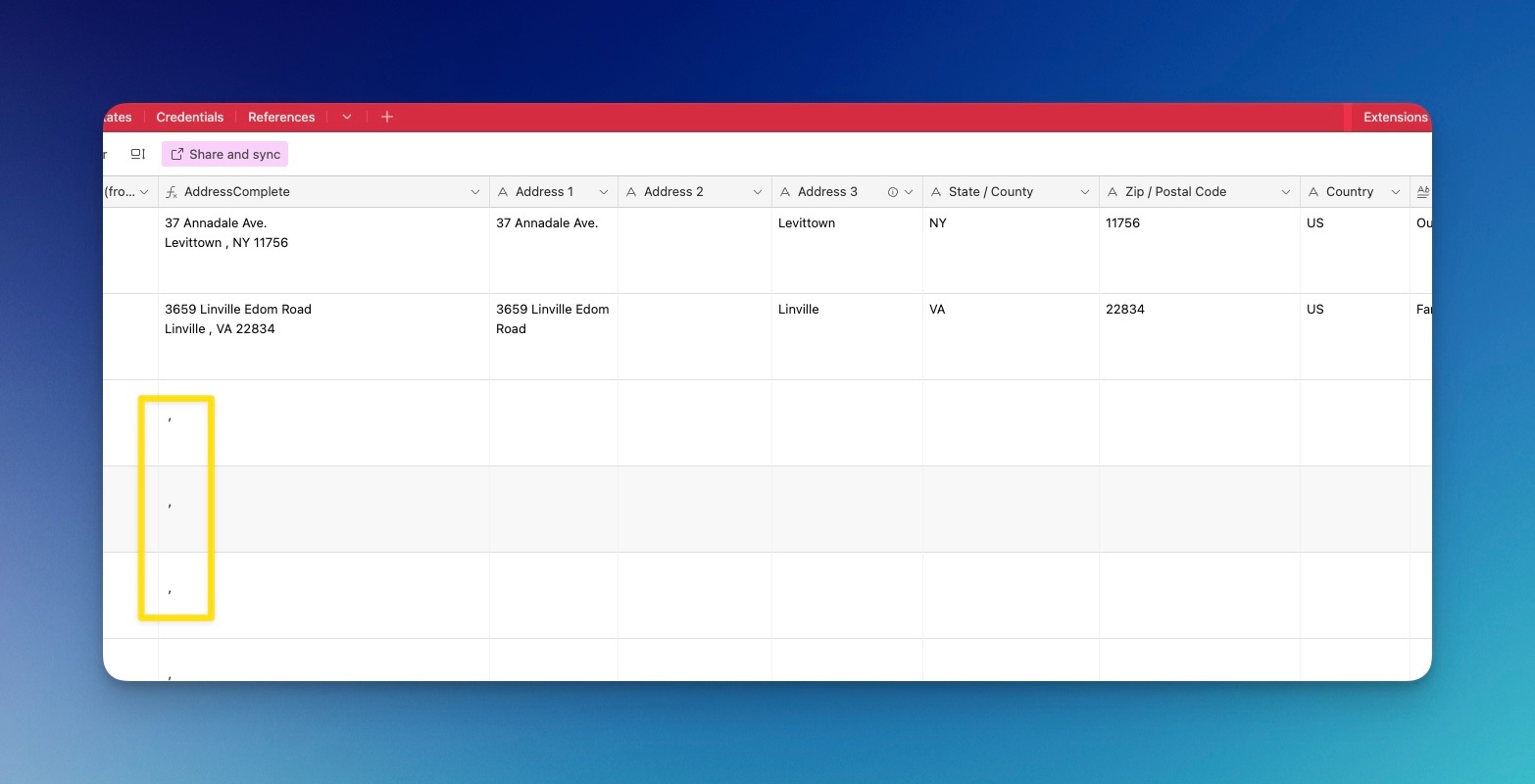
I am having a similar issue. I'm having commas show up when I don't want them to show up if the fields are empty.

I'm trying to use this formula which randomly used to work:


CONCATENATE({Address 1} & "\n" & IF({Address 2}, {Address 2} & "\n") & {Address 3}," , ",{State / County}," ",{Zip / Postal Code})
 
I want it so that if there isn't an address then no comma shows up (leaving just a blank field)