

Count total array value in linked record field to return integer

  • October 4, 2024
  • 3 replies
  • 106 views

Forum|alt.badge.img+1

New to all of this. No coding background; small business owner. I am trying to create a rudimentary inventory system with Airtable.


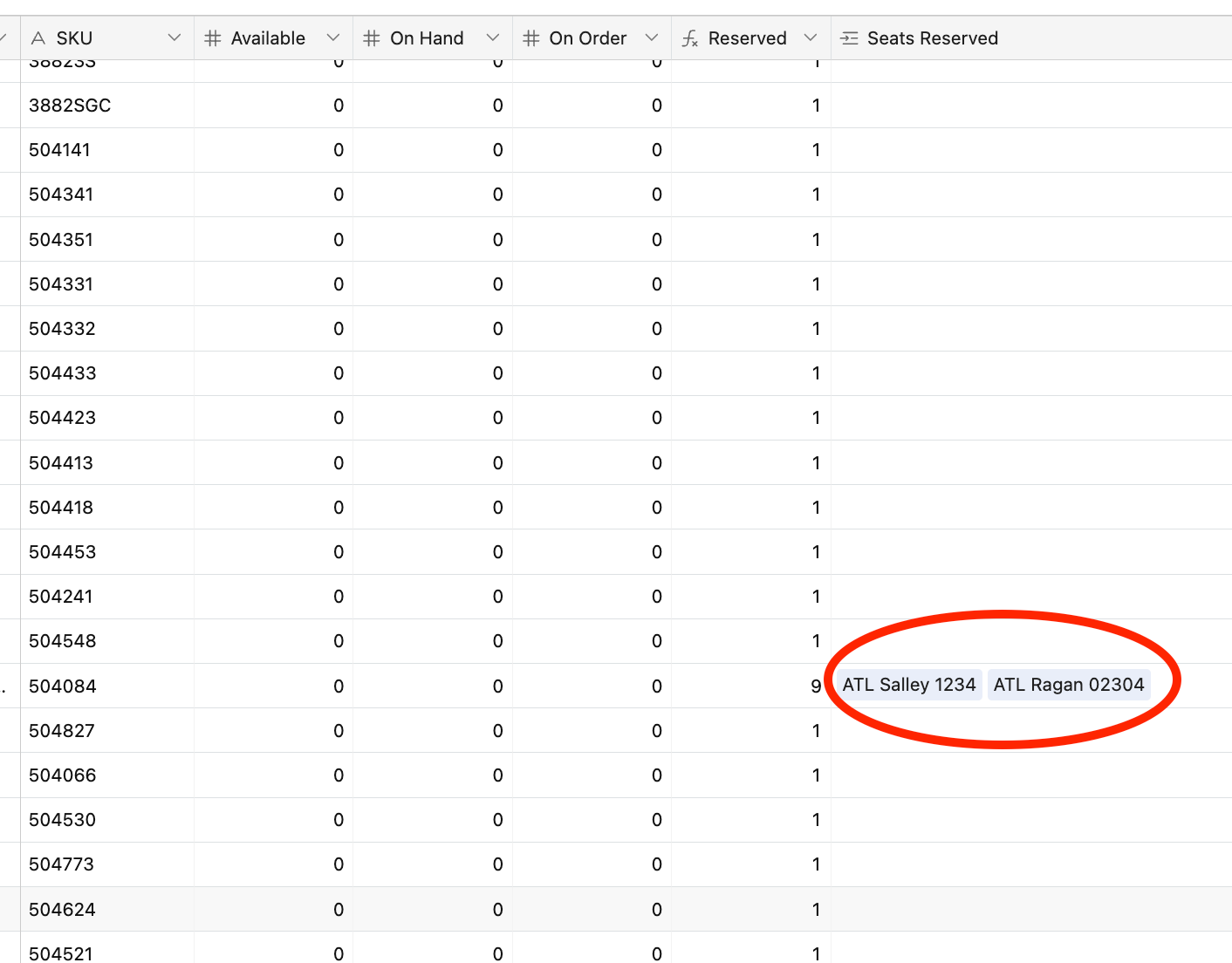
I can't figure out how to get a formula to "count" the number of array entries in a linked record field, and return back a simple integer value.


For example, in the photo attached, the "Reserved" field should return the value of "2," since there are two entries in the linked record field.


Any ideas? Thanks.
 

3 replies

kuovonne
Forum|alt.badge.img+29
  • Brainy
  • October 4, 2024

Use a Count field instead of a formula field.


Alexey_Gusev
Forum|alt.badge.img+25

Hi,
The best way is to use Airtable native Count field type, as @kuovonne said. It has built-in filter that allows you to count only links to records matching some condition in a linked table. Count, Lookup and Rollup are three field types whose results computed based on a value of a linked field.

If, for some reason, you need exactly formula solution, you can use

(Field!='')+LEN(Field)-LEN(SUBSTITUTE(Field,',',''))

Note that it's less reliable way, when comma presents in link text, it is counted too.


kuovonne
Forum|alt.badge.img+29
  • Brainy
  • October 5, 2024

Hi,
The best way is to use Airtable native Count field type, as @kuovonne said. It has built-in filter that allows you to count only links to records matching some condition in a linked table. Count, Lookup and Rollup are three field types whose results computed based on a value of a linked field.

If, for some reason, you need exactly formula solution, you can use

(Field!='')+LEN(Field)-LEN(SUBSTITUTE(Field,',',''))

Note that it's less reliable way, when comma presents in link text, it is counted too.


If for some reason you need a formula solution, use a rollup field instead, with the appropriate COUNT() function, probably COUNTALL(values). This is more reliable than Alexey's formula when there are commas in the text. Whatever other parts of the formula you want in the formula field you can also include in the rollup formula.

Although rollup fields are more complex than formula and count fields, they are really powerful and are worth learning if someone wants to master Airtable.

However, the original poster was "New to all of this" and a "small business owner" who is probably trying to do a zillion other things. So, I thought a simpler solution was better for a novice.

There are many ways to do things in Airtable, use what makes sense to you at the time!
