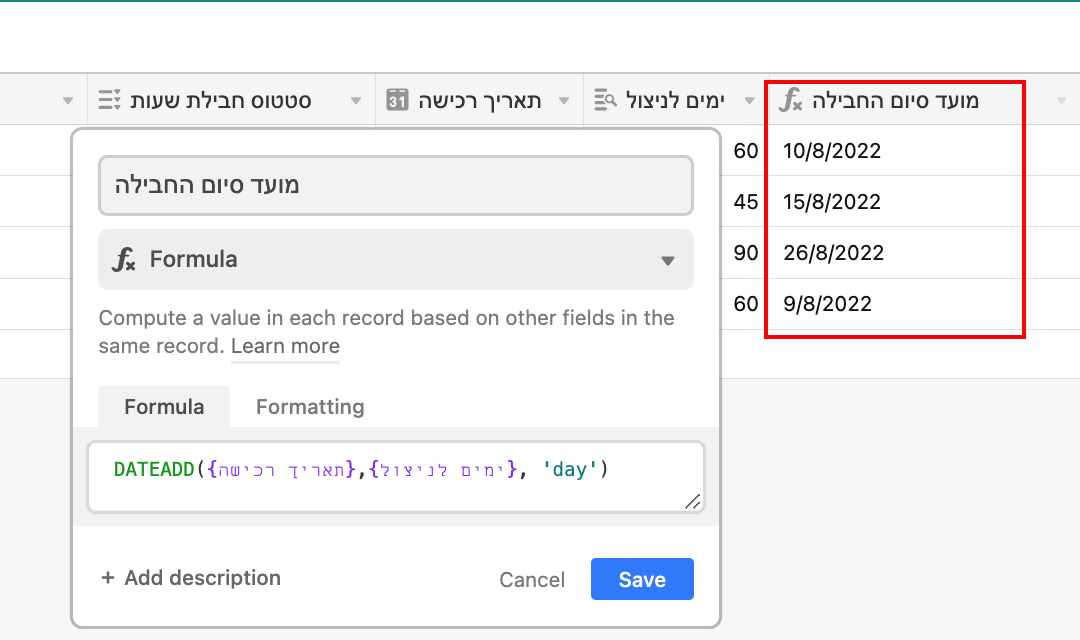
DATEADD returning the added field date instead of the result

  • September 1, 2022
  • 3 replies
  • 27 views

Forum|alt.badge.img+2

Hi,
Struggling with DATEADD formula, trying to get an hours bank result from:
Date of purchase and days left to use.
for some reason, I keep getting the first date I entered- The date of purchase.
Appreciate the advice.

3 replies

Mohamed_Swella1
Forum|alt.badge.img+17

Hi @Osnat_Melnikov

Welcome to Airtable Community!

Please paste the formula you are using here with a screenshot of both fields so we can help you.

To be clear, if you are trying to get the difference between 2 fields you can use the DATETIME_DIFF


Forum|alt.badge.img+2
  • Author
  • New Participant
  • September 2, 2022

Hi @Osnat_Melnikov

Welcome to Airtable Community!

Please paste the formula you are using here with a screenshot of both fields so we can help you.

To be clear, if you are trying to get the difference between 2 fields you can use the DATETIME_DIFF


Hi, thanks for your welcome!
I’m looking to add the date of purchase and days of use to set the ending date of the package


kuovonne
Forum|alt.badge.img+29
  • Brainy
  • September 2, 2022

Hi, thanks for your welcome!
I’m looking to add the date of purchase and days of use to set the ending date of the package


Welcome to the Airtable community!

Your field for {days of use} is a lookup field. (Sorry, but I cannot read your field name in its original language.) Convert that field to a rollup field instead. Use a rollup formula like SUM(values).