Solved

Field with DATEADD function not matching value in other Date field

  • December 14, 2023
  • 2 replies
  • 32 views

Forum|alt.badge.img+7

I have a Date field (Date Asset Added) whose value is entered manually formatted like this:

12/8/2023

Another field (Date RM) contains this formula:

 
DATEADD({Date Asset Added}, 0, 'day' which outputs this:
 
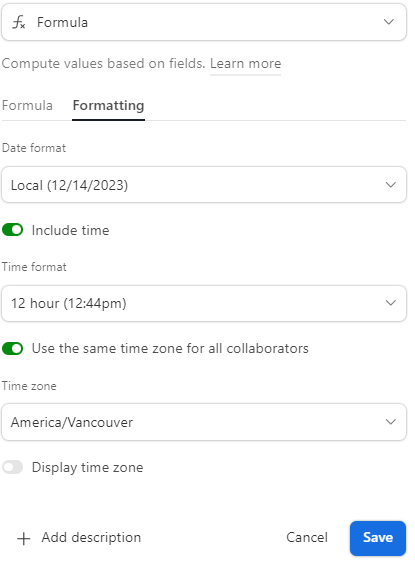
12/8/2023.  12:00am
 
I want to execute an automtion when these two values match, which they don't. So I tried using thiis:
 
DATETIME_FORMAT(DATEADD({Date Asset Added}, 0, ‘days’), ‘M/D/YYYY’)) which outputs this:
 
2023-12-08T00:00:00+00:00
 
 I think that DATETIME_FORMAT turns the date value into text. In any case, what formula can I use to get the value of the field Date RM to match the value in Date Asset Added?
 

Best answer by CharlieMullin

Hi @CharlieMullin ,

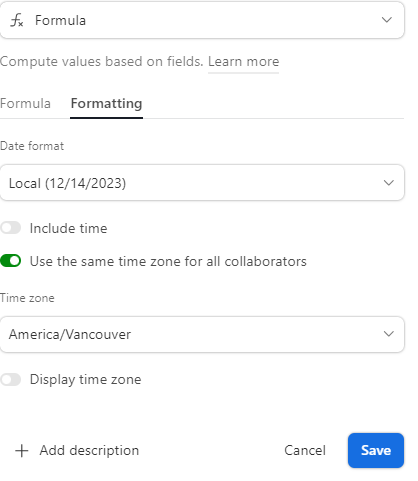
Have you tried formatting the DateRM field to not include time?


Hi Ella, thanks for that tip, which worked!

I got into trouble when I tried wrapping the DATEADD function inside a DATETIME_FORMAT function which changed the field type from Date to Text.

And all I had to do was turn off including time.


2 replies

Forum|alt.badge.img+17
  • Inspiring
  • December 14, 2023

Hi @CharlieMullin ,

Have you tried formatting the DateRM field to not include time?


Forum|alt.badge.img+7
  • Author
  • Inspiring
  • Answer
  • December 14, 2023

Hi @CharlieMullin ,

Have you tried formatting the DateRM field to not include time?


Hi Ella, thanks for that tip, which worked!

I got into trouble when I tried wrapping the DATEADD function inside a DATETIME_FORMAT function which changed the field type from Date to Text.

And all I had to do was turn off including time.