Formula for when Deadline is overdue, excluding certain statuses

  • February 16, 2021
  • 13 replies
  • 161 views

I’ve looked all over for this, and there are formulas that get close, but nothing that quite gets what I want.

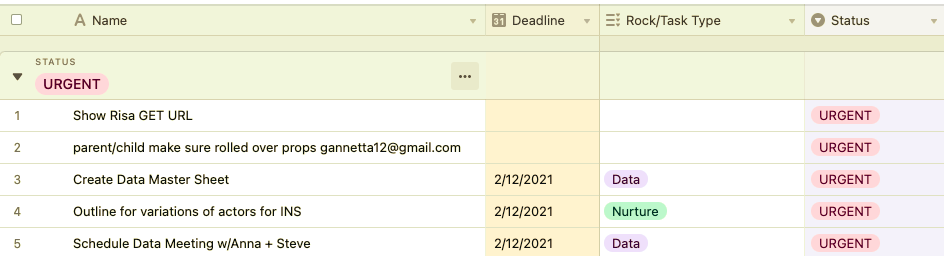
If the date is equal to or past the date under “Deadline”, autofill the formula cell with “OVERDUE”, unless the Status column (single select) is tagged “Complete”, in which case it should say “Done” no matter what (before, on, or after deadline)

Else-wise, the formula cell should be blank.

13 replies

Forum|alt.badge.img+18
  • Inspiring
  • February 16, 2021

Try something like this (might need a tweak)…

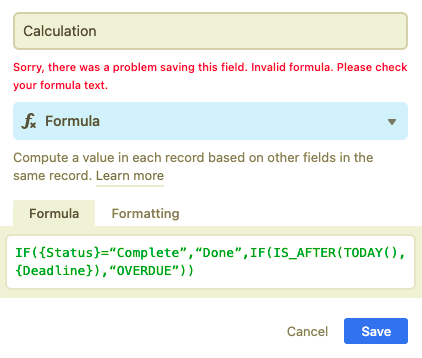
IF({Status}=“Complete”,“Done”,IF(IS_AFTER(TODAY(),{Deadline}),“OVERDUE”))


  • Author
  • Participating Frequently
  • February 16, 2021

It says invalid formula.


Forum|alt.badge.img+18
  • Inspiring
  • February 16, 2021

It says invalid formula.


Can you copy/paste the formula as you have it? Did you need to change either of the field names?


  • Author
  • Participating Frequently
  • February 16, 2021

I pasted exactly what you suggested and didn’t need to change any field names. The columns are labeled Deadline and Status on my base.


Forum|alt.badge.img+18
  • Inspiring
  • February 16, 2021

Well, I wanted to see your formula because, sometimes when you copy/paste, the double quotes get turned into the wrong type of quotes.

I’ll bet you $1 that if you manually retype the double quotes, the formula will work well.

Good luck!!


  • Author
  • Participating Frequently
  • February 16, 2021

Maybe you owe me $1?

IF({Status}=“Complete”,“Done”,IF(IS_AFTER(TODAY(),{Deadline}),“OVERDUE”))


  • Author
  • Participating Frequently
  • February 16, 2021

YOU WERE RIGHT! It was a difference of slanted quotes vs regular quotes.


  • Author
  • Participating Frequently
  • February 16, 2021

Can you copy/paste the formula as you have it? Did you need to change either of the field names?


Looking good! How would I add in for multiple Statuses, like if i wanted it to ignore “Complete” and “Archived”


Forum|alt.badge.img+18
  • Inspiring
  • February 16, 2021

Looking good! How would I add in for multiple Statuses, like if i wanted it to ignore “Complete” and “Archived”


When you say “ignore”, do you mean how would you remove them from view? If that’s the case, you would use the filter capability of the view.


  • Author
  • Participating Frequently
  • February 16, 2021

When you say “ignore”, do you mean how would you remove them from view? If that’s the case, you would use the filter capability of the view.


Meaning, if status is Complete or Archived, fill cell with “Done”


  • Author
  • Participating Frequently
  • February 16, 2021

When you say “ignore”, do you mean how would you remove them from view? If that’s the case, you would use the filter capability of the view.


Sorry I worded it wrong - i just meant, how to formula for showing “Done” if several statuses, rather than just one. So it would show “Done” if Status is either “Complete” or “Archived”


Kamille_Parks11
Forum|alt.badge.img+27

Well, I wanted to see your formula because, sometimes when you copy/paste, the double quotes get turned into the wrong type of quotes.

I’ll bet you $1 that if you manually retype the double quotes, the formula will work well.

Good luck!!


FYI: avoid that by giving people formulas encapsulated in backticks (``) so that IF(“test”) becomes IF("test")


Forum|alt.badge.img+3
  • Participating Frequently
  • February 21, 2021

Sorry I worded it wrong - i just meant, how to formula for showing “Done” if several statuses, rather than just one. So it would show “Done” if Status is either “Complete” or “Archived”


For that you need to use the OR function:

IF(OR({Status}="Complete",{Status}="Archived"),"Done",IF(IS_AFTER(TODAY(),{Deadline}),"OVERDUE"))

If you want to extend the formula further, a list of all possible functions is available here: Formula field reference – Airtable Support.