

Solved

How can I make my Switch Formula conditional on another column?

  • October 18, 2023
  • 3 replies
  • 51 views

Forum|alt.badge.img+4

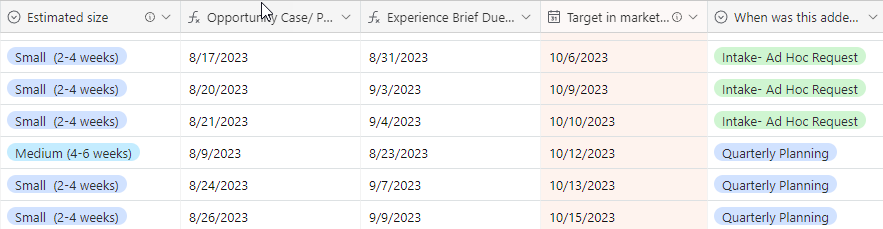
I have a switch formula setup to calculate Experience Brief Due Date and Opportunity Case Due date based on the Estimate size of the project, however I only want these values to pull in for items that are added during Quarterly Planning (not Intake-Ad Hoc Requests)-- Is there a way to set up the Switch Formula to be conditional on the value in the far right column (when the project was added)?

Here is my current switch formula:

Experience Brief Due Date:

SWITCH( {Estimated size},"Small  (2-4 weeks)", DATEADD({Target in market date}, "-35", "days"),
"Medium (4-6 weeks)", DATEADD({Target in market date}, "-49", "days"), "Large (6-8 weeks)", DATEADD({Target in market date}, "-63", "days"))

Best answer by Databaser

You can use:

 
IF({When was this added}="Quarterly Planning", SWITCH( {Estimated size},"Small  (2-4 weeks)", DATEADD({Target in market date}, "-35", "days"),
"Medium (4-6 weeks)", DATEADD({Target in market date}, "-49", "days"), "Large (6-8 weeks)", DATEADD({Target in market date}, "-63", "days")))
 
ps: use the right field name for {When was this added}

3 replies

Databaser
Forum|alt.badge.img+25
  • Brainy
  • Answer
  • October 19, 2023

You can use:

 
IF({When was this added}="Quarterly Planning", SWITCH( {Estimated size},"Small  (2-4 weeks)", DATEADD({Target in market date}, "-35", "days"),
"Medium (4-6 weeks)", DATEADD({Target in market date}, "-49", "days"), "Large (6-8 weeks)", DATEADD({Target in market date}, "-63", "days")))
 
ps: use the right field name for {When was this added}

Forum|alt.badge.img+4
  • Author
  • New Participant
  • October 24, 2023

You can use:

 
IF({When was this added}="Quarterly Planning", SWITCH( {Estimated size},"Small  (2-4 weeks)", DATEADD({Target in market date}, "-35", "days"),
"Medium (4-6 weeks)", DATEADD({Target in market date}, "-49", "days"), "Large (6-8 weeks)", DATEADD({Target in market date}, "-63", "days")))
 
ps: use the right field name for {When was this added}

Thank you so much, this worked!


Forum|alt.badge.img+4
  • Author
  • New Participant
  • April 2, 2024

Is there a way to add onto this formula to return the created date if "When was this added to the Plan?" does not equal "Quarterly Planning"?

Current Formula:

IF({When was this added to the Plan?}="Quarterly Planning", SWITCH( {Estimated size},"Small  (2-4 weeks)", DATEADD({Target in market date}, "-35", "days"),
"Medium (4-6 weeks)", DATEADD({Target in market date}, "-49", "days"), "Large (6-8 weeks)", DATEADD({Target in market date}, "-63", "days")))