

How to delete part of a text after and including a hyphen?

  • August 17, 2021
  • 5 replies
  • 124 views

Forum|alt.badge.img+14

If someone could help me with this, I’d be extremely grateful. I can’t figure this out.
This is what I"d like to achieve through a formula:
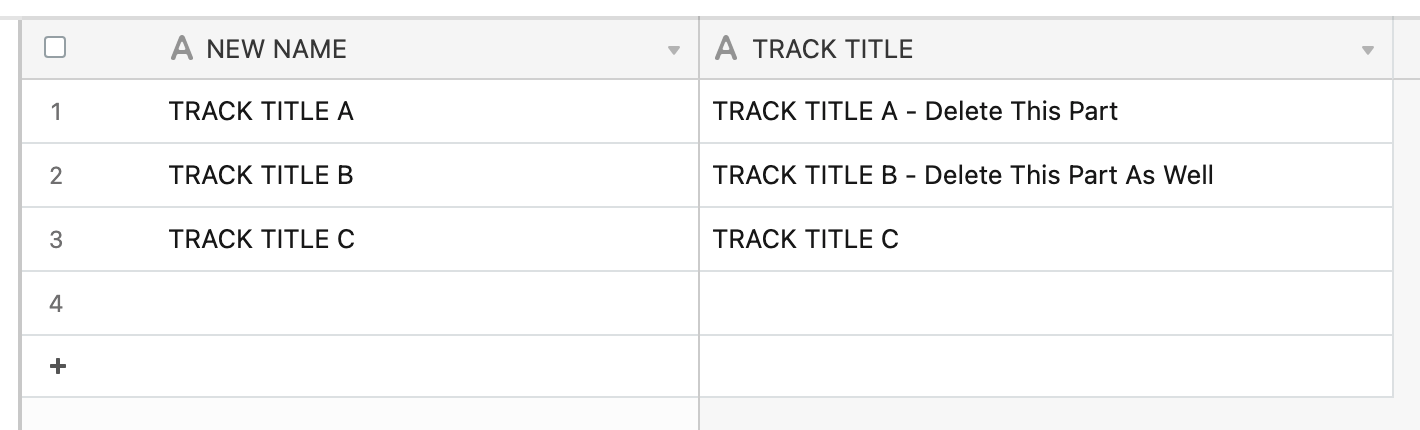
Most Track Titles have a name followed by a “space hyphen space” and a suffix.
I’d like to automatically delete everything after and including the “space hyphen space”.
If Track Title is not followed by “space hyphen space”, just copy the Track Title over.

Thank you so much for pointing me in the right direction.

5 replies

Forum|alt.badge.img+14
  • Author
  • Inspiring
  • August 17, 2021

I have come this far, but it results in an #ERROR! for TRACK TITLE C:

> IF(
>     {TRACK TITLE},
>     SUBSTITUTE({TRACK TITLE},
>     REGEX_EXTRACT({TRACK TITLE}," -.*"),""
>     ))

kuovonne
Forum|alt.badge.img+29
  • Brainy
  • August 17, 2021

Welcome back to the Airtable community!

Regular expressions can be tricky to setup. Try this formula. It looks for a string of characters that are not hyphens and then trims any leading/trailing space.

TRIM(REGEX_EXTRACT({TRACK TITLE}, "[^-]*"))

The problem with this formula is that REGEX_EXTRACT returns an error if the pattern does not have any matches.


Forum|alt.badge.img+14
  • Author
  • Inspiring
  • August 17, 2021

Welcome back to the Airtable community!

Regular expressions can be tricky to setup. Try this formula. It looks for a string of characters that are not hyphens and then trims any leading/trailing space.

TRIM(REGEX_EXTRACT({TRACK TITLE}, "[^-]*"))

The problem with this formula is that REGEX_EXTRACT returns an error if the pattern does not have any matches.


Thank you so much, kuovonne.

Would you mind adding your line of code to my formula? When I try to do it, I get formula syntax errors.
Thank you!


kuovonne
Forum|alt.badge.img+29
  • Brainy
  • August 17, 2021

Thank you so much, kuovonne.

Would you mind adding your line of code to my formula? When I try to do it, I get formula syntax errors.
Thank you!


My formula does not need to be embedded in your formula. It is a standalone formula.


Forum|alt.badge.img+14
  • Author
  • Inspiring
  • August 17, 2021

My formula does not need to be embedded in your formula. It is a standalone formula.


I just tried it. Works beautifully. Thank you so much!!