IF function with multiple DATE FIELDS

  • March 28, 2023
  • 5 replies
  • 55 views

Forum|alt.badge.img+1

Hi there,

I got trouble with using IF functions across Date field, currently I want my result is:

IF({Date field 1} is filled, then "Completed"), IF({Date field 2} is filled, then "Extended"), IF ({Date filed 3} is filled, then "Waiting")

How do I make this work? Thanks!

5 replies

Forum|alt.badge.img+4
  • Inspiring
  • March 28, 2023

Try this: 


IF(date3, "Waiting", IF(date2, "Extended", IF(date1, "Completed", "")))


Forum|alt.badge.img+1
  • Author
  • New Participant
  • March 28, 2023

Hi Danny,

It's not work because every Date field has different date variables. But if that field was filled, which is either Completed, Extended or Waiting


Forum|alt.badge.img+4
  • Inspiring
  • March 28, 2023

Hi Danny,

It's not work because every Date field has different date variables. But if that field was filled, which is either Completed, Extended or Waiting


I think you'll need to send over a mock up so I can take a look! 


Forum|alt.badge.img+1
  • Author
  • New Participant
  • March 28, 2023

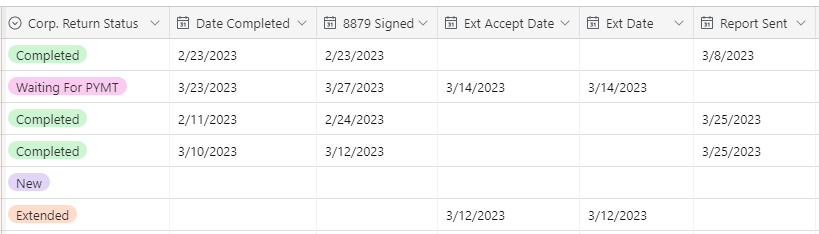
So look like this, I want to have another Field with formula, where 8879 Signed filled = Waiting for PMT, Ext Accept Date filled = Extended, Report Sent filled = Completed, 3 of that fields are empty = New, so I can get rid of the Status column and everything should be automatically whenever I filled the Date information


Forum|alt.badge.img+4
  • Inspiring
  • March 28, 2023

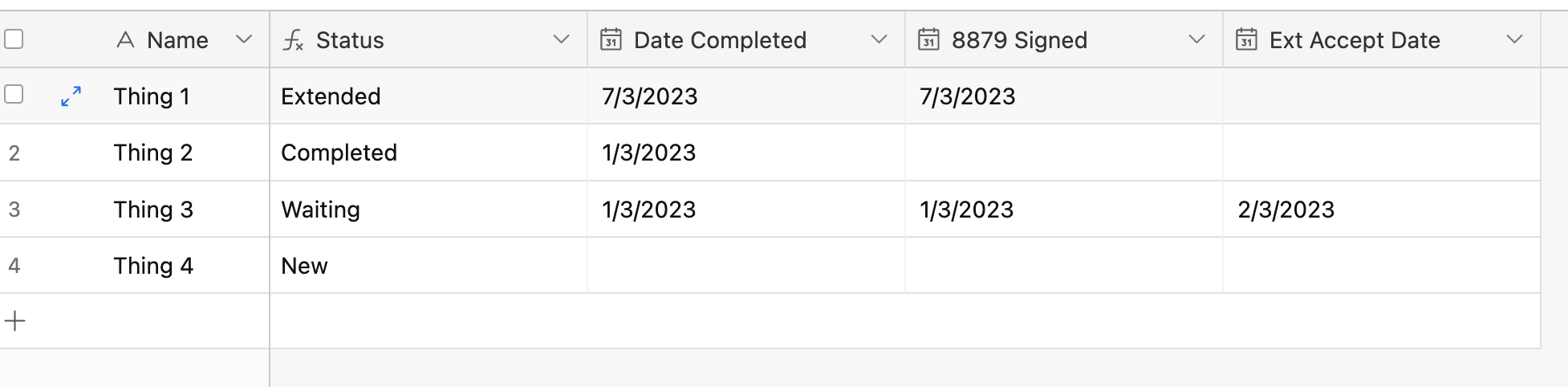
I might be misunderstanding but if this is what you are trying to accomplish then it should be possible with the formula I posted below! 


Here you can see the formula: 

IF({Ext Accept Date}, "Waiting", IF({8879 Signed}, "Extended", IF({Date Completed}, "Completed", "New")))