

Solved

If this or this then this otherwise that unless blank then stay blank

  • February 17, 2024
  • 3 replies
  • 66 views

AndreaR
Forum|alt.badge.img+9

Hi there, I am trying to create an If/or formula and got it to work but I can't get the formula to be blank if there's no data in a field. I'm sure that makes no sense. 

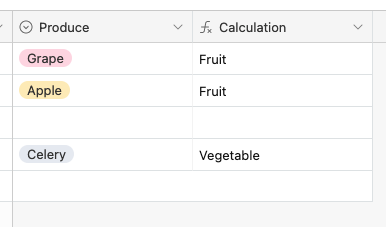
Here's an example: Let's say I have a small list of produce in a column. I want to create a formula in a new column to give me the category of produce either as a fruit or as a vegetable. I got the formula to work but if no produce has been selected I'm still seeing "Vegetable" in the formula column and I want it to return a blank value. Any ideas? Here's the example formula. Thanks in advance!

IF(OR({Produce}="Grape",{Produce}="Apple"),"Fruit","Vegetable")
 

Best answer by TheTimeSavingCo

Hah no that makes perfect sense.  Try this:

IF( Produce, IF( OR( Produce = "Apple", Produce = "Grape" ), "Fruit", "Vegetable" ) )

This topic has been closed for replies.

3 replies

TheTimeSavingCo
Forum|alt.badge.img+31

Hah no that makes perfect sense.  Try this:

IF( Produce, IF( OR( Produce = "Apple", Produce = "Grape" ), "Fruit", "Vegetable" ) )


Alexey_Gusev
Forum|alt.badge.img+25
  • Brainy
  • February 18, 2024

Hi,
Sometimes, if you list is large, especially when it is somewhere in the table form, you might want to use switch. The last (optional) value is default - when data exists, but such item is absent in list

SWITCH(Produce, '','', 'Apple','Fruit', 'Grape','Fruit', 'Celery','Vegetasble', 'something unknown')

AndreaR
Forum|alt.badge.img+9
  • Author
  • Inspiring
  • February 20, 2024

Hah no that makes perfect sense.  Try this:

IF( Produce, IF( OR( Produce = "Apple", Produce = "Grape" ), "Fruit", "Vegetable" ) )


YES!  This is awesome, thank you and have a good one.🏆👨‍🍳

