Hi Community - I have a formula that performs a simple calculation by summing a series of cells.
The challenge comes in that some of these cells contains text, rather than numbers. I would like the formula to ignore the text so that a total can be calculated.
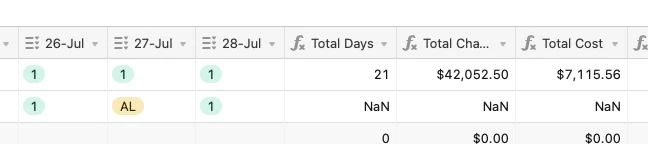
Currently, a ‘NaN’ is being returned. I attach an image of the cells that I am trying to calculate and the simple formula is:
{1-Jul}+{4-Jul}+{4-Jul}+{5-Jul}+{6-Jul}+{7-Jul}+{8-Jul}+{11-Jul}+{12-Jul}+{13-Jul}+{14-Jul}+{15-Jul}+{18-Jul}+{19-Jul}+{20-Jul}+{21-Jul}+{22-Jul}+{25-Jul}+{26-Jul}+{27-Jul}+{28-Jul}
Thanks in advance