Question

Issue with Lookup values in Formula Field

  • February 23, 2026
  • 13 replies
  • 85 views

Forum|alt.badge.img+2

Today I noticed an issue with Lookup values—Airtable formulas are not recognizing them in conditions. Is anyone else experiencing the same problem?

13 replies

  • New Participant
  • February 23, 2026

Yes, this is a common Airtable limitation—formulas don’t directly recognize Lookup values because they often return arrays instead of plain text or numbers. The usual AccuLynx login workaround is to convert them with a Rollup field using ARRAYJOIN(values) or create a Formula field in the linked table and then pull that in. This way, your conditions can evaluate clean text or numeric values without freezing.


Forum|alt.badge.img+2
  • Author
  • Participating Frequently
  • February 23, 2026

Yes, this is a common Airtable limitation—formulas don’t directly recognize Lookup values because they often return arrays instead of plain text or numbers. The usual AccuLynx login workaround is to convert them with a Rollup field using ARRAYJOIN(values) or create a Formula field in the linked table and then pull that in. This way, your conditions can evaluate clean text or numeric values without freezing.

It was working fine until Friday, but today I started facing this issue.


TheTimeSavingCo
Forum|alt.badge.img+31

Hm, could you talk a bit about what your formula was trying to do?  I’ll see if I can replicate it on my end

I had a weird one where a formula field that was referencing a rollup using ‘ARRAYUNIQUE()’ errored out around the same time.  Specifically, I was using a the formula field to reference it and converting it to single select options but it just wouldn’t recognize anything.  Was working fine for months before that too


Forum|alt.badge.img+2
  • Author
  • Participating Frequently
  • February 23, 2026

Hm, could you talk a bit about what your formula was trying to do?  I’ll see if I can replicate it on my end

I had a weird one where a formula field that was referencing a rollup using ‘ARRAYUNIQUE()’ errored out around the same time.  Was working fine for months before that too

In investigating the root cause, I found that when a Lookup field is text and used in a formula with a single‑select dropdown, the formula does not work. However, if the Lookup field is changed to a single‑select, the formula functions correctly. This behaviour was not present on Friday when everything worked fine, but today I am encountering #Error or blank formula values. I think same is Roll Up as i tried roll up formula, but it is not working.


bigwig
Forum|alt.badge.img
  • New Participant
  • February 23, 2026

I’m having the same problem where a rollup column was being use to populate a single-select formula column. Everything was working fine, then suddenly, with no chance on my part, things broke. All entries were set to the passthrough “default” single-select option. Debugging shows that the rollup formula is still outputting the same data. Seems like an internal implementation change/error with the “Change formula output to single select options” feature. 


Forum|alt.badge.img+6
  • Participating Frequently
  • February 23, 2026

I am having an issue with a formula field that is set to output single select options, it’s showing the fallback option despite meeting the conditions to output a different option.


bigwig
Forum|alt.badge.img
  • New Participant
  • February 23, 2026

I am having an issue with a formula field that is set to output single select options, it’s showing the fallback option despite meeting the conditions to output a different option.

That’s precisely the problem I’m having, too.


Forum|alt.badge.img+2
  • Author
  • Participating Frequently
  • February 23, 2026

I’m having the same problem where a rollup column was being use to populate a single-select formula column. Everything was working fine, then suddenly, with no chance on my part, things broke. All entries were set to the passthrough “default” single-select option. Debugging shows that the rollup formula is still outputting the same data. Seems like an internal implementation change/error with the “Change formula output to single select options” feature. 

To partially resolve this issue from your end, if you are using a Lookup field with a text data type in a formula that references a single‑select field, please change the Lookup field’s data type to single‑select. This adjustment will automatically fix the formula field.


Forum|alt.badge.img+2
  • Author
  • Participating Frequently
  • February 23, 2026

I am having an issue with a formula field that is set to output single select options, it’s showing the fallback option despite meeting the conditions to output a different option.

To partially resolve this issue from your end, if you are using a Lookup field with a text data type in a formula that references a single‑select field, please change the Lookup field’s data type to single‑select. This adjustment will automatically fix the formula field.


Forum|alt.badge.img+6
  • Participating Frequently
  • February 23, 2026

I am having an issue with a formula field that is set to output single select options, it’s showing the fallback option despite meeting the conditions to output a different option.

To partially resolve this issue from your end, if you are using a Lookup field with a text data type in a formula that references a single‑select field, please change the Lookup field’s data type to single‑select. This adjustment will automatically fix the formula field.


One of the fields used in my formula was a rollup of a single select, I changed it to a lookup and that did fix my formula field issue. However, it doesn’t feel right that we should need to change field types that had previously worked correctly just because something changed on Airtable’s end?


Forum|alt.badge.img+2
  • Author
  • Participating Frequently
  • February 23, 2026

Yes, there has definitely been a change from Airtable’s side. It isn’t strictly necessary to modify the field type, but if users are affected, this serves as a quick fix. Fields that don’t impact users can be left as they are.


bigwig
Forum|alt.badge.img
  • New Participant
  • February 23, 2026

In my case, I had a single-select column being referenced in another rollup column. The result of the rollup was being used to determine a third formula column, using the option to output the value of the formula as a single-select value.

A couple weeks ago, this setup worked as expected. Then, without any change on my part, the third formula column started returning only the fallback value, regardless of the input received.

I took the advice here and changed my approach to use a lookup column instead of that third formula outputting a single-select value. In my case, I was able to do the same algorithm, but now there are fewer intermediary steps. With this change, only a single column was needed to do the work of the previous two.

The insight came in understanding that a Lookup can return multiple single-select values when referencing a set of multiple linked records. From there, I was able to use the filtering and sorting options to get the output I needed by operating directly on this list of single-select values. Feels a bit odd in implementation, a lookup returning multiple values, but once you understand this is possible, the rest comes naturally.

While this workaround was successful in my case, the fact remains that some internal change caused a regression in the expected behavior of the fomula-to-single-select functionality. Hope the teams gets that one sorted out soon.

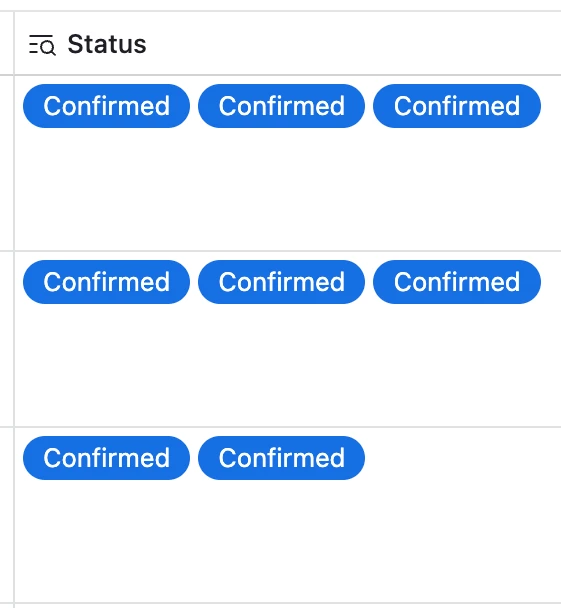
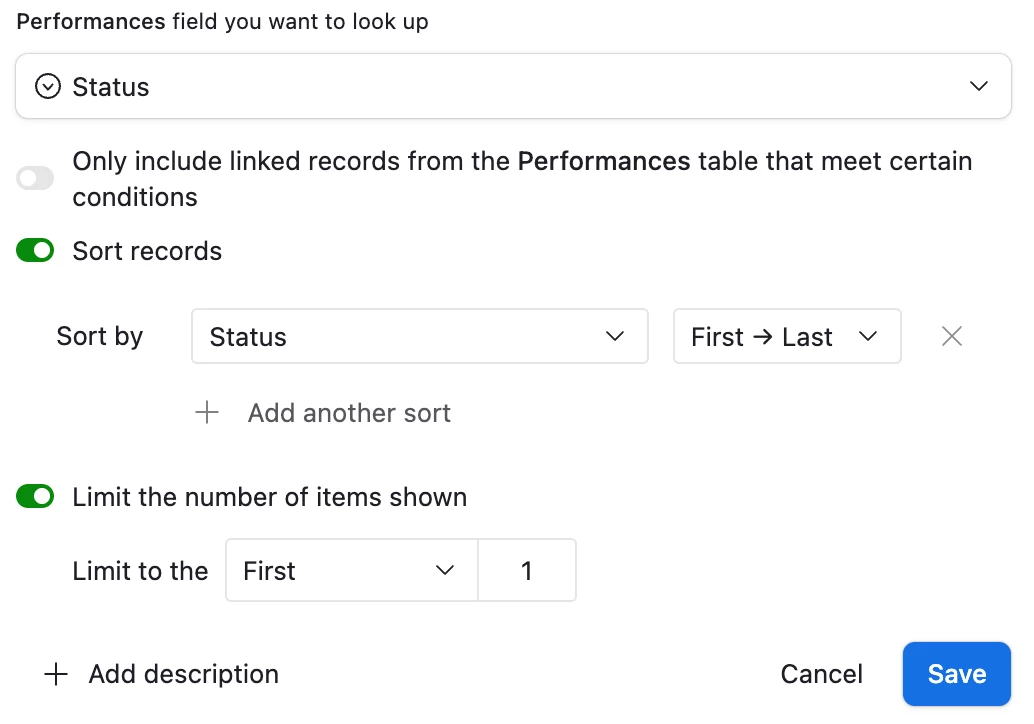
See this sequence of screenshots for context on the Lookup single-select approach:

Lookup field, each row returns the single-select value from a list of linked
Sorting and limiting the number of returned records helped me recreate the desired functionality.
.
Resulting lookup table returns a single-select value as if it were a single-select field itself.


Forum|alt.badge.img+2
  • Author
  • Participating Frequently
  • February 23, 2026

In my case, I had a single-select column being referenced in another rollup column. The result of the rollup was being used to determine a third formula column, using the option to output the value of the formula as a single-select value.

A couple weeks ago, this setup worked as expected. Then, without any change on my part, the third formula column started returning only the fallback value, regardless of the input received.

I took the advice here and changed my approach to use a lookup column instead of that third formula outputting a single-select value. In my case, I was able to do the same algorithm, but now there are fewer intermediary steps. With this change, only a single column was needed to do the work of the previous two.

The insight came in understanding that a Lookup can return multiple single-select values when referencing a set of multiple linked records. From there, I was able to use the filtering and sorting options to get the output I needed by operating directly on this list of single-select values. Feels a bit odd in implementation, a lookup returning multiple values, but once you understand this is possible, the rest comes naturally.

While this workaround was successful in my case, the fact remains that some internal change caused a regression in the expected behavior of the fomula-to-single-select functionality. Hope the teams gets that one sorted out soon.

See this sequence of screenshots for context on the Lookup single-select approach:

Lookup field, each row returns the single-select value from a list of linked
Sorting and limiting the number of returned records helped me recreate the desired functionality.
.
Resulting lookup table returns a single-select value as if it were a single-select field itself.


The only challenge you’ll encounter is when multiple distinct values exist. Restricting the limit to 1 will prevent the display of any additional values that may be present