Name of the month by date [Formula]

  • April 1, 2020
  • 15 replies
  • 456 views

Forum|alt.badge.img+5

Hey,

Is there a formula that pics the name of the month by date. We have built a system where we manage our project invoicing. We send our customers an invoice on a monthly basis based on the work completed, but we try to forecast the billing months by recording the assumed billing month for the project part. So, Airtable should understand that the (billing) month is a date field (billing predictability), but the option value should be the name of the month

Thanks

Mikko

15 replies

kuovonne
Forum|alt.badge.img+29
  • Brainy
  • April 1, 2020

To convert a date to a month name, use the DATETIME_FORMAT() function with the MMMM format specifier.

DATETIME_FORMAT({date}, 'MMMM')

Forum|alt.badge.img+3
  • New Participant
  • May 11, 2021

To convert a date to a month name, use the DATETIME_FORMAT() function with the MMMM format specifier.

DATETIME_FORMAT({date}, 'MMMM')

Hi @kuovonne, thanks for your reply :slightly_smiling_face:
Do you know how I could add the year, after your fomula with the month ?

So I could convert : 2021-05-11
To May 2021 for exemple

Thanks ! :slightly_smiling_face:


kuovonne
Forum|alt.badge.img+29
  • Brainy
  • May 11, 2021

You can include the format specifier for the year.

DATETIME_FORMAT({date}, 'MMMM YYYY')

Forum|alt.badge.img+3
  • New Participant
  • May 31, 2021

You can include the format specifier for the year.

DATETIME_FORMAT({date}, 'MMMM YYYY')

Sorry for the late reply, I missed it ! Thanks for your reply ! :slightly_smiling_face:

By chance, maybe you could help me with another little issue :

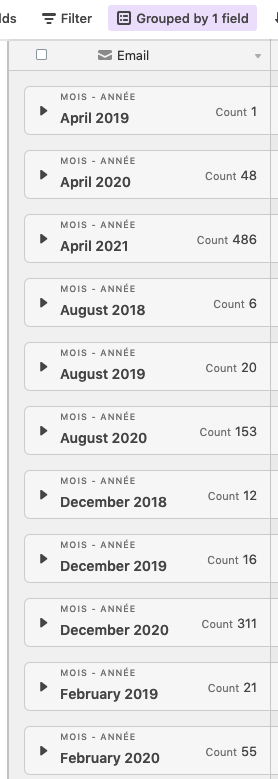
When I use this formula and group my row by date (with the month and year), Airtable sort the date in alphabetical order, and not Chronologic order.

Do you know if there is a way to sort by chronologic order, to have :
January 2019
February 2019

January 2020

Thanks !


Forum|alt.badge.img+2
  • New Participant
  • January 12, 2022

Sorry for the late reply, I missed it ! Thanks for your reply ! :slightly_smiling_face:

By chance, maybe you could help me with another little issue :

When I use this formula and group my row by date (with the month and year), Airtable sort the date in alphabetical order, and not Chronologic order.

Do you know if there is a way to sort by chronologic order, to have :
January 2019
February 2019

January 2020

Thanks !


Im interested to know also


  • New Participant
  • April 6, 2022

Hi,
I ran into the same issue, so I concatened the month number with the month:
DATETIME_FORMAT({Date}, ‘MM MMMM’)


Forum|alt.badge.img+7
  • Known Participant
  • May 16, 2022

You can include the format specifier for the year.

DATETIME_FORMAT({date}, 'MMMM YYYY')

Thank you so much for answering this question! Just wondering what I would add to this formula to leave it blank if there’s no date selected, rather than returning an #ERROR? Thank you


kuovonne
Forum|alt.badge.img+29
  • Brainy
  • May 16, 2022

Thank you so much for answering this question! Just wondering what I would add to this formula to leave it blank if there’s no date selected, rather than returning an #ERROR? Thank you


IF(
  {date},
  DATETIME_FORMAT({date}, 'MMMM YYYY')
)

Forum|alt.badge.img+7
  • Known Participant
  • May 19, 2022
IF(
  {date},
  DATETIME_FORMAT({date}, 'MMMM YYYY')
)

Thank you! Really appreciate your quick help :slightly_smiling_face:


Forum|alt.badge.img+7
  • Known Participant
  • May 19, 2022
IF(
  {date},
  DATETIME_FORMAT({date}, 'MMMM YYYY')
)

Ok, so it worked for one field that had the simple formula as above, but how would I add it to this formula so it doesn’t return ERROR when the Date/Time field is empty? Thank you! :slightly_smiling_face:

{Event Name} & " - " & DATETIME_FORMAT(SET_TIMEZONE({Date & Time}, ‘Australia/Brisbane’), “DD/MM/YY”)


kuovonne
Forum|alt.badge.img+29
  • Brainy
  • May 20, 2022

Ok, so it worked for one field that had the simple formula as above, but how would I add it to this formula so it doesn’t return ERROR when the Date/Time field is empty? Thank you! :slightly_smiling_face:

{Event Name} & " - " & DATETIME_FORMAT(SET_TIMEZONE({Date & Time}, ‘Australia/Brisbane’), “DD/MM/YY”)


It depends on what you want to have instead of the date. Here is one way.

CONCATENATE(
    {Event Name},
    " - ",
    IF(
        {Date & Time},
        DATETIME_FORMAT(SET_TIMEZONE({Date & Time}, 'Australia/Brisbane'), "DD/MM/YY"),
        "no date"
    )
)

Forum|alt.badge.img+7
  • Known Participant
  • May 21, 2022

It depends on what you want to have instead of the date. Here is one way.

CONCATENATE(
    {Event Name},
    " - ",
    IF(
        {Date & Time},
        DATETIME_FORMAT(SET_TIMEZONE({Date & Time}, 'Australia/Brisbane'), "DD/MM/YY"),
        "no date"
    )
)

Thank you! That worked perfectly! I just changed “no date” to “Date TBA.”


Forum|alt.badge.img+7
  • Known Participant
  • May 21, 2022

Thank you! That worked perfectly! I just changed “no date” to “Date TBA.”


Also @kuovonne, I posted a question on a feed that was a couple of years old that you had also been helping on, not sure if you’ve seen it, but if you have a moment I’d really appreciate your input since you’ve been so helpful and your explanations are really easy to follow.

Thank you! :slightly_smiling_face:


Sean_Lake1
Forum|alt.badge.img+20
  • Inspiring
  • September 9, 2022

I actually group first by Month number, and then by month name, which worked great for me :).


Forum|alt.badge.img+4
  • New Participant
  • April 13, 2023
IF(
  {date},
  DATETIME_FORMAT({date}, 'MMMM YYYY')
)

I'm struggling with a similar issue. I have the below formula. everything works, except, air table will not interpret the outcome as a date and will not sort logically (by month) but by alphabet. 

DATETIME_FORMAT(IF(AND( MONTH({Due Date}) < MONTH(TODAY()), {Payed?} = FALSE()), DATETIME_FORMAT(TODAY(),'MMMM YYYY'), DATETIME_FORMAT({Due Date},'MMMM YYYY') ),'MMMM YYYY' )

 hope someone can help with this!

thx in advance