Next Month Formula

  • August 12, 2020
  • 6 replies
  • 68 views

Forum|alt.badge.img+12

Hello Everybody, I am new to Airtable, would like to ask for a formula that shows me all records coming next month depending on a start date. in other words, I am sending this for operations people, and they want to see all their projects a month ahead. Can you guys help me with that?

6 replies

Forum|alt.badge.img+7
  • Known Participant
  • August 12, 2020

You don’t need a formula. You can just use the filters. “Start Date” is within “the next month.”


  • Participating Frequently
  • August 12, 2020

You don’t need a formula. You can just use the filters. “Start Date” is within “the next month.”


Just to build on this a little more…

You can create a new view for your operations people to use that already has a filter defined.

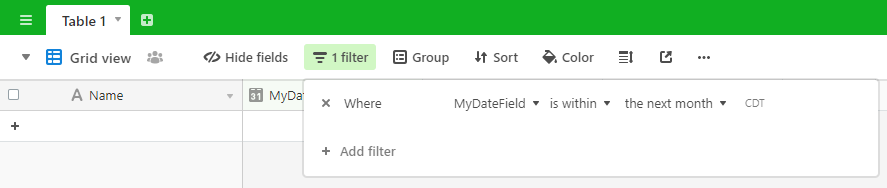
The filter might be something like this:

Will that work for you?


Forum|alt.badge.img+12
  • Author
  • Known Participant
  • August 13, 2020

Just to build on this a little more…

You can create a new view for your operations people to use that already has a filter defined.

The filter might be something like this:

Will that work for you?


Thankyou guys so much, That worked , not sure if it’s accurate though, I see some records the due date is August, which is the current month, is there a reason for that?


  • Participating Frequently
  • August 13, 2020

Thankyou guys so much, That worked , not sure if it’s accurate though, I see some records the due date is August, which is the current month, is there a reason for that?


Try this instead.

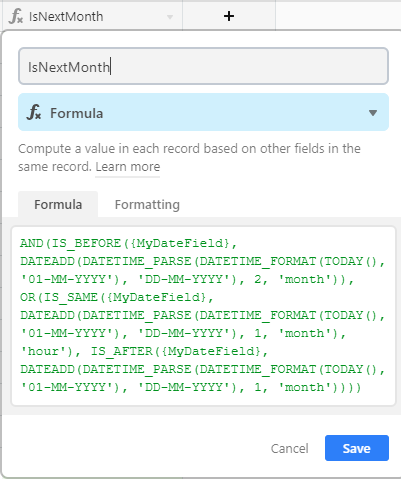
Add a new column named IsNextMonth that has the following formula:

AND(IS_BEFORE({MyDateField}, DATEADD(DATETIME_PARSE(DATETIME_FORMAT(TODAY(), '01-MM-YYYY'), 'DD-MM-YYYY'), 2, 'month')), OR(IS_SAME({MyDateField}, DATEADD(DATETIME_PARSE(DATETIME_FORMAT(TODAY(), '01-MM-YYYY'), 'DD-MM-YYYY'), 1, 'month'), 'hour'), IS_AFTER({MyDateField}, DATEADD(DATETIME_PARSE(DATETIME_FORMAT(TODAY(), '01-MM-YYYY'), 'DD-MM-YYYY'), 1, 'month'))))

It looks like this:

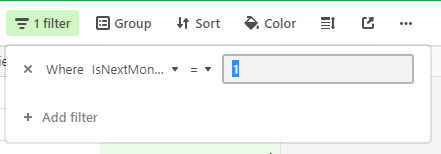
Then add a filter IsNextMonth = 1:

That should filter out the results to do what you’re after. Please let me know if it doesn’t work for you.

Then hide the IsNextMonth field if you don’t want to see it in the grid.


  • Participating Frequently
  • August 13, 2020

Also, the is within the next month didn’t work as I had originally had thought.

What it actually does is include today’s date 13Aug2020 all up until the same day next month 13Sep2020 which wasn’t what you were originally after. My bad. :slightly_smiling_face:


Forum|alt.badge.img
  • New Participant
  • May 30, 2024

Also, the is within the next month didn’t work as I had originally had thought.

What it actually does is include today’s date 13Aug2020 all up until the same day next month 13Sep2020 which wasn’t what you were originally after. My bad. :slightly_smiling_face:


They still haven't solved this issue after four years, which is why I'm here.