On or after (or before) (rather than IS_AFTER)

  • July 29, 2019
  • 2 replies
  • 55 views

Hey All,

I have a formula below that checks if a rental is currently Active.

I would like it to include bookings that are finishing today also as an “Active Rental :blue_car: ” ( and also bookings that start today). Is there a way to do that (or a better way to construct this formula?

My formula is below;

IF( IS_AFTER( {Date Started}, TODAY() ), “Upcoming :calendar: ”, IF( IS_AFTER( {Date Ending}, TODAY() ), “Active Rental :blue_car: ”, “Completed :white_check_mark: ” ) )

Thanks for any help.

Cheers,
Harry

2 replies

JonathanBowen
Forum|alt.badge.img+18

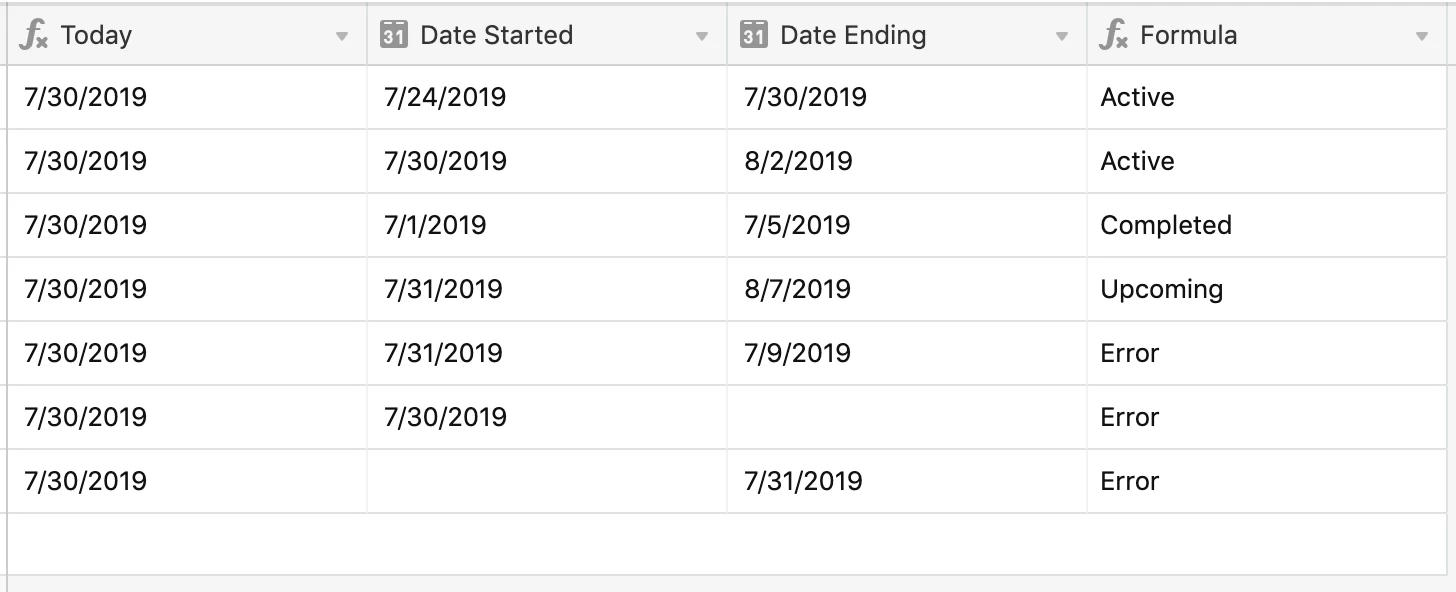
Hi @Harrison_Jones - try this:

IF(
  AND({Date Started}, {Date Ending}, {Date Started} <= {Date Ending}),
  IF(
    AND({Date Started} <= TODAY(), {Date Ending} >= TODAY()),
    'Active', 
    IF(
      {Date Started} > TODAY(),
      'Upcoming', 
      'Completed')
  ),
  'Error'
) 

Explanation:

This part:

AND({Date Started}, {Date Ending}, {Date Started} <= {Date Ending}),

Is checking that there is a start date, an end date and the start dates is less than or equal to the end date. If any of these are not true it throws an error and does not do any of the active, upcoming etc, evaluation.

The rest is the evaluation itself:

  IF(
    AND({Date Started} <= TODAY(), {Date Ending} >= TODAY()),
    'Active', 
    IF(
      {Date Started} > TODAY(),
      'Upcoming', 
      'Completed')
  ),

JB


  • Author
  • New Participant
  • July 30, 2019

JB

You legend!

Thank you so much.

Harry