hi, I’m new to airtable and not much of a techy person so even when I read some of the comments for how to do a running total, I’m still so lost…
I’m trying to create a monthly roll up to see how much money I should have at the end of each month but rolling up from the last month total. I am able to get as far as getting the Income - Expenses = Total but I tried using Previous Row function to get last row total to try to add it to next month’s total but it tells me it causes a circular reference.
Or is there a way to add last month’s total with this month’s income? I’m at my end on trying to get a running total. HELP anyone…
here is the view of the table… I need the previous row to be the last column roll up. I can’t set it up since it gives me circular error so only been able to use Delta for previous row to test it but it’s not the right value I need for the running total. how can I get the last column to be the running total?
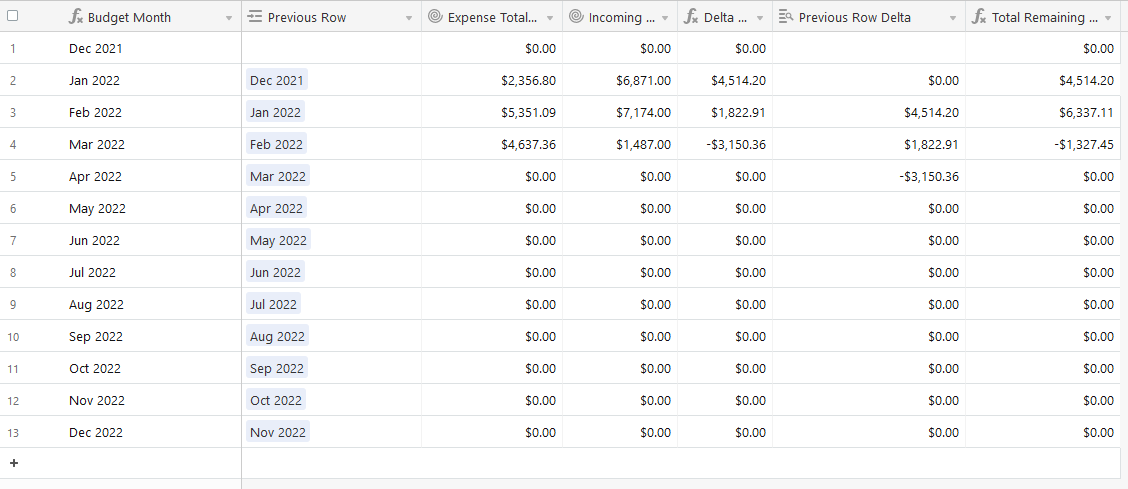

Running total for monthly budget
This topic has been closed for replies.


Enter your E-mail address. We'll send you an e-mail with instructions to reset your password.