Sorting time earliest to latest

  • May 22, 2022
  • 5 replies
  • 58 views

Forum|alt.badge.img+2

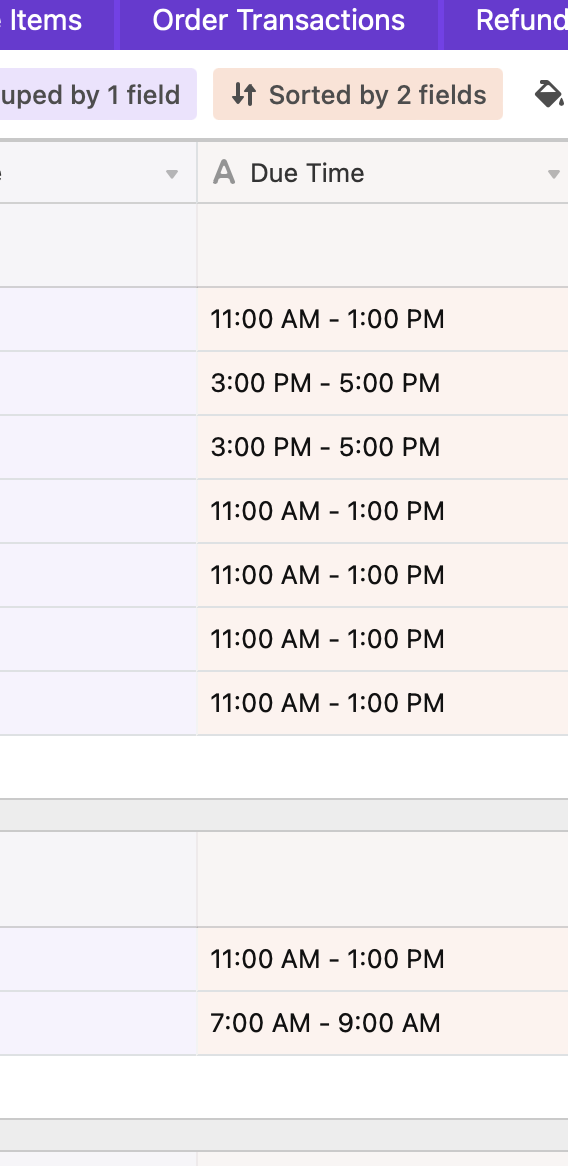
Hi, IS it possible to sort this list of times, earliest to latest? I can only sort A-Z and this is what it returns:

5 replies

Kamille_Parks11
Forum|alt.badge.img+27

These seem like consistent values. Can you convert it to a Single Select field? Single Selects let you define what the sort order for the options are, which your Views can adopt.


Forum|alt.badge.img+2
  • Author
  • Participating Frequently
  • May 22, 2022

Worked a treat, many thanks.


Forum|alt.badge.img+2
  • Author
  • Participating Frequently
  • May 29, 2022

unfortunately, this isn’t an option. As the data is brought in automatically, it needs a single line text field for it to sync properly. What other solutions are there?

Thanks


Kamille_Parks11
Forum|alt.badge.img+27

unfortunately, this isn’t an option. As the data is brought in automatically, it needs a single line text field for it to sync properly. What other solutions are there?

Thanks


Then create a single select field, and use an Automation to copy the Text field’s value into it. Sort by the select field.


kuovonne
Forum|alt.badge.img+29
  • Brainy
  • May 29, 2022

unfortunately, this isn’t an option. As the data is brought in automatically, it needs a single line text field for it to sync properly. What other solutions are there?

Thanks


Use a SWITCH() formula field to convert the strings into a sortable number.

SWITCH( {Due Time},
  "7:00 AM - 9:00 AM", 7,
  "11:00 AM - 1:00 PM", 11,
  "3:00 PM - 5:00 PM", 15
)