Truncated zero - how to get it back?

  • August 19, 2022
  • 3 replies
  • 43 views

Nedra_Hines
Forum|alt.badge.img+10

Good afternoon! I’m working on gmail automation and inserting $ amount fields into the content of my message. I’m using the following formula and noticed that the trailing zero is missing for an amount: CONCATENATE(‘$’& ROUND({Daily Rental Fee},2))

Missing zero:
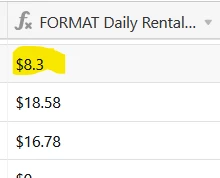
How can I get the zero to appear?

3 replies

Rupert_Hoffsch1
Forum|alt.badge.img+21

Hi @Nedra_Hines, that’s how Airtable behaves in these cases. You can use the following formula on your formula field to add a 0 if truncated:

IF(Formula, Formula & IF(FIND(".", Formula & "") = LEN(Formula & "") - 1, "0"))

(this has been part of an older thread and kudos to @Justin_Barrett for the solution! Missing zero in currency data)


Nedra_Hines
Forum|alt.badge.img+10
  • Author
  • Inspiring
  • August 20, 2022

Hi @Nedra_Hines, that’s how Airtable behaves in these cases. You can use the following formula on your formula field to add a 0 if truncated:

IF(Formula, Formula & IF(FIND(".", Formula & "") = LEN(Formula & "") - 1, "0"))

(this has been part of an older thread and kudos to @Justin_Barrett for the solution! Missing zero in currency data)


Thank you so much!!! It worked!!! :clap: :clap: :clap:


Forum|alt.badge.img+4
  • Participating Frequently
  • September 5, 2024

Hi @Nedra_Hines, that’s how Airtable behaves in these cases. You can use the following formula on your formula field to add a 0 if truncated:

IF(Formula, Formula & IF(FIND(".", Formula & "") = LEN(Formula & "") - 1, "0"))

(this has been part of an older thread and kudos to @Justin_Barrett for the solution! Missing zero in currency data)


@Rupert_Hoffsch1 Hmmm I have gone through this thread and the previous but still can't seem to get it to work. 

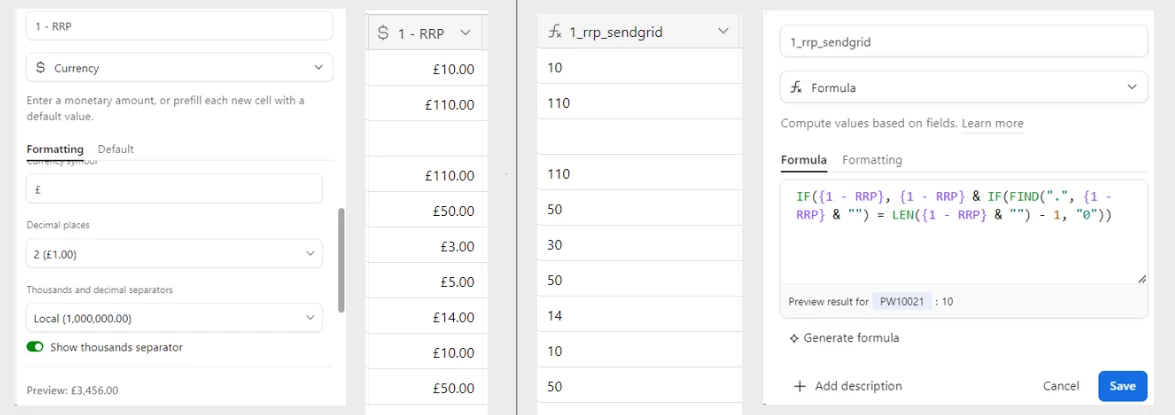
I don't get any error with the formula or anything, just still rounds to two. Even in the preview results window in the formula. I have attached an image below, any help would be great

Thank you!