Using linked records to create a list of filenames

  • August 18, 2023
  • 3 replies
  • 57 views

Forum|alt.badge.img+5

Hello, I've looked around for an answer to this but haven't found one yet, apologies if I've been looking in the wrong place or the answer is obvious.

My airtable has a list of filename prefixes in one field and a corresponding number of files in another. The prefixes are formatted something like this: item-01, and then there would be a file count that can range up into the dozens. What I am hoping to do is use those two fields to create a file name list. So if the file count was 2, I would want a list that would go something like

item-01-001.tif
item-01-002.tif

This data would then be output to a "filenames" tab in the airtable. Is this doable? I am not good with formulas so I've been trying various solutions using linked records and automations but I haven't had any luck. 

Thank you for reading! 
3 replies

Forum|alt.badge.img+19

Hello,

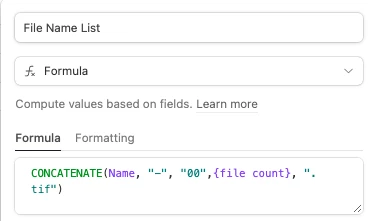
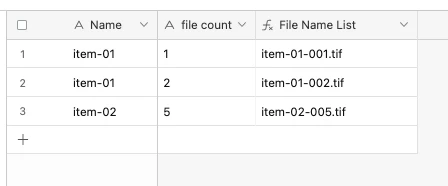
You could use the concatenate formula. If I understood your use case correctly, it would look something like this.

Formula for this example: 

CONCATENATE(Name, "-", "00",{file count}, ".tif")

Forum|alt.badge.img+5
  • Author
  • New Participant
  • August 21, 2023

Hello,

You could use the concatenate formula. If I understood your use case correctly, it would look something like this.

Formula for this example: 

CONCATENATE(Name, "-", "00",{file count}, ".tif")

Sorry but this is not what I'm looking for. In addition to the name/number matching it's important that it produce the correct number of filenames; a single entry will produce multiple filenames. So for example: 

Name
item-01

File count
3

Should produce:

File name list
item-01-001.tif
item-01-002.tif
item-01-003.tif


Forum|alt.badge.img+19

Ahhh, gotcha!