What would be the formula to show the age of a person as of today? I need the result in years

  • June 13, 2016
  • 24 replies
  • 278 views

DATETIME_DIFF([date1], [date2], ‘units’)

I saw this formula but how do I modify it to include my fields and a result in years for the units?

24 replies

Forum|alt.badge.img+9
  • Known Participant
  • June 13, 2016

Here’s my age formula: DATETIME_DIFF(TODAY(), Birthday, ‘years’)

I have a field named “Birthday” in my table that contains the birthdate.


Forum|alt.badge.img+4

Here’s my age formula: DATETIME_DIFF(TODAY(), Birthday, ‘years’)

I have a field named “Birthday” in my table that contains the birthdate.


I use Tim’s method, understanding you get an “ERROR” if the birthday field is not filled in.


  • New Participant
  • February 21, 2017

What do I do If I need my output to be years and months?


Forum|alt.badge.img+12
  • Inspiring
  • February 21, 2017

What do I do If I need my output to be years and months?


To get the age of a person in months:
DATETIME_DIFF(TODAY(), Birthday, 'months')
-> 346

Modifying the above to always give you the remainder when dividing by years, using MOD:
MOD(DATETIME_DIFF(TODAY(), Birthday, 'months'), 12)
-> 10

Finally, concatenating that with the age in years and adding units:
DATETIME_DIFF(TODAY(), Birthday, 'years') & ' years, ' & MOD(DATETIME_DIFF(TODAY(), Birthday, 'months'), 12) & ' months'
-> 28 years, 10 months


  • Participating Frequently
  • January 7, 2018

Here’s my age formula: DATETIME_DIFF(TODAY(), Birthday, ‘years’)

I have a field named “Birthday” in my table that contains the birthdate.


For the formula to work for me, I needed to make: , Birthday, => ,{Birthday},

Thanks for the help.


  • New Participant
  • January 11, 2018

Here’s my age formula: DATETIME_DIFF(TODAY(), Birthday, ‘years’)

I have a field named “Birthday” in my table that contains the birthdate.


Trying to use your DATETIME_DIFF(TODAY(), Birthday, ‘years’)

Still getting that error!! Please help!


  • New Participant
  • January 11, 2018

For the formula to work for me, I needed to make: , Birthday, => ,{Birthday},

Thanks for the help.


Please send me the entire code formula! Thanks.


  • Participating Frequently
  • January 12, 2018

Please send me the entire code formula! Thanks.


DATETIME_DIFF(TODAY(), {Birthday}, ‘years’)

And {Birthday} is a field in my table, of course.

Hope that works for you.


  • New Participant
  • January 12, 2018

DATETIME_DIFF(TODAY(), {Birthday}, ‘years’)

And {Birthday} is a field in my table, of course.

Hope that works for you.


Still giving the formula error!


  • Participating Frequently
  • January 12, 2018

Still giving the formula error!


Maybe there’s something wrong with the data in your Birthday field or there is no information in that field, yet.


Forum|alt.badge.img+5
  • Inspiring
  • January 14, 2018

Still giving the formula error!


Check to make sure the single quotes around 'years' are straight single quotes ('') and not ‘pretty’ matching inverted comma-style single quotes (‘’). Sometimes when you copy-and-paste from the forum, you inadvertently pick up the latter, which will cause an error. Simply overwrite them using the single-quote key on your keyboard.


Forum|alt.badge.img+12
  • Known Participant
  • February 26, 2018

Check to make sure the single quotes around 'years' are straight single quotes ('') and not ‘pretty’ matching inverted comma-style single quotes (‘’). Sometimes when you copy-and-paste from the forum, you inadvertently pick up the latter, which will cause an error. Simply overwrite them using the single-quote key on your keyboard.


Good thoughts, this fixed it for me!

Here’s my final formula:

DATETIME_DIFF(TODAY(),Birthday, ‘years’)


  • New Participant
  • June 7, 2018

To get the age of a person in months:
DATETIME_DIFF(TODAY(), Birthday, 'months')
-> 346

Modifying the above to always give you the remainder when dividing by years, using MOD:
MOD(DATETIME_DIFF(TODAY(), Birthday, 'months'), 12)
-> 10

Finally, concatenating that with the age in years and adding units:
DATETIME_DIFF(TODAY(), Birthday, 'years') & ' years, ' & MOD(DATETIME_DIFF(TODAY(), Birthday, 'months'), 12) & ' months'
-> 28 years, 10 months


Thanks for your response to the “Age” question.

How about instead of Years and Months, you want Years and a Decimal Equivalent for months.

For example exactly 12 years 6 months would simply be 12.5 years old. How to do that .5 calculation within the formula?

Thanks


Forum|alt.badge.img+5
  • Inspiring
  • June 7, 2018

Thanks for your response to the “Age” question.

How about instead of Years and Months, you want Years and a Decimal Equivalent for months.

For example exactly 12 years 6 months would simply be 12.5 years old. How to do that .5 calculation within the formula?

Thanks


To build upon @Matt_Bush’s example, try

IF(birthday,
    DATETIME_DIFF(
        TODAY(),
        birthday,
        'years')&
            RIGHT(
                ROUND(
                    MOD(
                        DATETIME_DIFF(
                            TODAY(),
                            birthday,
                            'days'
                            ),
                        365
                        )/365,
                    1
                    )&'',
                2
                )

That gives you YY.M.


  • New Participant
  • June 7, 2018

I changed birthday to {Birthdate} and used your example, but it failed.
Birthdate is my Field Name

See below:
IF({Birthdate}, DATETIME_DIFF(TODAY(),{Birthdate}, ‘years’) & RIGHT(ROUND(MOD(DATETIME_DIFF(TODAY(),{Birthdate},‘days’), 365)/365, 1) &’’, 2)


Forum|alt.badge.img+5
  • Inspiring
  • June 7, 2018

I changed birthday to {Birthdate} and used your example, but it failed.
Birthdate is my Field Name

See below:
IF({Birthdate}, DATETIME_DIFF(TODAY(),{Birthdate}, ‘years’) & RIGHT(ROUND(MOD(DATETIME_DIFF(TODAY(),{Birthdate},‘days’), 365)/365, 1) &’’, 2)


Oops, I must’ve dropped a parenthesis between testing the routine and formatting it to post.
Try this:

IF(
    {Birthdate},
    DATETIME_DIFF(
        TODAY(),
        {Birthdate},
        'years'
        )&RIGHT(
            ROUND(
                MOD(
                    DATETIME_DIFF(
                        TODAY(),
                        {Birthdate},
                        'days'
                        ),
                    365
                    )/365,
                1
                )&'',
                2
            )
    )

  • New Participant
  • June 11, 2019

Here’s my age formula: DATETIME_DIFF(TODAY(), Birthday, ‘years’)

I have a field named “Birthday” in my table that contains the birthdate.


Works PERFECTLY! Thanks Tim!


  • New Participant
  • December 7, 2019

I used this formula
=TONOW({DOB}, ‘years’)


None of the options worked for me! I get the error sign. :frowning:

Screen Shot 2020-01-22 at 11.35.48 AM|429x500


Forum|alt.badge.img+18

None of the options worked for me! I get the error sign. :frowning:

Screen Shot 2020-01-22 at 11.35.48 AM|429x500


@Khatia_Odzelashvili, your error is due to the quotation marks in your formula - they are curly quotes rather than straight quotes, because you copy-pasted them from styles text here in the forums.

Try just deleting those quotes and retyping them directly in the formula editor.

In case that isn’t clear:

  • Open up that formula editor you screencaptured
  • Place your cursor after the first single quote around the word ‘years’
  • Backspace to delete it, and then type a new single quote
  • Repeat for the single quote after the word ‘years’

Jeremy, thank you, it worked! :smiling_face_with_halo: :pray:


  • New Participant
  • February 27, 2021

That formula works for me! But when I put it in there’s a field that says NaN…is there a way for the field to be empty even if the birthdate field isn’t filled in?


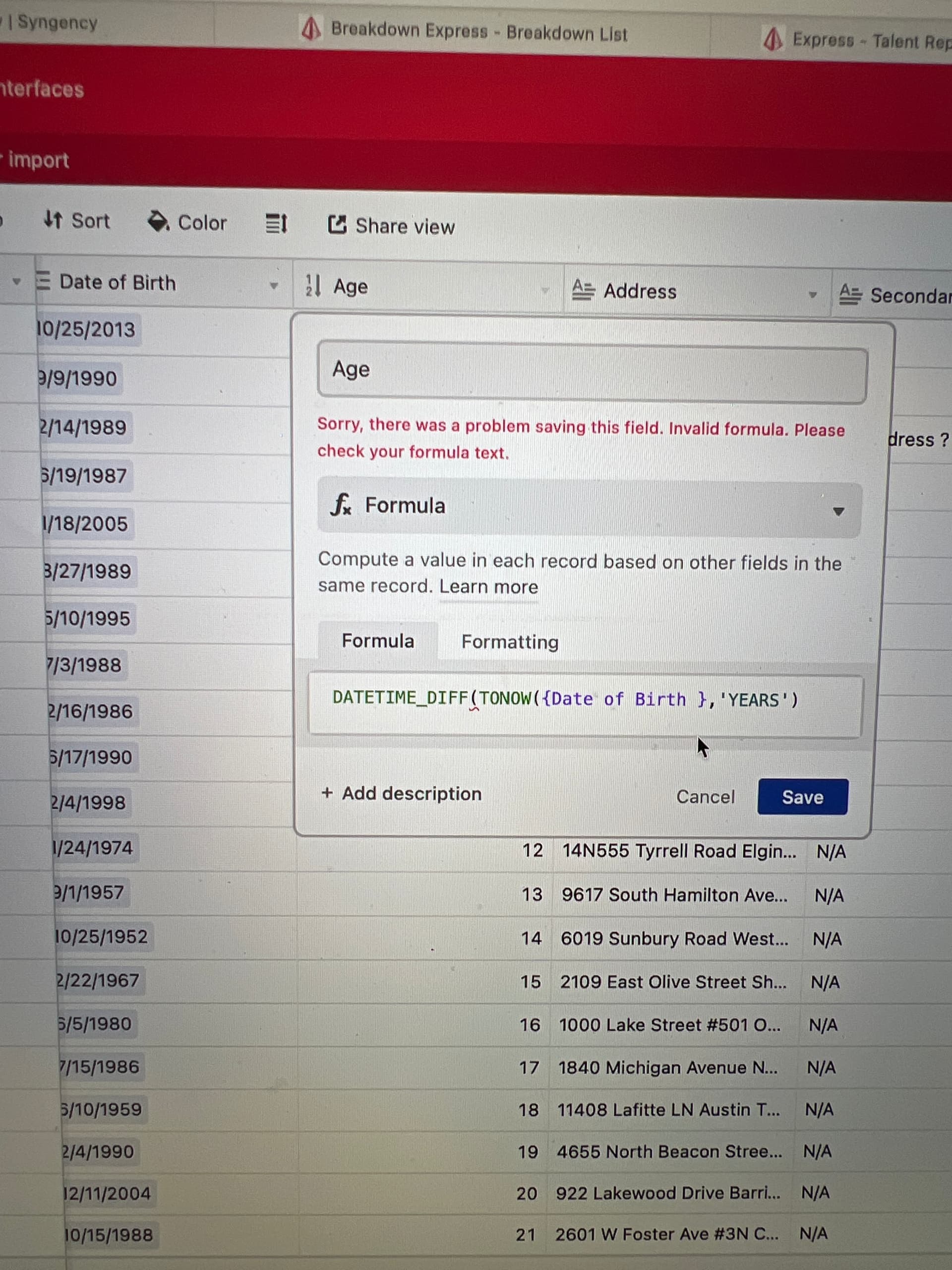
What am I doing wrong - just trying to calculate age from the date of birth


Forum|alt.badge.img+9
  • Known Participant
  • September 28, 2022

What am I doing wrong - just trying to calculate age from the date of birth


It looks like you’ve combined the two approaches. My original solution using the DATETIME_DIFF() function is fine, but it’s useful to check and see if there’s data in the cell that contains the {Date of Birth} too. The function would look like this:

IF({Date of Birth}, DATETIME_DIFF(TODAY(), {Date of Birth}, 'years'))

As others have said, watch out for curly quotes. Make sure you have the straight tick mark quotes in your formulas.

The other approach using TONOW() works too (and didn’t exist when I did my original post), but it includes the word years in the output which I don’t want. That formula would look like this:

TONOW({Date of Birth}, 'years')

Either approach works.