Question

Different Interfaces has different record url

  • December 5, 2025
  • 6 replies
  • 99 views

Forum|alt.badge.img+1

Hello, we have an issue with the urls of the records on the interfaces.

We have basically 2 interfaces 1 for our project manager and one for our dev team.

The issue is when we try to share a record url from the interface to our dev team they can’t access the url because they have their own interface even if the record is basically the same.


So how to solve this issue? Any idea or workaround?

We need to have different interfaces for different teams and is a pity we could not cross share records url.


Thanks a lot!

6 replies

TheTimeSavingCo
Forum|alt.badge.img+31

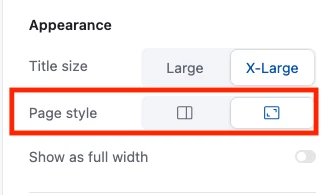
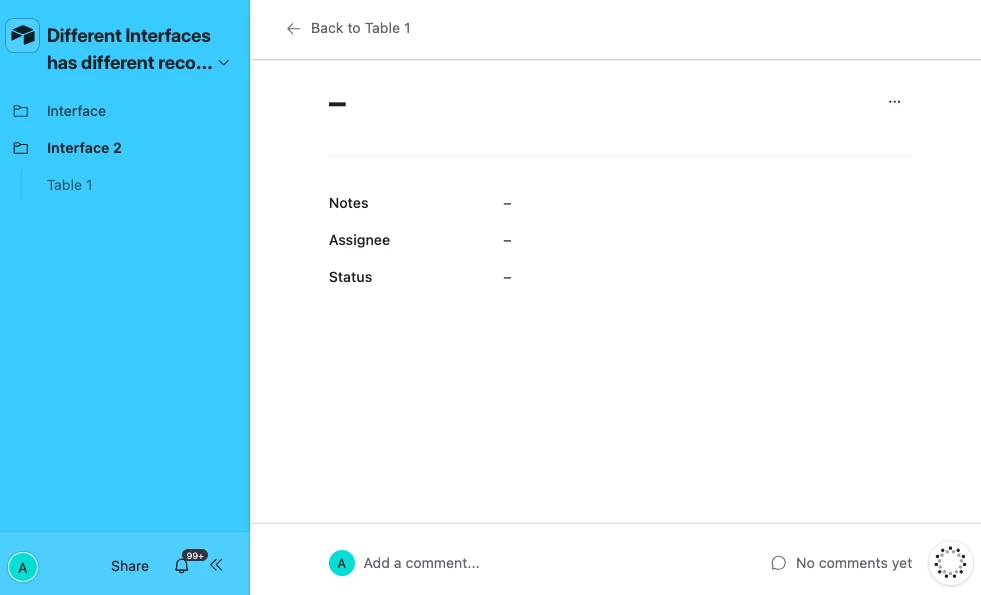
Depends on what Interface Layout you’re using I’m afraid.  Assuming we’re talking about a Record Detail, if you use the full screen version of that layout the Record ID gets used in the URL if that helps?

e.g. the following two URLs point at the same record in two different Record Detail Interfaces

https://airtable.com/appbs7SNL6vqXkB9L/pagT49DSTsEqO0na1/rec9x3xcA7aUooZUp/home=pagVIE4COa6gpFRdt

https://airtable.com/appbs7SNL6vqXkB9L/pagXhWGuZT0Wi6cPD/rec9x3xcA7aUooZUp?home=pag4J7U9WDBPZvEhV

And so you could use a formula field to help you construct the link that your PM can then link to your Dev team

And here’s what I mean by a full screen layout:


Mike_AutomaticN
Forum|alt.badge.img+28

Hey ​@AryanShirani,


@TheTimeSavingCo solution above is exactly what you are looking for. Please feel free to reach out if you need any help setting this up! 
 

Mike, Consultant @ Automatic Nation 


Forum|alt.badge.img+1
  • Author
  • New Participant
  • December 7, 2025

@TheTimeSavingCo thanks a lot for sharing, I just tested that but the problem is persisting, if I try to send the url of that task by copying the url from the browser bar, the dev user gets a error message similar to “You don’t have permission for the interface”.

So basically is not possible to share the task url between 2 interfaces even if you change the layout to a popup layout as shown in your screenshot.

I am missing something?


Forum|alt.badge.img
  • New Participant
  • December 7, 2025

It’s true that different interfaces can make finding information a bit tricky. I recently used the Lee property lookup and found it surprisingly straightforward to navigate through detailed records. Having a reliable source in the middle of all these options really helps streamline the research process. Definitely makes comparing data much easier.


Mike_AutomaticN
Forum|alt.badge.img+28

Hey ​@AryanShirani,

Do remember that copying the url from the browser is not enough. If your record has some way of figuring out whether the PM or the Dev url should be used, you can have a formla which will say something like:
 

IF(
ConditionHere,
"https://airtable.com/appPM12345/pagPM6789/" & RECORD_ID() & "/home=pagPMVIEW",
"https://airtable.com/appDEV12345/pagDEV6789/" & RECORD_ID() & "/home=pagDEVVIEW"
)


If your record does not have a way of figuring out whether the PM or Dev url should be used, then you will probably need to have two different fields. One with the constructed url for the PM the other one for the construced url of the dev.

The important thing here is that they are actually two different root urls. Pm will never be able to access dev’s given your permissions and viceversa. You will want to construct the url in a formula to make sure that each record has its own direct url in a dynamic way.

Feel free to reach out if you need help setting this up.

Mike, Consultant @ Automatic Nation


TheTimeSavingCo
Forum|alt.badge.img+31

if I try to send the url of that task by copying the url from the browser bar, the dev user gets a error message similar to “You don’t have permission for the interface”.

Ah that’s not how you would share it.  The steps for setting this up are:

  1. Set the Dev Interface layout to use a full page record detail
  2. Open any record in that layout and copy the url from the full page detail
  3. Create a new formula field that rebuilds that url dynamically by swapping out the record ID in the copied url with record_id().  Your end product will look like something like this, with the app and page IDs being different of course:
    1. 'https://airtable.com/appbs7SNL6vqXkB9L/pagXhWGuZT0Wi6cPD/' & RECORD_ID() & '?home=pag4J7U9WDBPZvEhV'
  4. Display this formula field in the PM Interface so that they can copy the value and send it to the development team


---

How this works

The URL has a few parts:
- App ID (which base): appbs7SNL6vqXkB9L
- Page ID (which interface page): pagXhWGuZT0Wi6cPD
- Record ID (which specific record): rec9x3xcA7aUooZUp
- ?home=… (which interface layout to open): pag4J7U9WDBPZvEhV

We replace the record ID portion with RECORD_ID() so the link always opens the correct record’s detail view in the Dev interface for anyone who clicks it