Question

Showing cumulative record count over time

  • January 26, 2026
  • 10 replies
  • 54 views

Forum|alt.badge.img+3

I am trying to figure out how to show growth of a set of records over time, cumulatively. I have created a column in my table that shows the date of when each new record was added, but when I try to graph that in Interfaces, it seems to only let me show to total number of records added in each given month, I can’t figure out how to make a chart that shows the new monthly total added to the previous monthly total to give cumulative growth over the course of the year.


I have found a few previous help questions that were similar, but it seems like no one really got an answer. Is this impossible in Airtable?


10 replies

DisraeliGears01
Forum|alt.badge.img+21

The easiest solution that I often implement is adding a DATETIMEFORMAT({Creationdate}, ‘MMM’) formula field, and formatting that as a single select. So then every date will output Jan, Feb, Mar, etc. You can then add a bar graph tallying those up.

That’s how I make this chart work

I also have a DATETIMEFORMAT year formula and have that as a selectable filter too.


Forum|alt.badge.img+3
  • Author
  • New Participant
  • January 26, 2026

Thank you for this. This is a great trick, but it still doesn’t let me get a cumulative count… In other words, a chart showing the growing totals over time.


ScottWorld
Forum|alt.badge.img+35
  • Genius
  • January 26, 2026

@Dahvi 

There is no automated nor quick way to do that in Airtable.

You would need to create an entirely separate table in Airtable that you could call your “Reporting” table.

Then, each record in that table would represent a different month & year.

So, for example, each row would look something like this: 

January 2026
February 2026
March 2026
April 2026

Then, you would need to add a linked record field that links to all of your records in your “master table” that you want to be a part of that particular month & year.

Then, you would add a “count” field that would show you the count of all the linked records for that month & year.

One tricky part would be getting all the old records in your “master” table to continually link to each new record that you create in your “Reporting” table.

What I would recommend is creating an automation so whenever you create a new record in your “Reporting” table, it automatically finds all the old records in your “master table” and links them to your new “reporting” table. (Airtable can only find a maximum of 1,000 records, so if you think you’ll have more than that, you’ll need to use Make’s advanced automations for Airtable.)

The even trickier part is getting all of your new records in your “master table” to link to only the newest reporting record whenever you create a new record in your “master table”.

You can do this by creating a formula in your master table that results in each record’s month & year (so, for example, the formula would result in “January 2026”), and then setup an automation that copies & pastes that formula into the linked record field that links it to the “Reporting” table.

Then, you can create a chart/graph from your “Reporting” table.

As I mentioned above, the trickiest part will be making sure all of your “master records” are continually linked to the right records in the “Reporting” table.

Hope this helps!

If you have a budget and you’d like to hire the best Airtable consultant to help you with this or anything else that is Airtable-related, please feel free to contact me through my website: Airtable consultant — ScottWorld


DisraeliGears01
Forum|alt.badge.img+21

Ohhhh...

Okay, well this is a bit of a PITA and maybe somebody has a better solution, but I figured out something that works for your rolling cumulative…

Instead of a formula for month, create a new table (lets call it Calendar) with records titled Jan, Feb, Mar, etc. Link your created dates to that table (so Jan should have 31 records if it’s daily, you could use the Datetimeformat formula to make this easier/automate). In the Calendar table, you also should make a self-referenced link to the preceding/following month. 

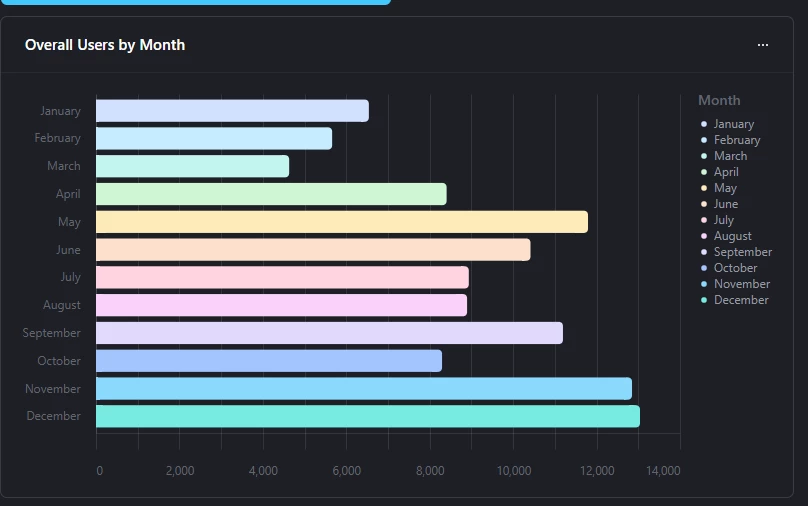
In the Calendar table add a rollup of the metric you’re tracking, lets take Users from my example above. So now in that Calendar table I have total users for all Jan and Feb and March, we just need to add them together. Because of the self referential link, you can add a lookup that shows the preceding months total, and then a formula adding those together. 

Now do that 10 more times with new fields and by the end you’ll have a computed field that displays a cumulatively added monthly total. Then you can make a bar graph haha. 

Box in red is 5 months stacking, the principal is the same


ScottWorld
Forum|alt.badge.img+35
  • Genius
  • January 26, 2026

@DisraeliGears01 

Nice! Another great way of accomplishing this! 😃🙌

- ScottWorld, Expert Airtable Consultant


TheTimeSavingCo
Forum|alt.badge.img+31

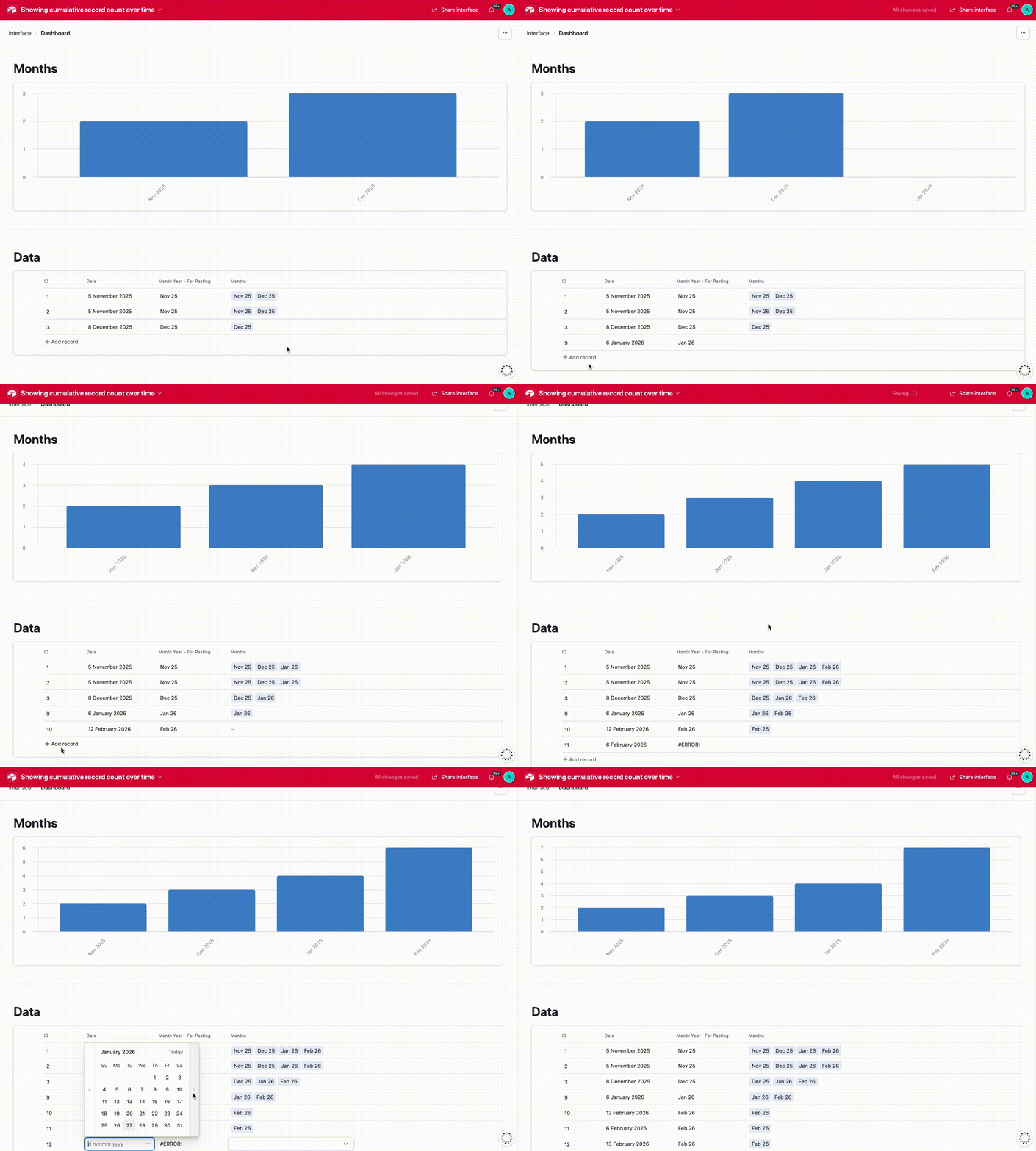
Does this look right?  If so I’ve set it up here for you to check out!


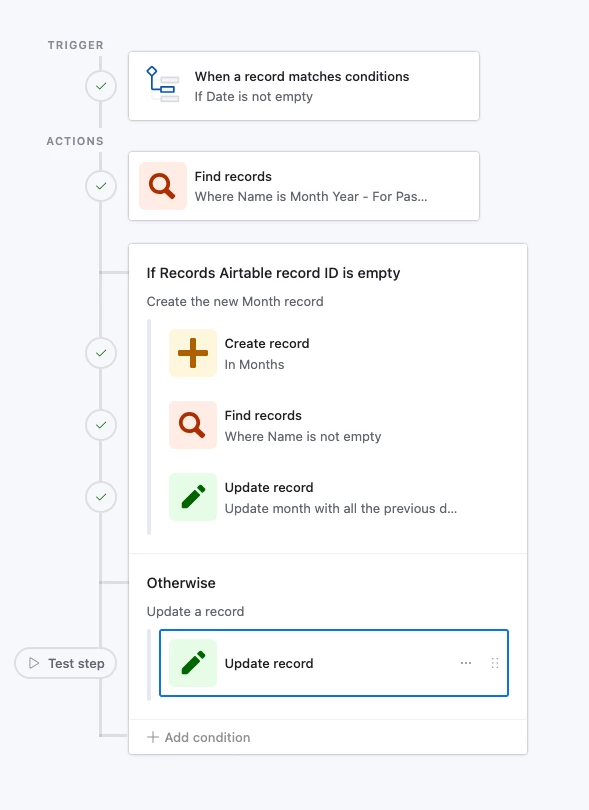
And here’s how the automation looks:


The idea is to create a new table where each record represents a single month and create a system to cumulatively link your data records to each month.  The automation first tries to look for a record in the Months table for the triggering record’s month, and if it doesn’t find one it’ll:

  1. Create the new month
  2. Grab all the previous data records via the Months table
    1. This’ll stop working when you hit 1000 month records but that’s probably fine?
  3. Link the previous data records to the new Month record

If it finds one, then it just links the new data record to the found Month record


Mike_AutomaticN
Forum|alt.badge.img+28

Hey ​@Dahvi,

I did not give this a shot yet, but I wonder if custom interfaces built using Omni could do this for you without the need of messing with helper fields or automations in the data layer. ​@ScottWorld ​@DisraeliGears01 ​@TheTimeSavingCo any thoughts?

Mike, Consultant @ Automatic Nation 
YouTube Channel


Forum|alt.badge.img+3
  • Author
  • New Participant
  • January 27, 2026

Wow everyone! Thank you! So much to try here. Let me see what I can figure out with all of the ideas above. (NOTE for Airtable: It would be AWESOME if there were an easier way to do this.)


ScottWorld
Forum|alt.badge.img+35
  • Genius
  • January 27, 2026

@Mike_AutomaticN 

Good question — it might be worth a shot to see if Omni could build that out as an interface page!

That would be very cool if Omni could do it.

- ScottWorld, Expert Airtable Consultant


Mike_AutomaticN
Forum|alt.badge.img+28

Wow everyone! Thank you! So much to try here. Let me see what I can figure out with all of the ideas above. (NOTE for Airtable: It would be AWESOME if there were an easier way to do this.)


Whilst we are at it, you might want to submit this as a feature request using this form!

Mike, Consultant @ Automatic Nation 
YouTube Channel