Question

Streamline equipment check-in/check-out for multiple records

  • January 9, 2026
  • 12 replies
  • 109 views

Forum|alt.badge.img+1

I’ve seen similar questions asked, but I can’t quite find the solution I’m looking for.

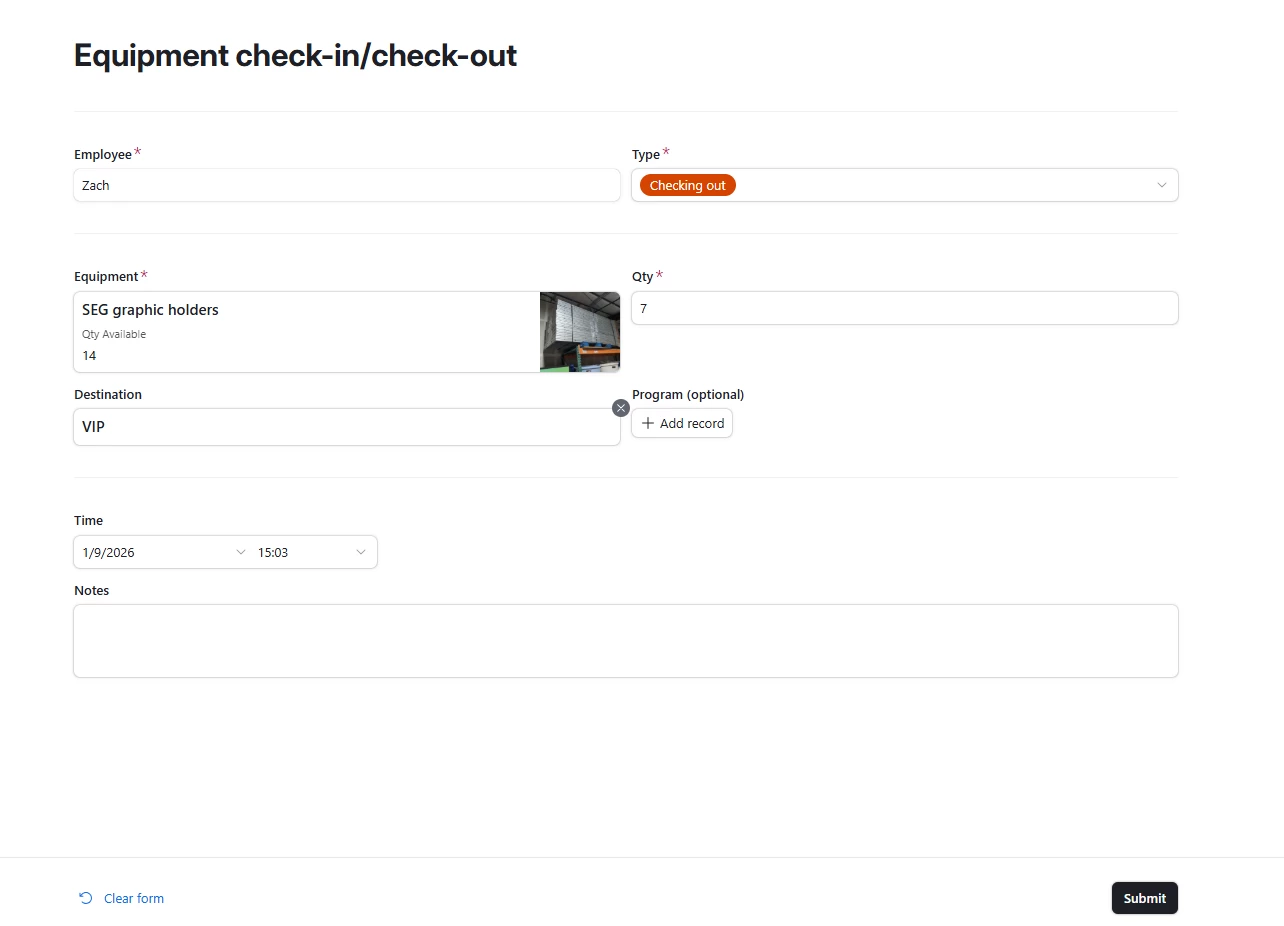
I manage a fairly large (~2000 item) equipment inventory. I have a system to check items in and out to different people, projects and locations. Basically, I have a table of inventory items, and a table of in/out transactions that links to the inventory table and includes quantity checked out, destination, program, etc. I also have a form for various users in the company to create a transaction record, and dynamic fields in the inventory table to keep track of how much inventory is available, and how much is checked out and to whom. Screenshots below:


Inventory Table
Transaction Table
Checkout Form
Outstanding Inventory interface view

This is fine for checking out a single inventory item, but it’s rather slow and cumbersome for checking out multiple items at once. Think someone loading a truck with a barcode scanner. I’ve seen Fillout recommended multiple times here and gave that a shot, but wasn’t very happy with the results. I was able to get multiple items checked out on the same form, but it required me to make another linked table of inventory items and quantities and for users to create a new record for every item they were checking out. This was only slightly quicker than submitting the native Airtable form multiple times, but it was much more complex.

What would be great is if form users could somehow select multiple inventory items and associated quantities in a grid type view. Or, if they could fill out the name, type, destination and program fields only once, then enter a new inventory item and quantity every time the submit button was pressed. Or anything else… I’m open to any ideas to speed the process up.

Thanks, and I hope this makes sense!

12 replies

TheTimeSavingCo
Forum|alt.badge.img+31

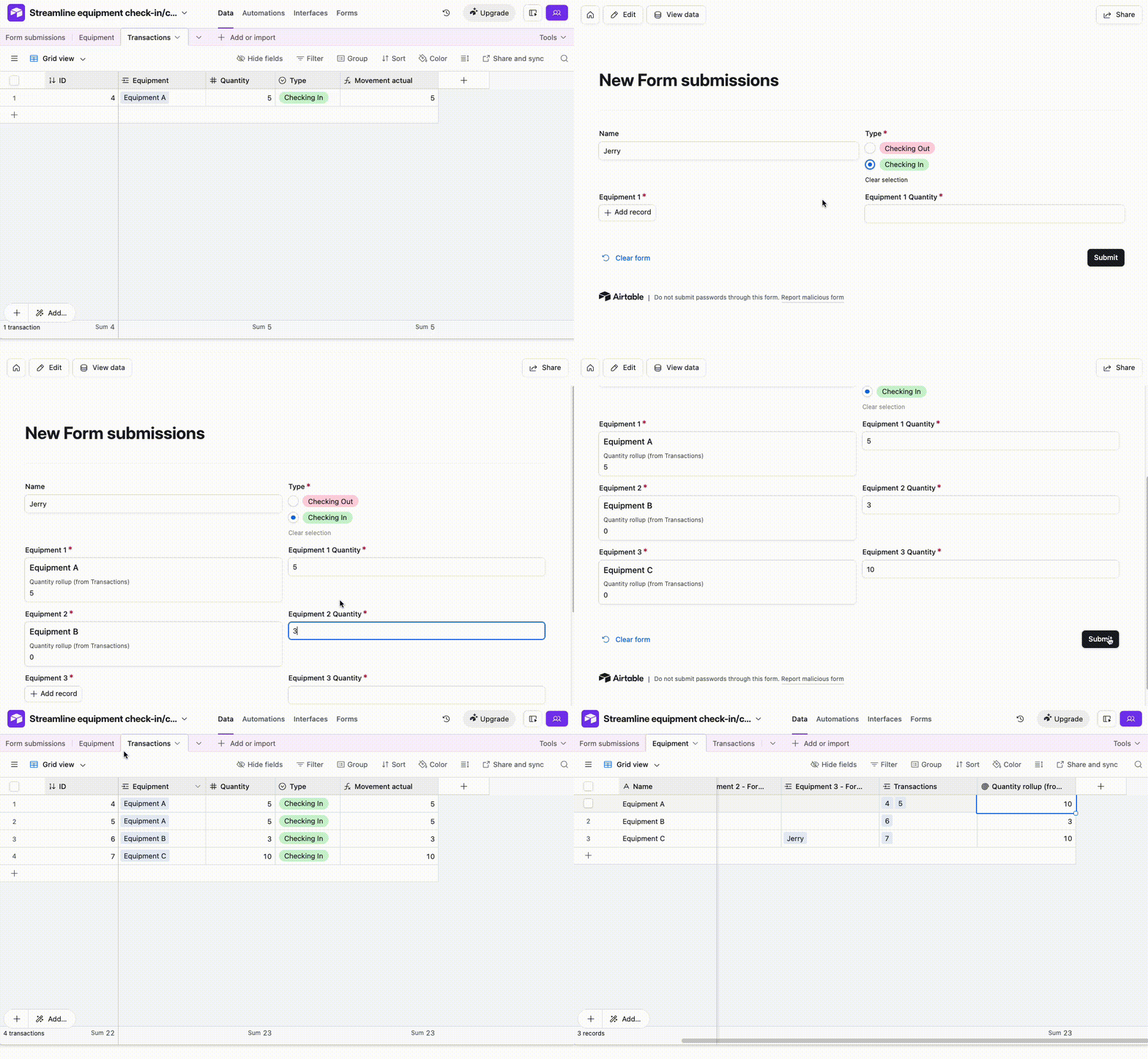
Not ideal, but the last time I faced this issue I ended up creating a bunch of extra linked fields so that the user could key in multiple line items into the same form, and then used an automation to create the records in the Transactions table.  I’ve set it up here for you to check out

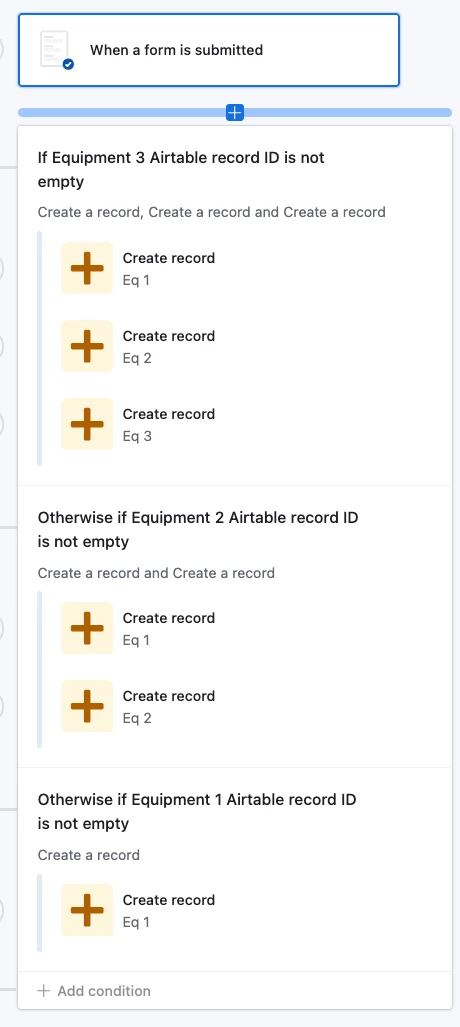
The main downside is that there’s a max number of items we can add at one time via the form; up to 6 I believe, based off of the 25 actions per automation limitation.  Other than that it works pretty well for me!

And the automation looks like this


ScottWorld
Forum|alt.badge.img+35
  • Genius
  • January 10, 2026

@zhenry 

This is a great example of the type of app that Airtable isn’t very well suited for.

If you’re open to switching away from Airtable, the #1 best database app for this sort of thing is Apple's FileMaker.

I was a Certified FileMaker Developer for almost 30 years before becoming a top Airtable consultant in 2018, and I developed several incredible equipment check-in & check-out inventory systems powered by barcode scanners in FileMaker.

Even to this day, if anybody approaches me for this sort of a system in Airtable, I tell them that Airtable is not the right app for this, and I recommend that they use FileMaker.

If you're interested, I can refer you to some FileMaker developers who can help you with this. Just contact me through my website.

- ScottWorld, Expert Airtable Consultant 


Forum|alt.badge.img+1
  • Author
  • New Participant
  • January 12, 2026

Thanks both for the replies!

@TheTimeSavingCo I will look at this method, this looks like it could be a good workaround for what we are trying to do.

@ScottWorld Good to know about FileMaker. I’ve gotten a fair bit down the road with Airtable so it would be a bit painful to switch, but I’ll keep it in mind. In the past Apple’s closed ecosystem has been a bit of a turn off for me, but maybe that has changed in recent years. None of our company is currently in the Apple ecosystem.

I have one more idea for how to do a quick checkout of multiple items… I’m going to work on it today, and I’ll report back if I have any success.

Thanks for the help!


ScottWorld
Forum|alt.badge.img+35
  • Genius
  • January 12, 2026

@zhenry FileMaker is fully multi-platform. It runs on Windows PCs, Macs, iPhones, Androids, all web browsers, everything. I think that 90% of their customers are running Windows. It’s been around for 40+ years, so it’s really the most mature and powerful database on the planet for companies that are under 1,000 users. I just mentioned that it was from Apple so that you know the strength and power and money behind it — it’s not going anywhere  

- ScottWorld, Best Airtable Consultant 


Forum|alt.badge.img+1
  • Author
  • New Participant
  • January 12, 2026

@ScottWorld thanks for the info!

I found a bit of a workaround for checking out lots of things within the interface.

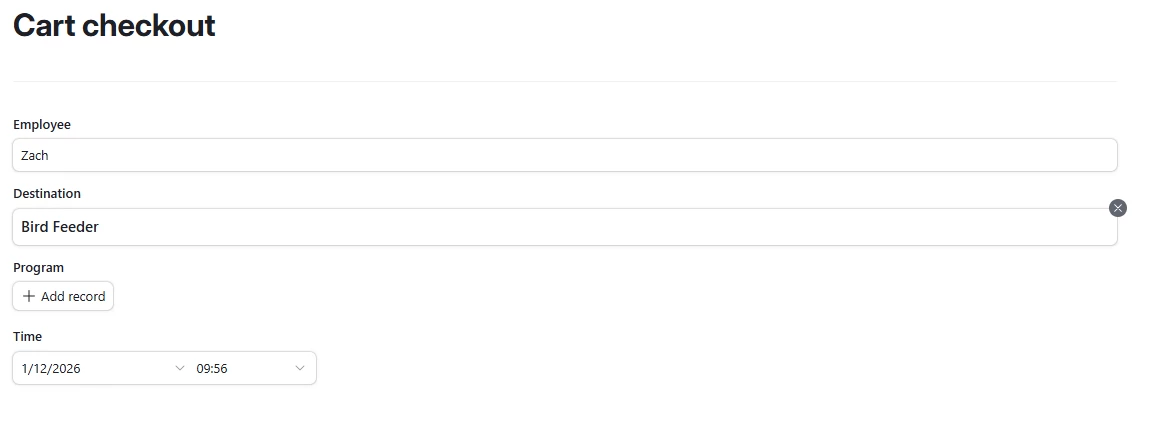
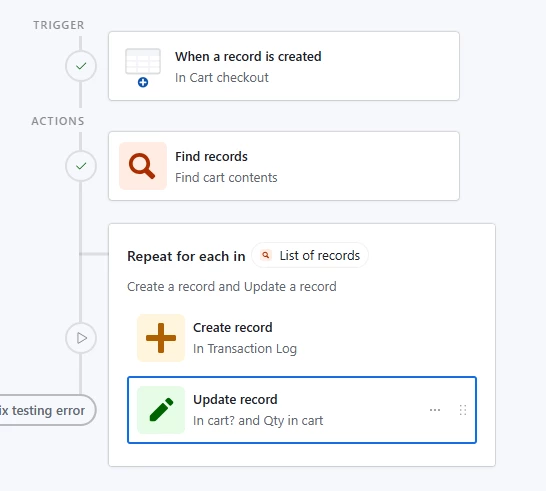
I added a checkmark field to the inventory table for “Add to cart,” and another field for the “Qty in cart.” Then I added another table for cart checkouts with employee, destination, program and time fields, and an interface form to add a record to this table. Adding a record triggers an automation to add a record to the transaction table for every piece of equipment with the “Add to cart” checkbox ticked, and fill in the quantity, employee, destination etc fields appropriately. Finally the cart fields are reset.

So, to check out a ton of items at once, a user would tick the checkbox and fill out the quantity on every item they wanted, then submit a checkout form with their name, the destination and program, and the time.

Inventory selection page


Cart page
Cart checkout page


Automation flow
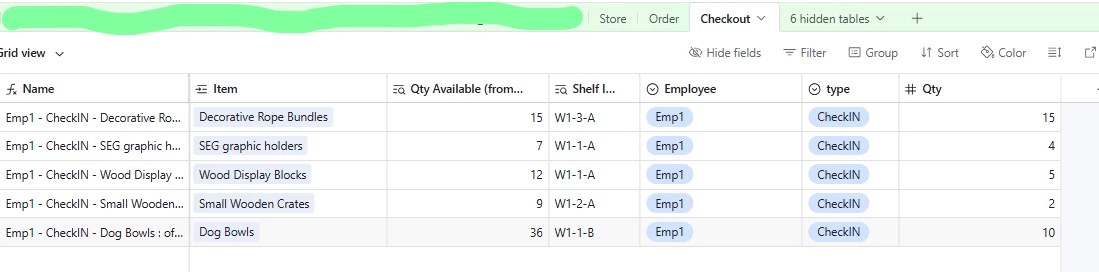
Corresponding transaction records created by automation

This basically covers all the features I was looking for. However, since it isn’t entirely contained within a form and requires inline editing in the interface, its use is limited to editors/creators. I think we can make this work for now, though it would still be nice to get it all done within a form.

Thanks for the help!


TheTimeSavingCo
Forum|alt.badge.img+31

That’s pretty neat! 

The only potential issue with this is that only one person can use this system at a time but I take it that’s not a problem?

Assuming it did become a problem, you could use a system where you would have a Record Review / Blank layout that would let users create Cart records on the fly, and it would:

  1. Look for all the active Inventory records
  2. For each of those, create a ‘Cart Line Item’ that’s linked to the Cart
  3. The Interface would show the user all these Cart Line Item records for them to tick the ‘Add to cart’ checkbox and set the quantities, destinations, etc
  4. A ‘Submit’ or equivalent checkbox / single select that would trigger another automation
    1. This automation would find all the newly created Cart Line Item records that were linked to this Cart record that didn’t have ‘Add to cart’ checked and delete them to make sure everything’s cleaned up

Flow Digital
Forum|alt.badge.img+2
  • Participating Frequently
  • January 13, 2026

Hey there!

This is a common pain point with inventory systems. Here's the most efficient solution:

Solution: Batch Checkout with Junction Table

Architecture:

Create a new table structure:

  • Batch Checkouts (new table)
  • Batch Items (new junction table)
  • Transactions (your existing table)

Tables Setup:

Batch Checkouts table:

  • Name (single line text)
  • Destination (single select)
  • Program (single select)
  • Date (date)
  • Status (single select: "Draft", "Submitted")

Batch Items table (junction):

  • Link to Batch Checkouts (linked record)
  • Link to Inventory (linked record)
  • Quantity (number)

How it works:

  1. User creates ONE batch checkout record with common fields (name, destination, program)
  2. Uses an Interface grid view to add multiple inventory items to that batch - each row is one item + quantity
  3. When ready, they change Status to "Submitted"
  4. Automation triggers and creates individual Transaction records from all Batch Items

Automation Script:

let batchTable = base.getTable("Batch Checkouts");
let itemsTable = base.getTable("Batch Items");
let transTable = base.getTable("Transactions");

// Get the batch record that triggered this
let batchId = input.config().batchId;
let batchRecord = await batchTable.selectRecordAsync(batchId);

// Get all items in this batch
let itemsQuery = await itemsTable.selectRecordsAsync({
fields: ["Link to Batch Checkouts", "Link to Inventory", "Quantity"]
});

let batchItems = itemsQuery.records.filter(
record => record.getCellValue("Link to Batch Checkouts")?.[0]?.id === batchId
);

// Create transaction records
let transactions = batchItems.map(item => ({
fields: {
"Inventory Item": item.getCellValue("Link to Inventory"),
"Quantity": item.getCellValue("Quantity"),
"Name": batchRecord.getCellValue("Name"),
"Destination": batchRecord.getCellValue("Destination"),
"Program": batchRecord.getCellValue("Program"),
"Date": batchRecord.getCellValue("Date")
}
}));

// Batch create
while (transactions.length > 0) {
await transTable.createRecordsAsync(transactions.splice(0, 50));
}

Interface Setup:

Create an Interface with:

  • Form to create new Batch Checkout
  • Grid element showing Batch Items filtered to current batch
  • Users add inventory items directly in the grid (fast data entry)
  • Submit button updates Status field to trigger automation

Why this works:

  • Common fields entered once
  • Grid view is fast for adding multiple items
  • Works with barcode scanners (they can scan into the grid)
  • Automation handles the heavy lifting
  • Original Transaction structure stays intact

Pro tip: Add a "Delete Batch" automation that cleans up the batch records after successful creation to keep things tidy.

Flow Digital - Most Rated Automation Agency in the World


Forum|alt.badge.img+1
  • Author
  • New Participant
  • January 13, 2026

Thanks for the replies!

I think I am not understanding entirely the purpose of the additional cart or “batch items” table, but that may be due to a gap in my understanding of the way Airtable and interfaces work. Would there not still be the limitation of one active cart, or batch, at a time? Why not add selected records to the transaction log immediately, without the step of an intermediate table?

I think the edge case of two users attempting to do a batch checkout at the same time are quite low. It would only happen if two different people were at the warehouse checking things out for two different projects simultaneously, and I think that is probably pretty unlikely.


Alexey_Gusev
Forum|alt.badge.img+25

Hi
Airtable has a lot of ways to achieve this goal, including AI

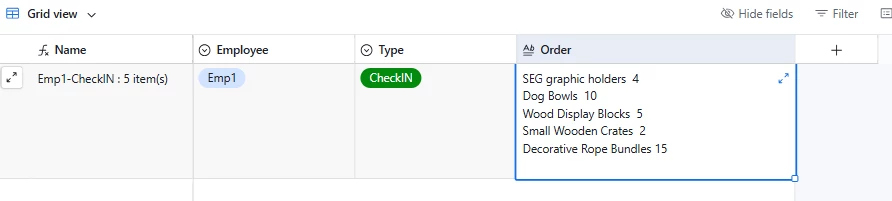
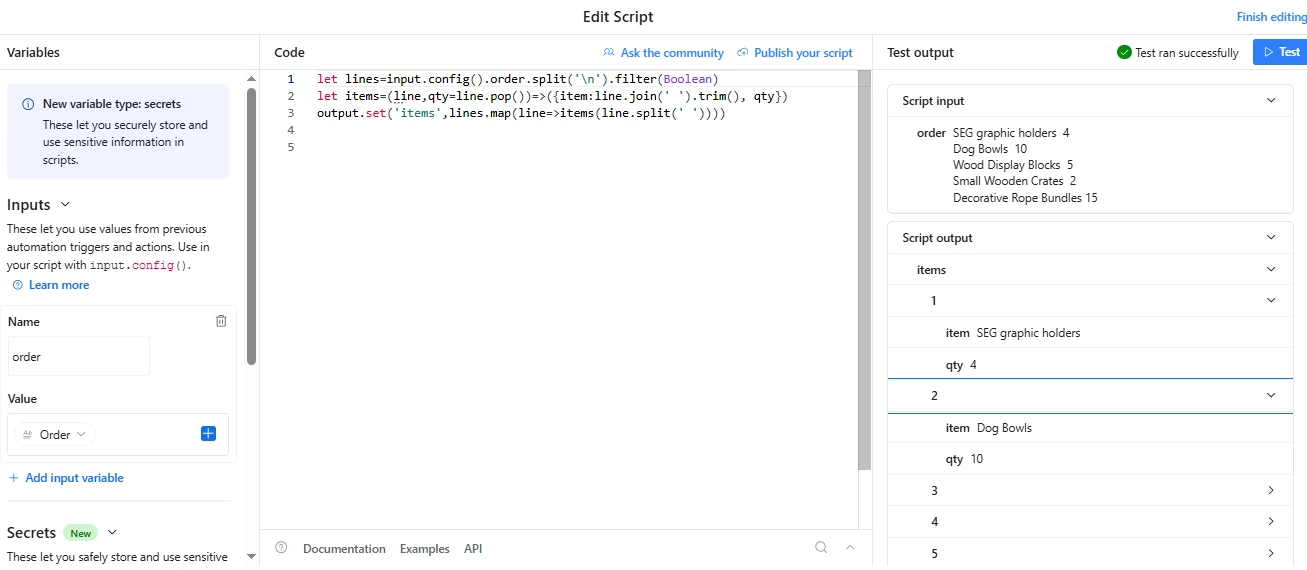
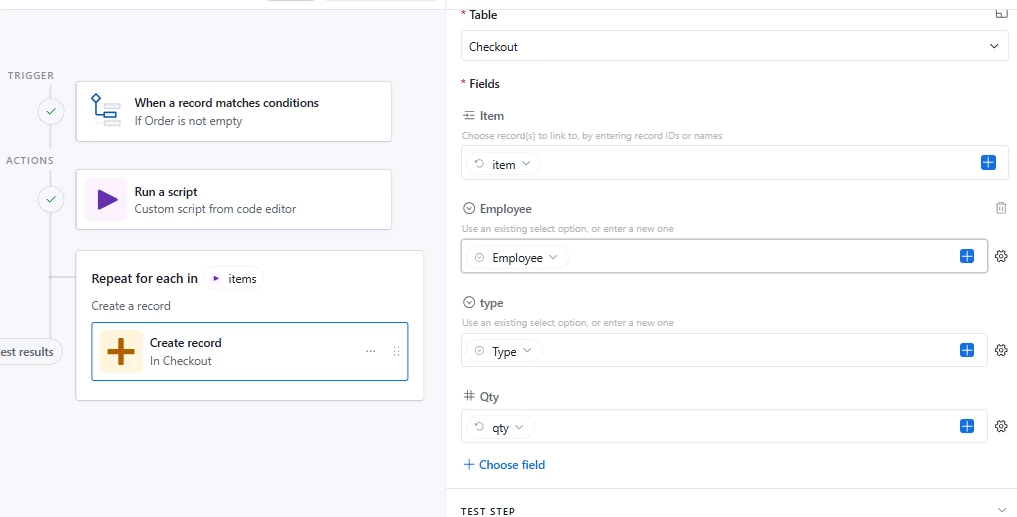
When you fill form with employee, type and order,


automation creates checkout records in other table, quantity must be last in line, divided by space or several spaces.

I didn’t use AI, but added a bit scripting


The rest is done by automation


Of course some additional functionality must be added, like checking what if such item not exists in Store list (AI might help with that) , or checking that the quantity should not exceed available in the store. Its just for example.


TheTimeSavingCo
Forum|alt.badge.img+31

Would there not still be the limitation of one active cart, or batch, at a time?

Ah, once we add a new Cart record, the list of items that are created would be only for that Cart

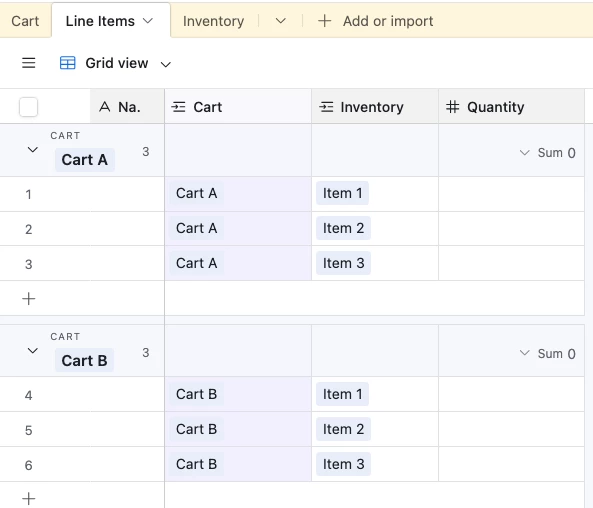
For example:

Jerry creates Cart A.  Automation finds 3 active Inventory items and creates them as Line Items linked to Cart A

Elaine creates Cart B.  Automation finds 3 active Inventory items and creates them as Line Items linked to Cart B

And so you’d end up two sets of Carts that each user could work on at the same time:


Why not add selected records to the transaction log immediately, without the step of an intermediate table?

Yeap that’s fine if we’re not worried about two people using it at once!

In that situation, the primary upside of having a Cart table would be it letting us store the Cart specific data, such as the Employee, Destination, Program, Date, etc


Forum|alt.badge.img+1
  • Author
  • New Participant
  • January 14, 2026

Ah, gotcha! So, this concept is running in the data view? I was thinking of interfaces, but maybe that is an unnecessary constriction. I just want to minimize the learning curve/friction for less tech savvy users. Am I correct in thinking that you can't construct interface pages or elements with scripts and automations?


TheTimeSavingCo
Forum|alt.badge.img+31

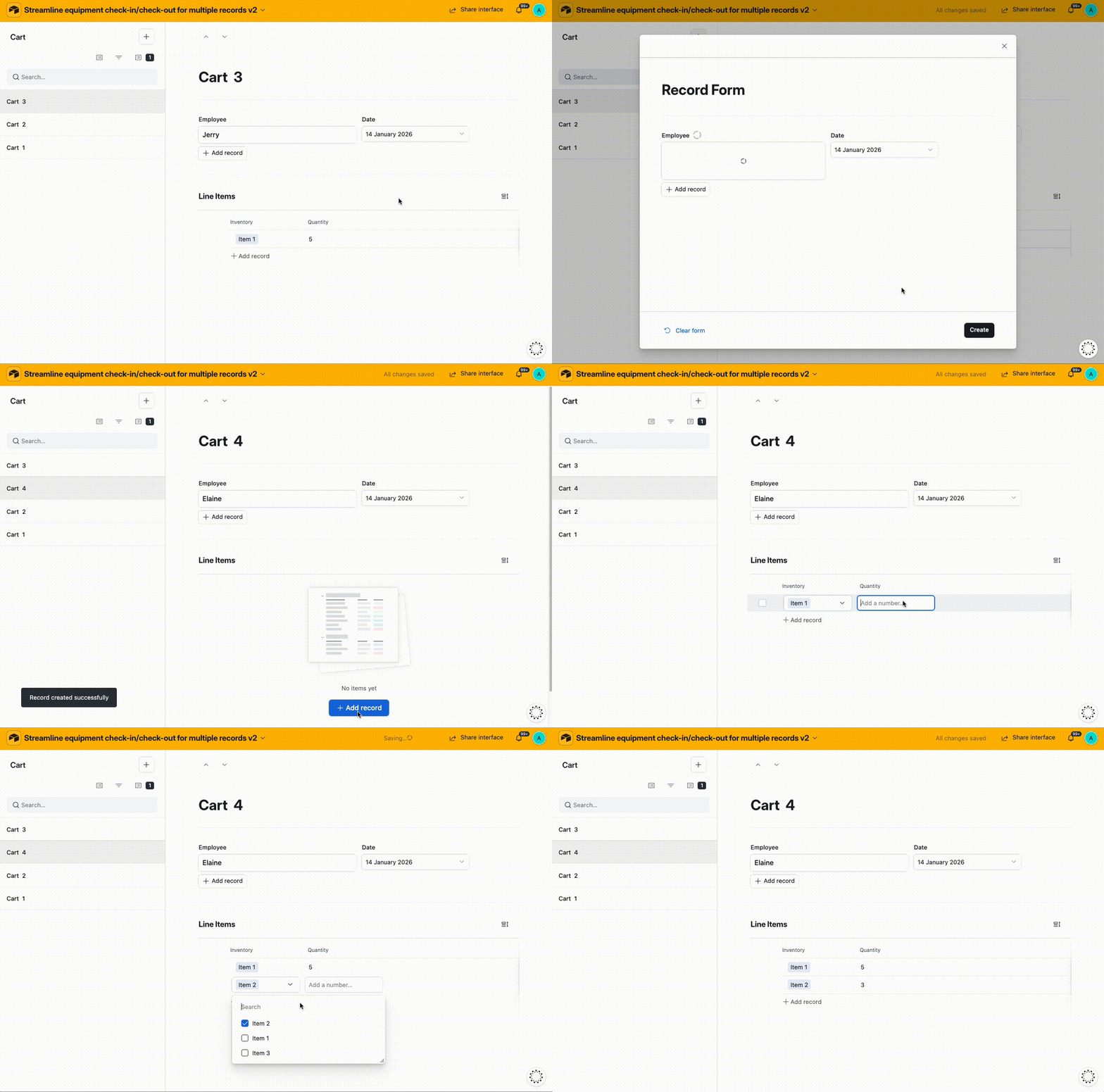
Ah, gotcha! So, this concept is running in the data view? I was thinking of interfaces, but maybe that is an unnecessary constriction. I just want to minimize the learning curve/friction for less tech savvy users.

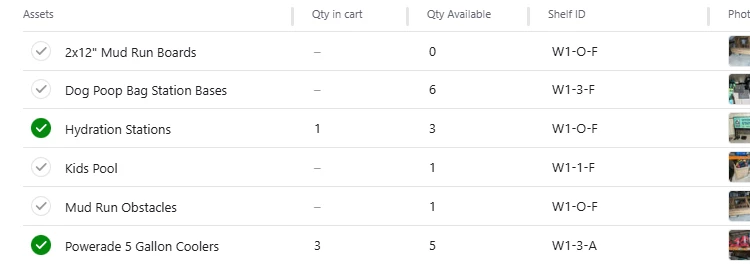
Nope, it’d be in Interfaces and this is how it might look:


And if you want to prepopulate the list of items because checkouts use most of the items in Inventory, you could set up an automation to do that too


---

Am I correct in thinking that you can't construct interface pages or elements with scripts and automations?

Oh nah, we can totally trigger automations and automations with scripts, depending on the Layout you’re using.  Can’t trigger Script Extensions though

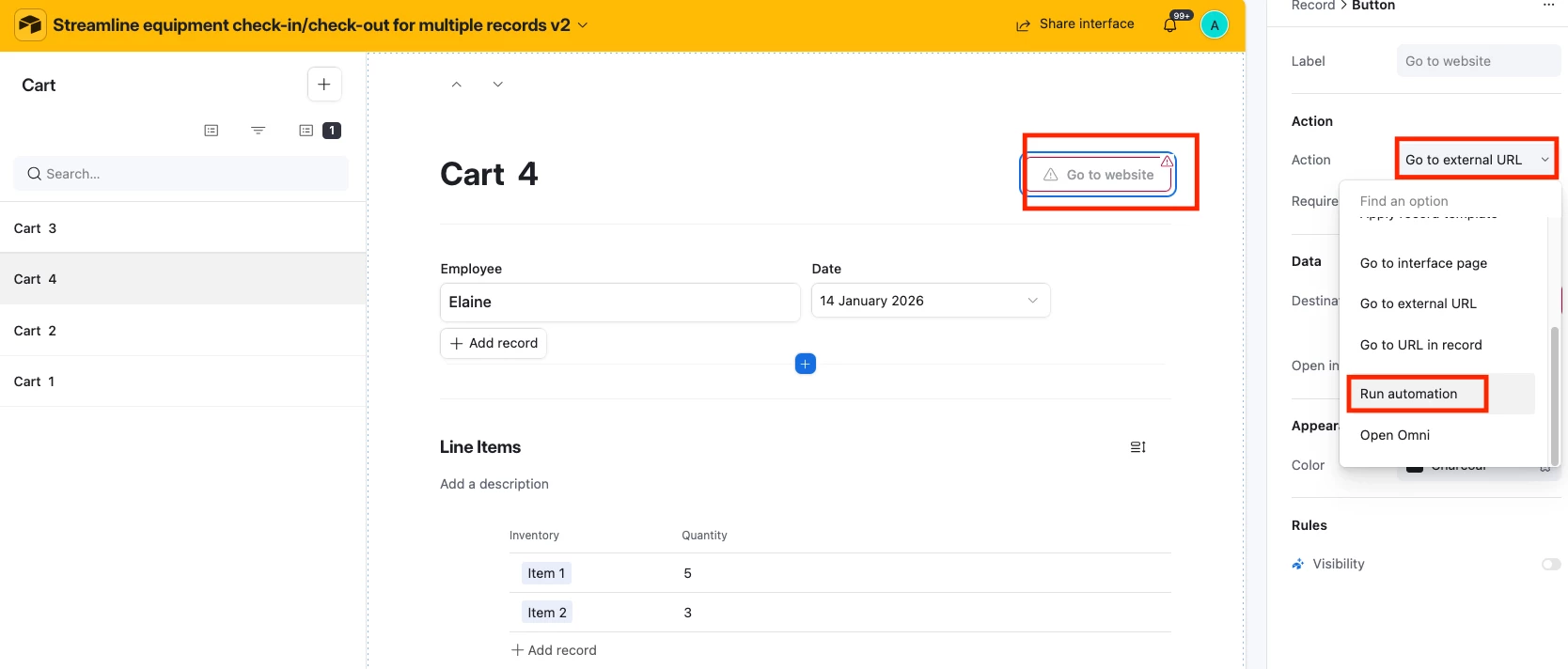
For example, on a Record Review we can add a button to trigger an automation:


For Layouts like Lists, we can either: 

  1. Allow the user to click into a Record Detail and then click a button in there
  2. Create a checkbox field or something that’ll then trigger the automation