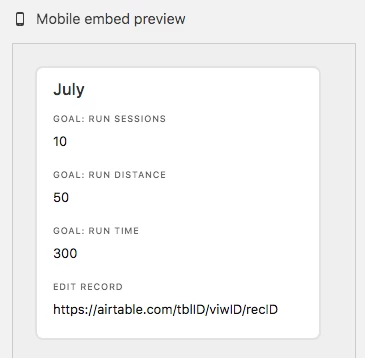
Control Card Preview on View Embed Code

  • July 4, 2018
  • 3 replies
  • 18 views

Grant_Dailey
Forum|alt.badge.img+9

I would like the ability to control how many fields are visible on the record preview when embedded on a website. I use the “card view on desktop” option, and it shows the first 3-4 fields on the card. This can be confusing for users that think data is missing or incomplete. It would be helpful to be able to determine how many fields are visible in the record preview, before clicking to view the entire record.

3 replies

Forum|alt.badge.img+4
  • Known Participant
  • July 5, 2018

Grant, would this inelegant workaround be possible?

In your table, use the formula field type to expose the record URL (https://airtable.com/tblID/viwID/recID) for each record and call it “Edit Record.”

In the view your are embedding on the website, show 1-2 key variables as well as the “Edit Record.” Hide the rest. If your users need to edit a record, clicking on the link will take them to the record in their Web browser.

Jack


Grant_Dailey
Forum|alt.badge.img+9
  • Author
  • Known Participant
  • July 6, 2018

John, thanks for the suggestion. I don’t necessarily need users to be able to edit the records, just view them. I’d like to keep it all on the website within the embed code as well, rather than having to navigate away.


Forum|alt.badge.img+4
  • Known Participant
  • July 6, 2018

Grant,

Perhaps I don’t understand your end goal, but this might work for you. Create a gallery view for your table. Once in the gallery view, you can use the “customize cards” action to determine which fields are visible (see https://support.airtable.com/hc/en-us/articles/360000367008-Guide-to-hiding-fields-and-field-visibility#gallery). I’ve created an embed for this kind of view and the mobile embed preview seems to do what you want it to do – "control how many fields are visible on the record preview when embedded on a website " using the card view on desktop option. Clicking on the record preview opens the full record.

John/Jack