Delete Record Automation - No Script

  • July 11, 2023
  • 6 replies
  • 30 views

Forum|alt.badge.img+6
What is the proposed idea/solution?

Delete records using Automation. I want to move data from Table A > Table B. Currently there's no way without scripting to be able to do such a simple operation. Given that you can right click to delete a record, I'm shocked that this basic functionality is missing.

How does is solve the user problems?

Avoids major workarounds for what I would consider in a data management tool, to be core functionality.

How was this validated?

...

Who is the target audience?

Everyone

6 replies

ScottWorld
Forum|alt.badge.img+35
  • Genius
  • July 11, 2023

I totally agree with this suggestion 100%. This is much needed in the product!

Be sure to send this as a feature suggestion to support@airtable.com, since Airtable employees don’t read our feedback here.

Unfortunately, there are currently only 3 ways to automate the deletion of records:

1. Scripting. However, most people using Airtable don’t know JavaScript and don’t want to learn JavaScript. I do not have a deletion script, but if somebody would like to post one below, that would be great! 😊

2. Use an external low-code automation platform: For a non-scripting way of doing this, you currently need to use an external tool like Make's automations & integrations for Airtable, which you could trigger instantly by clicking on a button in Airtable that runs a webhook in Make, or you could use a single-select field in Airtable which triggers a webhook via this script (even though we’re trying to avoid scripts). You can also have Make poll your Airtable table on a regular schedule to check for any records which you have marked for deletion, and then it can delete them on that schedule.

3. Use the Airtable extension Data Fetcher, which lets you schedule a sequence of API calls to Airtable. This still requires knowledge of understanding & coding API calls.

p.s. If your company has a budget for your project and you’d like to hire an expert Airtable consultant to help you with any of this, please feel free to contact me through my website: Airtable consulting — ScottWorld


Forum|alt.badge.img+2
  • New Participant
  • March 10, 2024

How would you do this in make? 


ScottWorld
Forum|alt.badge.img+35
  • Genius
  • March 10, 2024

Forum|alt.badge.img+2
  • New Participant
  • March 10, 2024

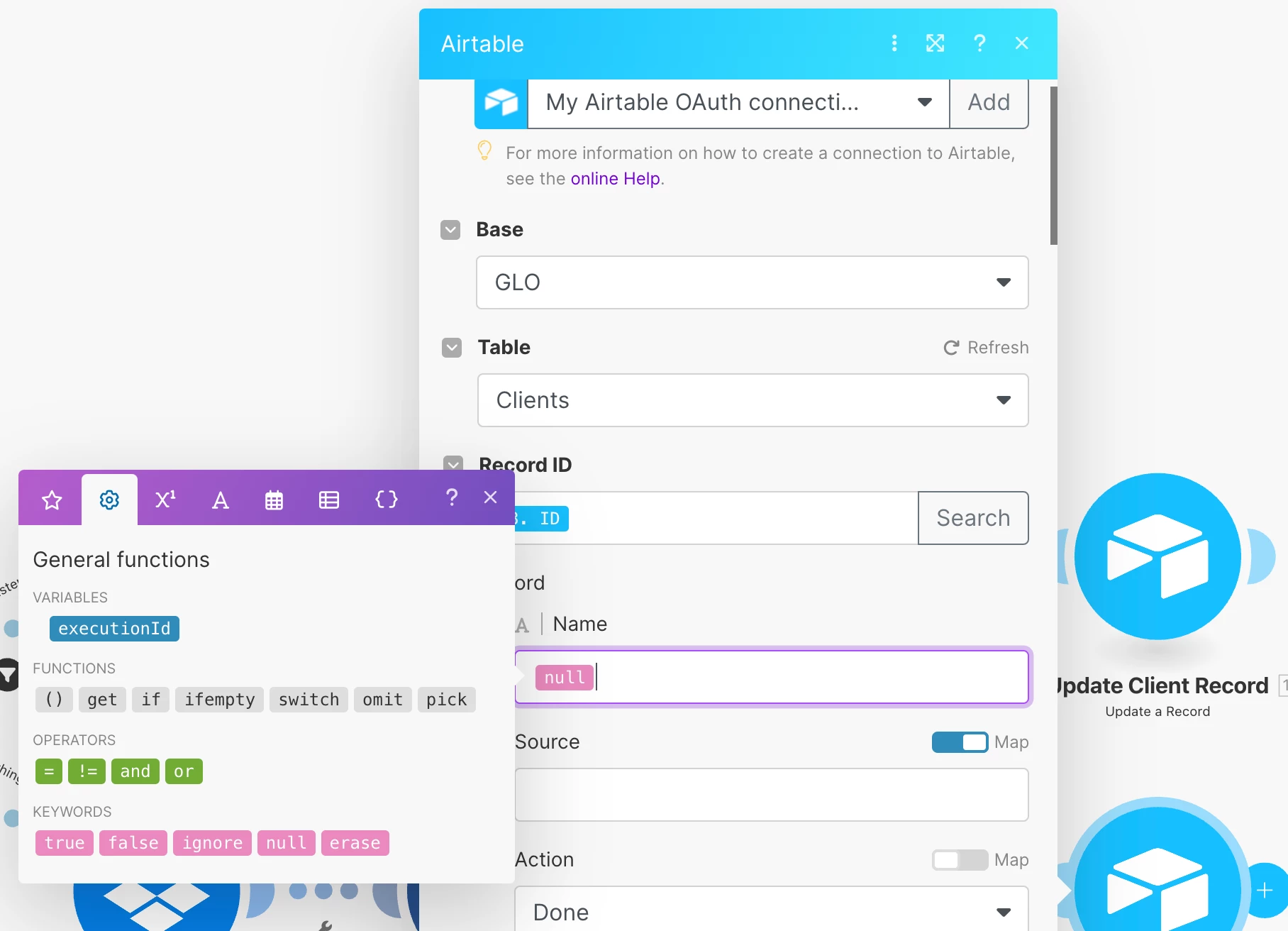
Do you know if theres a way to clear a cell of a record with make?


ScottWorld
Forum|alt.badge.img+35
  • Genius
  • March 10, 2024

Yes, you can use the NULL function in Make to clear out a field. See screenshot below.

Functions are just one of the many beautiful things about Make — they have dozens of built-in functions that you can use to do whatever you want, but they have hundreds of other advanced features as well.

If you’ve never used Make before, I’ve assembled a bunch of Make training resources in this thread: https://air.tableforums.com/t/make-com-basic-navigation-tips/277

For example, here is how you would instantly trigger a Make automation from Airtable. https://air.tableforums.com/t/sending-airtable-data-to-an-external-webhook-such-as-make-com/159

I also give live demonstrations of how to use Make in many of my Airtable podcast appearances here:
https://www.youtube.com/watch?v=SbH9iE5ncCk&list=PLqssva4liHRwHhQIpTXekG8WObEoyC2F1

For example, in this video, I show how to work with Airtable arrays in Make.
https://www.youtube.com/watch?list=PLqssva4liHRwHhQIpTXekG8WObEoyC2F1&v=sKPyG0HZCYY

p.s. If you have a budget for your project and you’d like to hire an expert Airtable consultant to help you with any of this, please feel free to contact me through my website: Airtable consulting — ScottWorld


Forum|alt.badge.img+2
  • New Participant
  • March 12, 2024

This is a very good answer thanks @ScottWorld!